



Bulk corporate gift cards require more than adding a voucher product to your store. You need a reliable process for pricing, recipient data, unique code generation, scheduled delivery, redemption controls, reporting, and support. This guide explains how to sell and fulfill corporate gift cards in bulk with WooCommerce.
What Makes a Corporate Gift Card Order Different from a Standard Gift Card Purchase?
A standard gift card order usually involves one buyer, one recipient, and one voucher. A corporate order may include tens or hundreds of vouchers, negotiated pricing, custom branding, recipient spreadsheets, scheduled distribution, and specific accounting requirements.
The central challenge is not simply learning how to sell corporate gift cards in bulk with WooCommerce. It is ensuring that the number of issued codes, PDF files, recipient records, emails, and redeemed balances remains consistent throughout the process.
A typical B2B workflow must account for:
- minimum order quantities and volume-based pricing,
- fixed or buyer-selected gift card values,
- unique codes or a predefined list of corporate codes,
- delivery to a coordinator or directly to individual recipients,
- recipient names, email addresses, messages, and delivery dates,
- expiration dates, product restrictions, and usage limits,
- resends, refunds, failed messages, and unused code reporting.
Before configuring a WooCommerce gift card plugin, document who purchases the cards, who receives them, when the codes become active, and who provides support after delivery.
Choose a Bulk Gift Card Sales Model: Self-Service Checkout or Request a Quote
The right sales model depends on order size and complexity. A self-service product works well when corporate buyers choose from standardized packages. A request-a-quote process is better when each order requires negotiation or manual approval.
Self-service WooCommerce checkout
Use self-service checkout when buyers can select a predefined value, enter a quantity, upload or provide recipient information, and pay using your standard payment methods. This model reduces administrative work and is suitable for repeatable packages such as 25, 50, or 100 employee vouchers.
The product page should clearly explain the minimum quantity, available values, delivery method, expected gift card delivery time, and accepted recipient data format.
Request a quote
A quote-based workflow is more appropriate for negotiated discounts, custom artwork, unusually large orders, purchase orders, delayed invoicing, or orders that need legal and financial review. After approving the quote, your team can create a WooCommerce order manually and attach the correct fulfillment data.
Define Gift Card Values, Minimum Quantities, Pricing, and Corporate Terms
Set commercial rules before building the product. Changing values or redemption conditions after codes have been delivered can create accounting discrepancies and customer complaints.
Define the following elements for each corporate package:
- Gift card value: one fixed amount, several variations, or a permitted custom value.
- Minimum quantity: the smallest order eligible for corporate pricing.
- Maximum quantity: a practical checkout limit beyond which the buyer should request a quote.
- Volume pricing: fixed package prices or quantity thresholds.
- Payment terms: immediate online payment, bank transfer, or manually approved invoicing.
- Delivery method: one coordinator, multiple recipients, PDF attachments, or download links.
- Validity: expiration rules and the date from which the voucher may be used.
- Refund policy: how cancellations affect generated, delivered, or partially redeemed cards.
Display these terms on the product page and in the corporate agreement. If a discount is offered on the purchase price, make it clear that this does not necessarily change the face value available to the recipient.
Choose the Right WooCommerce Gift Card and Bulk-Code Workflow
WooCommerce provides a coupon mechanism, but a corporate gift card workflow also needs voucher creation, PDF generation, personalized fields, code assignment, and controlled delivery. A suitable WooCommerce gift card and voucher plugin can provide the foundation for creating and selling PDF gift cards through regular WooCommerce products.
For a broader overview of available designs, product fields, and optimization options, see how to customize and optimize WooCommerce gift cards. You can also review the solutions available in the Flexible Coupons category before selecting add-ons for bulk fulfillment.
Your final workflow should support one of two code strategies:
- Automatically generated unique codes for gift cards created and controlled entirely in your WooCommerce store.
- Imported predefined codes when a partner, corporate buyer, franchise system, or external platform supplies the code inventory.
Avoid using one shared code for a large recipient group unless the campaign explicitly requires it. A shared code makes individual delivery, balance tracking, replacement, and fraud investigation much harder.
Create a Corporate Gift Card Product in WooCommerce
Create a simple or variable WooCommerce product and enable its PDF coupon functionality. A simple product is suitable for one value, while a variable product can present several denominations or corporate packages.
Configure the product with a suitable coupon template, price, expiration period, eligible products or categories, and recipient fields. If no physical item is shipped, configure the product as virtual so checkout does not request unnecessary shipping information.
Recipient name, recipient email, and recipient message fields can be displayed on the product page. These fields may be required when direct delivery is part of the package. Product-level settings can also determine whether the voucher supports multiple uses and whether email delivery is delayed. See the Flexible Coupons product edit screen documentation.

The following tutorial introduces the base process for creating a coupon template, connecting it to a WooCommerce product, choosing the order status that triggers generation, and making the purchased PDF available to the customer.
For corporate sales, use a dedicated product rather than reusing a consumer gift card without modification. A separate product gives you clearer order reports, corporate terms, minimum quantities, email instructions, and templates.
Generate Unique Codes or Import Predefined Corporate Codes
Automatically generated codes are usually the simplest option when your store is responsible for both issuance and redemption. Each purchased voucher should receive a unique code with enough random characters to reduce the risk of guessing.
Predefined codes are useful when another organization controls the identifiers. For example, a campaign partner may provide an approved code pool, or a corporate client may require codes that correspond with its internal reward system.
Flexible PDF Coupons PRO – Coupon Codes Import can assign codes from an uploaded file when PDF coupons are generated. The documented workflow supports spreadsheet-based files and reads codes from the first column, with each code placed in a separate row. Uploaded lists show how many records have been used, helping the store monitor the remaining code stock. See the coupon code import documentation.

Prepare the file before accepting the order. Remove blank rows, duplicate codes, headings in the code column, and values that have already been issued. Then connect the correct list to the corporate gift card product. The detailed process is covered in the guide explaining how to import predefined coupon codes from a spreadsheet.
Do not confuse code import with WooCommerce coupon export. Importing assigns an available code to a new voucher. Exporting produces an operational file for reconciliation, reporting, or delivery. If your process needs both, define separate controls for incoming code inventories and outgoing fulfillment files.
Collect Recipient Names, Email Addresses, Messages, and Delivery Dates
Structured recipient data reduces manual work and prevents delivery errors. For small self-service orders, the buyer can complete recipient fields directly on the product page. For larger negotiated orders, a standardized spreadsheet may be more practical.
A recipient record should include only the data required for fulfillment:
- recipient name,
- recipient email address,
- gift card value or package reference,
- personal message,
- requested delivery date and time zone,
- optional department or internal reference.
Validate the number of rows against the purchased quantity. A 100-unit order should not proceed to distribution if the buyer provides 98 recipients or 102 requested vouchers. Decide whether incomplete rows should stop the entire batch or move into an exception queue.
For email addresses, remove leading and trailing spaces, reject visibly invalid formats, and check for accidental duplicates. Ask the corporate coordinator to confirm the final recipient list before codes are generated or messages are scheduled.
Deliver Bulk Gift Cards to One Buyer or Multiple Recipients
There are two practical delivery models. The first sends every voucher to one corporate coordinator, who distributes the files internally. The second sends each voucher directly to its intended recipient.
Send all vouchers to one coordinator
This model gives the corporate buyer full control over distribution. It is useful when the organization wants to upload codes to an employee portal, print vouchers, distribute rewards during an event, or review every file before release.
However, sending a code archive creates a security responsibility. Protect exported files, restrict access, avoid placing unencrypted code lists in shared folders, and confirm the recipient before resending the batch.
Send vouchers directly to recipients
Direct distribution removes work from the corporate coordinator and supports personalized vouchers by email. It also increases the importance of clean recipient data, email deliverability, scheduled tasks, and resend procedures.
The Multiple PDFs add-on can split a quantity-based purchase into separate coupon items and collect individual recipient names, addresses, and messages. It can also route multiple coupons to the first recipient when one coordinator should receive the entire set. See the Multiple PDFs documentation.
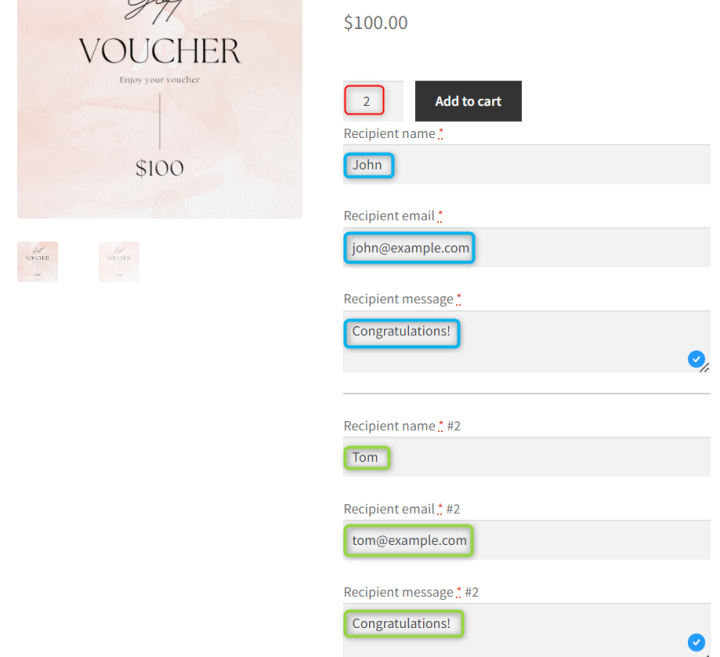
For an additional example of quantity-based fulfillment, see how to send multiple PDF vouchers in one order.
Schedule delivery of eGift cards
When the buyer wants delivery on an employee appreciation day, holiday, or campaign launch date, configure scheduled sending instead of holding the order manually. Available delivery options may include an interval after purchase, a fixed date, or a date selected by the buyer.
The order must still reach the status configured to generate the coupon. Test this relationship carefully: scheduling an email does not help if the payment method leaves the order in a status that never triggers voucher generation. See the Advanced Sending documentation.
To refine the message, attachments, subject line, and delivery date, follow the guide on how to customize voucher emails and schedule delivery.
Configure Expiration, Usage Limits, Eligible Products, and Multi-Use Redemption
Corporate gift card rules should be agreed before codes are issued. WooCommerce coupons can be configured with expiration dates, product and category restrictions, minimum or maximum spend, email restrictions, and usage limits. Test both eligible and ineligible carts to confirm that the restrictions work as expected. See the official WooCommerce coupon management documentation.
Expiration dates
Choose a validity period appropriate for the campaign and communicate it in the product terms, email, and voucher. Avoid showing conflicting dates in the PDF, email, and WooCommerce coupon record.
Eligible products and categories
Use restrictions when a voucher should apply only to a specific service, collection, brand, or campaign. Also decide whether sale items are eligible and whether the gift card can be combined with other coupons.
Usage limits
A single-use corporate voucher should normally have a usage limit of one. If the code is linked to a particular recipient, an allowed-email restriction may provide an additional safeguard, but it also requires the recipient to use the matching billing email.
Reusable balances
A reusable gift card allows the recipient to spend its value over multiple orders. This is useful for higher-value employee benefits or client accounts, but the remaining balance must be handled consistently. Review how to configure reusable gift cards and coupon conditions before offering a multi-use gift card. Flexible Coupons product settings include an option that permits a coupon value to be spread over several purchases. See the product settings documentation.
A multi shop gift voucher is a separate infrastructure project. Standard WooCommerce coupons belong to the store in which they were created. Cross-store or cross-brand redemption requires shared data, synchronized balances, compatible checkout logic, and agreed settlement rules. Do not promise it as a standard WooCommerce capability.
Manage Large Orders, Code Exports, Resends, and Customer Support
Once orders become large, fulfillment needs an audit trail. Maintain a record that connects the WooCommerce order, order item, recipient, voucher code, face value, generation time, delivery status, and redemption status.
Your operational view should distinguish between:
- paid but not generated,
- generated but not sent,
- scheduled for future delivery,
- sent successfully,
- delivery failed or bounced,
- resent to the same recipient,
- cancelled or refunded,
- partially or fully redeemed.
In Flexible Coupons, the order screen can display the generated coupon code and provide options to view or download the voucher. Manual generation is available when no coupon has yet been generated for the relevant order item; it creates a new coupon rather than replacing an existing one. See the order edit screen documentation.
Before resending a voucher, determine whether you are sending the existing code again or replacing it. A replacement procedure should deactivate the original code before issuing a new one. Otherwise, two usable credentials may remain in circulation.
For a WooCommerce coupon export, include only the fields required by the recipient or internal team. Avoid sharing customer data in a code file unless it is operationally necessary. Use access controls and an agreed deletion schedule for exported files.
Test the Complete Corporate Ordering and Redemption Process
Do not use a large corporate order as the first production test. Run a small order through every stage using the same payment method, product variation, code source, delivery model, and restrictions intended for the client.
A complete test should include these steps:
- Place an order with the intended quantity and product variation.
- Confirm that the order status triggers generation at the correct time.
- Compare the number of generated codes with the number of purchased vouchers.
- Check that every code is unique and assigned to the correct order item.
- Verify recipient names, email addresses, values, messages, and delivery dates.
- Open every test PDF and confirm that the visible code matches the WooCommerce coupon record.
- Check the email subject, body, sender, download link, and attachment.
- Redeem a voucher against an eligible cart.
- Try the same code against an ineligible product or outside another configured condition.
- Confirm single-use or multi-use balance behavior.
- Test a resend without generating an unintended duplicate code.
- Process a test refund and verify the effect on the voucher.
Also test what happens when the imported code pool is empty, a recipient address is invalid, a scheduled task is delayed, or an attachment cannot be opened. These exceptions are where an otherwise functional gift card WooCommerce workflow often fails at scale.
Corporate Gift Card Use Cases: Employee Rewards, Client Gifts, and Incentive Programs
Employee rewards
Companies can purchase WooCommerce bulk gift cards for performance awards, work anniversaries, wellness programs, seasonal gifts, or employee recognition. Direct delivery works well when recipient data is complete, while coordinator delivery may be better for internal events.
Client and partner gifts
Personalized vouchers can support customer retention, partner appreciation, event follow-ups, and account-based marketing. Use a professional template and include clear redemption instructions rather than promotional language that obscures the gift.
Sales and referral incentives
Unique codes can be issued as rewards for referrals, reseller performance, completed training, or sales targets. Individual codes make it easier to identify whether a reward was delivered and redeemed.
Service and experience vouchers
Corporate buyers may purchase service vouchers for consultations, training, hospitality, or events. In these cases, product restrictions and expiration rules can be more important than a reusable monetary balance.
Bulk Corporate Gift Card Launch Checklist
Before publishing the product or accepting a negotiated order, confirm every commercial and technical element below.
- The corporate product has the correct values, prices, and minimum quantity.
- The buyer understands whether checkout is self-service or quote-based.
- The selected plugin workflow generates the required number of separate vouchers.
- The coupon template displays the correct value, code, validity, and instructions.
- The automatic generation status matches the payment workflow.
- Recipient fields are required only where necessary.
- The recipient spreadsheet format has been provided and approved.
- Imported codes are unique, valid, unused, and assigned to the correct product.
- Direct-recipient and coordinator-delivery options have been tested.
- Scheduled delivery uses the correct date, time, and time zone.
- Email attachments and download links work on desktop and mobile devices.
- Expiration, product restrictions, and usage limits have been tested.
- Reusable balance behavior is documented if multi-use redemption is enabled.
- The team has procedures for failed messages, resends, refunds, and replacements.
- Exports containing codes or personal data are stored and shared securely.
- Support staff can locate the order, voucher, code, and delivery history.
Frequently Asked Questions About Bulk WooCommerce Gift Cards
Can WooCommerce create gift cards in bulk?
WooCommerce can store and validate coupon codes, but bulk corporate fulfillment normally requires a WooCommerce gift cards plugin or additional workflow for PDF creation, unique code assignment, recipient data, and email delivery.
Should every corporate recipient receive a unique code?
In most cases, yes. Unique codes improve security, individual usage limits, reporting, replacements, and support. A shared code is more suitable for a general promotion than for vouchers with individual monetary value.
How do I accept gift cards on WooCommerce?
Enable coupon use in WooCommerce, create or generate codes with the required values and restrictions, and allow recipients to enter their codes in the coupon field during cart or checkout. Test the discount calculation and eligible products before distributing the vouchers.
Can I schedule delivery of eGift cards?
Yes, when your gift card delivery solution supports delayed or date-based emails. Confirm whether the delay starts at order creation or another event, and verify that the order reaches the status required to generate and send the voucher.
Can all vouchers be sent to one corporate contact?
Yes. This is often the safest approach when a coordinator wants to review or distribute the files internally. Use a workflow that creates separate vouchers while routing them to one approved email address.
Can a buyer send separate vouchers to multiple recipients in one order?
Yes, provided the workflow can split the purchased quantity and store separate recipient details for each voucher. Test how adding or changing quantities in the cart affects the number and value of generated PDFs.
Can I import codes supplied by a corporate partner?
Yes. Use a controlled import workflow, validate the source file, and ensure that each code is unique and unused. Keep separate lists for separate products or campaigns to avoid assigning the wrong inventory.
Can one gift card be used across several WooCommerce stores?
Not by default. A multi-store voucher requires shared code validation and balance synchronization between stores. It may also require settlement and refund rules between the participating businesses.
Key Takeaways
The most important conclusions for a dependable corporate gift card program are:
- Define the B2B process first: pricing, quantities, payment, code source, and delivery model should be clear before configuration.
- Use unique codes: they provide stronger control over redemption, replacement, and reporting.
- Validate recipient data: quantity and email checks prevent the most common bulk fulfillment errors.
- Separate generation from delivery: know exactly when codes are created and when messages are sent.
- Test restrictions and exceptions: include failed emails, empty code pools, refunds, resends, and partial redemption.
- Protect code files: treat unused and active vouchers as financial credentials.
Summary
To successfully sell gift cards with WooCommerce at a corporate scale, combine a well-defined commercial offer with controlled code generation, structured recipient data, reliable email delivery, and tested redemption rules. Start with a small pilot order, document every exception procedure, and expand quantities only after the complete ordering and fulfillment path works consistently.
The appropriate combination of gift card add-ons can then automate predefined code imports, multiple voucher generation, personalization, and scheduled delivery without turning every corporate order into a manual project.
