




Sending several WooCommerce coupons or tickets should not require repeated purchases or manual email attachments. With the Multiple PDFs add-on for Flexible PDF Coupons PRO, customers can order several PDF files at once and direct them to one or more recipients—making group tickets, bulk vouchers, and corporate gifts easier to manage.
Table of contents
- What is the Multiple PDFs add-on?
- Key features for multiple WooCommerce PDFs
- How to configure Multiple PDFs
- Why send multiple PDFs in one email?
- Practical use cases
- Deployment, compatibility, and support
- Key takeaways
- Summary
What is the Multiple PDFs add-on for WooCommerce?
The Multiple PDFs add-on extends Flexible PDF Coupons PRO with the option to create several coupons, vouchers, or tickets within one order. Depending on the selected configuration, the generated PDF files can be delivered to one email address or distributed among several recipients.
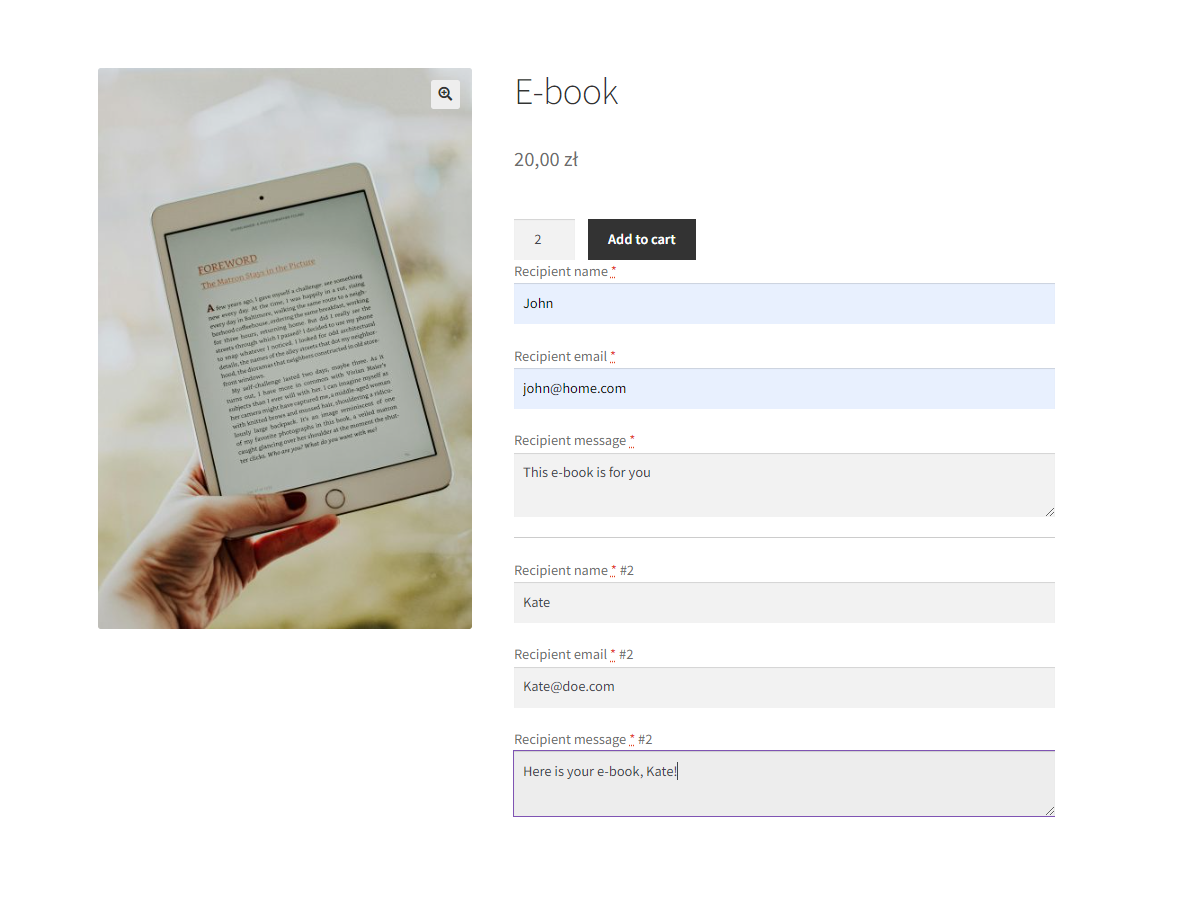
This workflow is useful when a customer wants to buy several admissions, service vouchers, or gifts in a single transaction. Instead of repeating the purchase for every attendee or recipient, the customer selects the required number and provides the relevant delivery details on the product page.
Flexible PDF Coupons PRO – Multiple PDFs
Create several PDF coupons or tickets from one product purchase and deliver them to one or more recipients.
WP Desk
Key features for multiple WooCommerce PDFs
Send several PDF coupons to one recipient
You can configure the product so that all generated PDF files go to the first recipient. The product page then displays one delivery email field, while the ordered coupons or tickets are sent together to that address.
This option works well when one person is responsible for distributing a set of event tickets, employee vouchers, printable gift cards, or service credits.

Distribute PDFs among multiple recipients
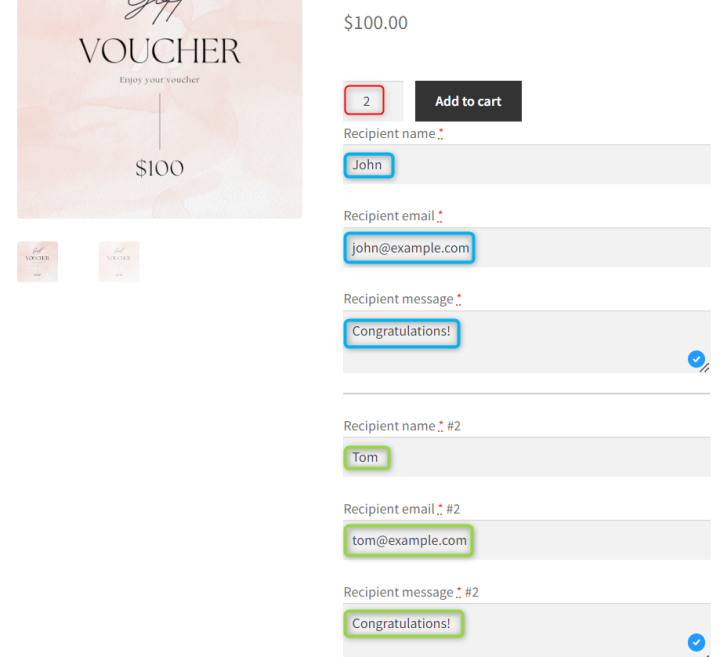
Alternatively, customers can provide different email addresses for individual recipients. This allows a store to deliver PDFs directly to attendees, clients, friends, family members, or employees without asking the buyer to forward every file manually.
Control recipient fields and limits
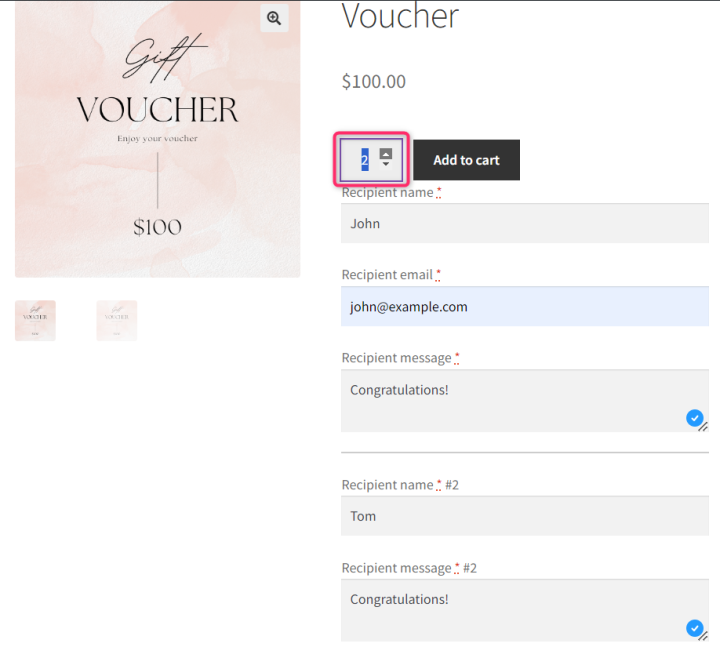
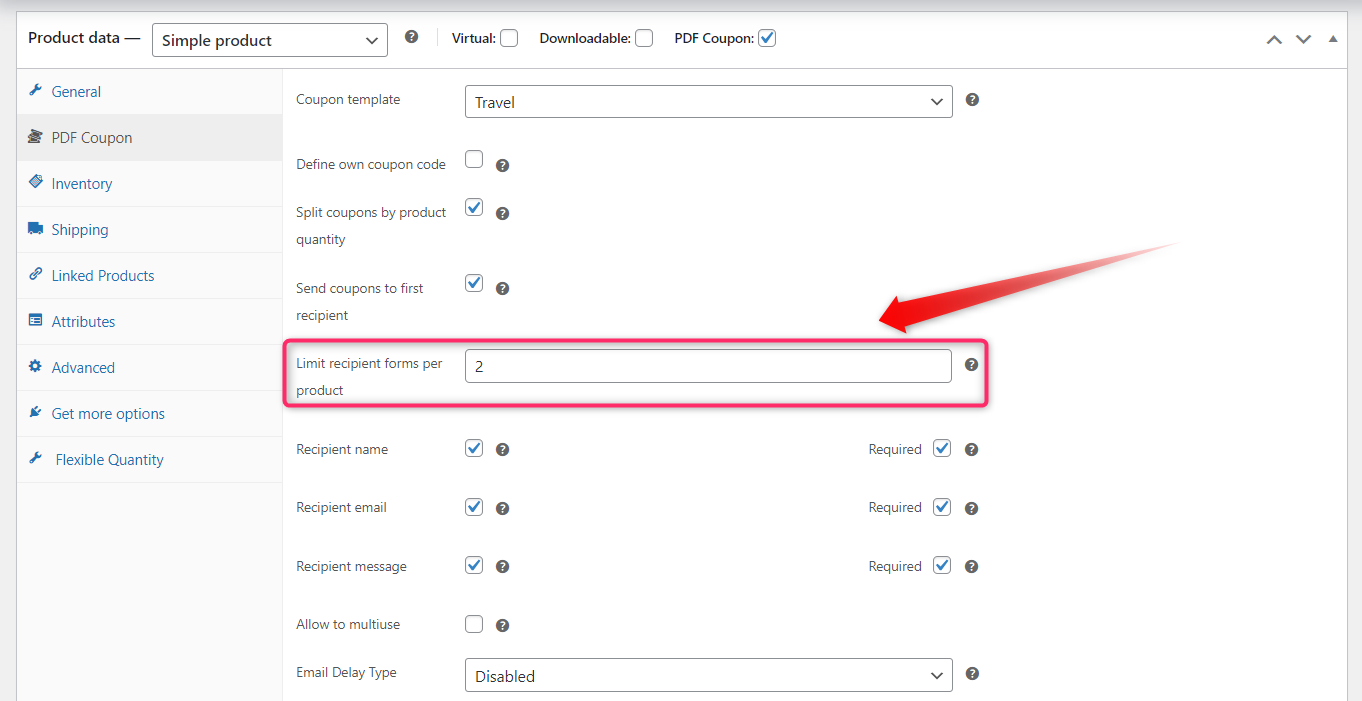
Store owners can set the maximum number of recipients available for the product. They can also decide whether the product page should request both the recipient’s name and email address or only the email address. This helps keep the form appropriate for the product being sold.
For example, named recipient fields may be useful for personalized gift vouchers, while email-only fields can make a straightforward group-ticket purchase faster.
Use branded PDF coupon templates
The add-on works with coupon products created using Flexible PDF Coupons PRO. This means the multiple-file workflow can be combined with branded PDF designs prepared for gift cards, service vouchers, coupons, or event tickets.
Using a consistent template helps stores provide customers with recognizable, print-ready documents while reducing the need to create and attach each file manually.
How to configure Multiple PDFs in WooCommerce
The setup is completed in WordPress and the relevant coupon product settings. No custom coding is required.
- Install Flexible PDF Coupons PRO. Create or configure the WooCommerce coupon product and its PDF template.
- Install and activate the Multiple PDFs add-on. The extension adds the necessary options to the coupon product configuration.
- Open the product data settings. Enable and configure the multiple-PDF workflow for the selected product.
- Choose the delivery method. Decide whether all PDFs should go to the first recipient or whether customers can enter several recipient email addresses.
- Set the maximum number of recipients. This gives you control over how many PDFs can be ordered and assigned through the product form.
- Select the customer fields. Choose whether to collect recipient names and email addresses or email addresses only.
- Save and test the product. Place a test order to check the product form, PDF generation, email delivery, and final document layout.
Why send multiple PDFs in one email?
Reduce repetitive order steps
Without a multiple-PDF workflow, customers may need to add the same voucher or ticket repeatedly or place separate orders. The add-on allows them to handle the required number of documents in one purchasing process.
Simplify delivery for customers
Customers can choose whether one organizer receives all files or whether each person receives a PDF directly. This makes the product suitable for both centralized and individual distribution models.
Keep quantities under control
A configurable recipient limit helps merchants define how many files can be assigned through a particular coupon product. This is useful when the offer has operational limits, such as event capacity or a fixed number of vouchers in a package.
Support different business models
Multiple WooCommerce PDF coupons are not limited to traditional discounts. The same process can support printable vouchers, gift cards, service credits, admission documents, and PDF event tickets.
Practical use cases for multiple PDF coupons and tickets
Event tickets for groups
An event organizer can let one customer buy several tickets and enter the attendees’ details during the order. The PDFs can then be sent to the buyer or distributed to individual email addresses.
Gift vouchers for family and friends
A retail shop, salon, spa, gym, or experience provider can offer several vouchers in one order. This is useful for seasonal gifting, family packages, or customers buying gifts for multiple people.
Corporate voucher orders
Businesses purchasing vouchers for employees or clients can complete one order rather than repeating the checkout process. The buyer can receive all PDFs centrally or provide separate recipient addresses, depending on the product configuration.
Service packages
Service businesses can use separate PDFs to represent individual visits, treatments, sessions, or credits. This gives customers printable documents that can be distributed or presented separately.
Marketplaces and multi-offer campaigns
A marketplace or retailer running a structured promotion can use multiple PDFs when several documents are required from one coupon product. The format and recipient settings can be adapted to the way the offer is delivered.
Deployment, compatibility, and support
The add-on is configured through the existing Flexible PDF Coupons PRO product workflow. If your store needs additional customer or order fields, you can also review Flexible Product Fields and Flexible Checkout Fields. Always verify that the chosen setup matches your current WooCommerce environment and test it before using it for live orders.
Detailed setup information is available in the Multiple PDFs documentation. It explains the available settings and helps you configure recipient handling for your coupon products.

Key takeaways
- The Multiple PDFs extension requires Flexible PDF Coupons PRO and does not work as a standalone plugin.
- Customers can obtain several PDF coupons, vouchers, or tickets through one product order.
- All PDFs can be delivered to one recipient or distributed among several email addresses.
- Store owners can set recipient limits and choose which recipient fields appear on the product page.
- The workflow is suitable for events, corporate vouchers, gift cards, service credits, and group purchases.
- Configuration takes place in WooCommerce without custom coding.
- A complete test order is recommended before making the product available to customers.
Summary
The Multiple PDFs add-on for WooCommerce coupons provides a practical way to generate and deliver several PDF documents from one purchase. It reduces repetitive ordering, gives customers flexible recipient options, and helps merchants maintain control over quantities and product fields.
Combined with Flexible PDF Coupons PRO, it can support branded gift vouchers, service coupons, corporate packages, and PDF event tickets. If your store regularly serves groups or customers buying for several people, Multiple PDFs can make both checkout and delivery easier to manage.
