



Cyber Monday can generate a surge of orders, but an uncontrolled discount can erode margins just as quickly. This guide explains how to create Cyber Monday deals in WooCommerce using time-limited coupons and gift cards, with practical safeguards for eligibility, stacking, usage limits, delivery, and testing.
The goal is not to rebuild your entire coupon or voucher system. Instead, you will configure one focused campaign that customers can understand and your store can reliably process. If you need a broader introduction to the available fields, start with the complete guide to creating WooCommerce coupons, then return here to prepare the Cyber Monday promotion.
Choose a Cyber Monday Deal Structure
Before opening the WooCommerce coupon settings, decide what the campaign should achieve. A strong offer is not necessarily the largest discount. It is the offer that supports your margin, average order value, inventory plan, and customer acquisition goal.
The following models work well for WooCommerce Cyber Monday coupons and gift card campaigns:
- Percentage discount: useful when eligible products have similar margins and you want the saving to scale with the cart value.
- Fixed cart discount: effective for threshold-based offers such as a fixed saving after reaching a minimum spend.
- Discounted gift card: customers purchase stored value for less than its redemption value, creating immediate cash flow and encouraging a later visit.
- Bonus gift card: customers receive a gift card after making a qualifying purchase, supporting retention without reducing every product price at checkout.
A WooCommerce percentage discount is easy to communicate, but its cost increases with the order value. A WooCommerce fixed cart discount gives you more predictable exposure and pairs naturally with a minimum spend. For example, a fixed saving above a defined threshold can encourage customers to add another eligible item without applying an unlimited percentage reduction.
For gift cards, calculate the potential cost at redemption rather than looking only at Cyber Monday revenue. A discounted gift card can affect the margin of a future order, while a bonus gift card adds deferred promotional value that may not be used immediately.
Create a Cyber Monday Coupon in WooCommerce
WooCommerce core includes percentage, fixed-cart, and fixed-product coupons. Coupon use must first be enabled under WooCommerce settings. The coupon editor then provides separate areas for general settings, usage restrictions, and usage limits.
Use this process to create the campaign code:
- Go to WooCommerce → Settings → General.
- Find the coupon options and select Enable the use of coupon codes.
- Save the settings.
- Go to Marketing → Coupons and add a new coupon.
- Enter a short, memorable code associated with the campaign.
- Add an internal description containing the campaign purpose, planned dates, and responsible team member.
- Choose the discount type and enter the amount without a currency or percentage symbol.
- Configure the expiry, restrictions, and usage limits before publishing or scheduling the coupon.
The code should be easy to type on a mobile device and difficult to misread. Avoid unnecessary punctuation and characters that can be confused with one another. The internal description is also valuable when several employees are reviewing active promotions during a busy sales period.
Configure Discount Type, Eligibility, and Product Restrictions
Select the Correct Discount Type
Choose Percentage discount when the same percentage should apply to all eligible products. Choose Fixed cart discount when one amount should be deducted from the eligible cart total. A fixed-product discount applies the specified amount to each eligible item, so it requires particular care when customers can purchase multiple units.
Before publishing, test the discount against low-value, typical, and high-value baskets. This shows the real campaign cost more clearly than testing only one ideal order.
Define Who and What Qualifies
Open the Usage restriction tab and match the settings to the advertised terms. The most useful safeguards for a Cyber Monday campaign are:
- Minimum spend: requires the customer to reach a defined subtotal before the coupon is accepted.
- Maximum spend: prevents a coupon from being applied above a chosen subtotal.
- Products and categories: limits the offer to selected parts of the catalog.
- Excluded products and categories: protects low-margin items, gift cards, and other non-qualifying products.
- Exclude sale items: prevents an additional coupon reduction on products that are already discounted.
- Allowed emails: restricts a coupon when the promotion is intended for selected recipients.
Keep the public wording aligned with the configuration. If your banner says “20% off everything” while the coupon excludes several categories, customers may interpret a correct checkout rejection as a technical error.
Set Coupon Expiration and Usage Limits
The WooCommerce coupon expiry date controls when the promotion stops being usable. WooCommerce documentation states that a coupon cannot be used on the date entered as its expiry date, so verify the behavior in your store before promising that the offer remains available through the end of that day. Store timezone settings should also be checked before launch.
If the code should become available later, WooCommerce also allows the coupon publication date and time to be scheduled from the Publish panel. This can help prevent early use, although the complete storefront and checkout flow should still be tested with the planned timing.
Next, open the Usage limits tab. WooCommerce provides a total usage limit, a limit on qualifying items for percentage or fixed-product discounts, and a WooCommerce coupon usage limit per user. The item limit does not restrict a fixed cart discount.
For a broadly distributed Cyber Monday code, a per-user limit of one is usually the clearest starting point when the offer is intended as a single customer benefit. Also set a total usage limit if the campaign has a fixed budget, limited inventory, or a capped number of rewards. Do not choose an arbitrary cap: calculate it from the maximum acceptable promotional cost.
Prevent Coupon Stacking and Protect Your Margins
Coupon stacking can turn a reasonable promotion into an unintended loss. In the Usage restriction settings, enable Individual use only when the Cyber Monday code must not be combined with other coupon codes. WooCommerce provides this option specifically to prevent a coupon from being used together with additional coupons.
Review more than coupon-to-coupon combinations. The campaign may also overlap with sale prices, free shipping, loyalty rewards, automatic discounts, subscriptions, bundles, or customer-specific pricing.
Use the following margin safeguards as a final configuration review:
- Require a minimum spend that supports the intended order value.
- Exclude sale items if the Cyber Monday discount should not deepen existing markdowns.
- Exclude products and categories with insufficient margin.
- Prevent the coupon from discounting gift card products unless that is the deliberate offer.
- Set a total usage limit when campaign liability must be capped.
- Use a per-user limit to reduce repeated use by the same customer.
- Test shipping, tax, and rounding with realistic carts.
Remember that a standard product coupon does not automatically eliminate shipping charges. If free shipping is part of the campaign, configure and test that benefit separately rather than assuming a cart discount will cover it.
Create a Cyber Monday Gift Card Offer
A Cyber Monday gift card promotion can follow two distinct models. Decide which model you are using before configuring products, emails, or coupon restrictions.
Sell Gift Cards as Cyber Monday Products
In this model, the customer buys a WooCommerce gift card as a product. The buyer may receive it directly or send it to another recipient. The campaign incentive can be a reduced purchase price, additional redemption value, or another benefit defined in the offer terms.
Issue Gift Cards as Purchase Rewards
In the reward model, the customer first completes a qualifying order and receives a gift card afterward. The qualifying purchase and the reward voucher are separate parts of the campaign. This requires a reliable method for generating the reward only after the relevant order condition has been satisfied.
If you want to design and sell printable vouchers rather than distribute only a standard checkout code, a WooCommerce gift card and voucher plugin can turn a coupon product into a customer-facing PDF gift card. You can also explore the broader Flexible Coupons category for guidance related to voucher campaigns.
The tutorial below demonstrates the basic workflow for creating and selling PDF gift cards. Review the current plugin interface and available features when implementing the campaign, because the recorded workflow may differ from the latest version.
When configuring a coupon product, Flexible Coupons can associate it with a coupon template, validity period, eligible products, eligible categories, recipient details, and email delivery options. Product-level settings can also determine whether the voucher may be used across multiple purchases.

Keep the Cyber Monday design focused on information the recipient needs: gift card value, code, validity, redemption conditions, and store identity. For a closer look at the customer-facing format, see how PDF gift cards in WooCommerce can support printable and downloadable vouchers.
Combine Coupons and Gift Cards Without Creating Discount Loopholes
The main risk appears when a promotional coupon can reduce the price of a gift card that later retains its full redemption value. A customer may then purchase stored value at a discount and use it on products that were supposed to be excluded from the original Cyber Monday campaign.
If discounted gift card purchases are not part of the offer, add the gift card product or its dedicated category to the coupon’s exclusions. Then test a mixed cart containing both an eligible standard product and a gift card. Confirm that only the intended items contribute to the discount.
If the campaign intentionally discounts gift cards, document the rules for redemption. Decide whether the gift card can be combined with future coupons, used on sale products, applied to shipping, or redeemed across multiple orders. When reusable value is required, review the options for multi-use gift cards and coupon conditions.
For a bonus gift card incentive, define the qualifying subtotal after considering refunds, excluded products, and other discounts. Generate the reward only after the order reaches the status required by your process. This reduces the chance of issuing value for an unpaid, failed, or immediately canceled order.
Schedule and Communicate the Cyber Monday Promotion
Build the schedule backward from the end of the offer. Your storefront banner, coupon availability, email delivery, advertising, and support instructions should all use the same campaign period.
A practical communication sequence can include the following stages:
- Pre-launch: announce the date, basic benefit, and important exclusions without exposing the code too early.
- Launch: send the code, direct customers to eligible products, and state the deadline clearly.
- Reminder: contact customers who have not purchased, without implying that an expired offer will be extended.
- Final message: repeat the exact deadline, timezone, minimum spend, and major restrictions.
- Post-campaign: remove promotional banners and explain gift card delivery or redemption where relevant.
If you are researching how to send a coupon by email in WooCommerce, distinguish between sharing a standard promotional code and delivering a generated gift card. WooCommerce core allows you to distribute a coupon code through your chosen marketing channel, but it does not automatically apply the code at checkout.
For purchased gift cards, email content should identify the sender or buyer where appropriate, show the value and validity, and provide a clear download or redemption path. Flexible Coupons can email generated coupons after an order reaches the configured status, while its PRO options can attach the PDF in addition to providing a download link. (flexiblecoupons.net)
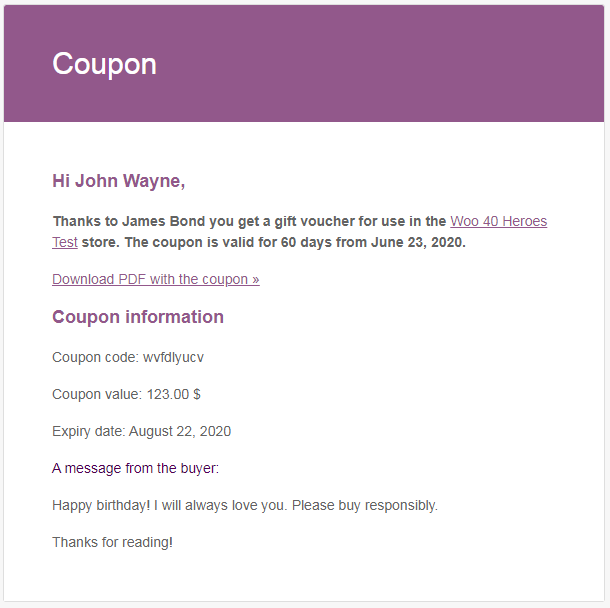
If the recipient should receive the voucher later, use an appropriate delivery workflow to schedule WooCommerce gift card delivery for a delay, fixed date, or customer-selected date. The Advanced Sending settings also support reusable email templates and additional recipients.
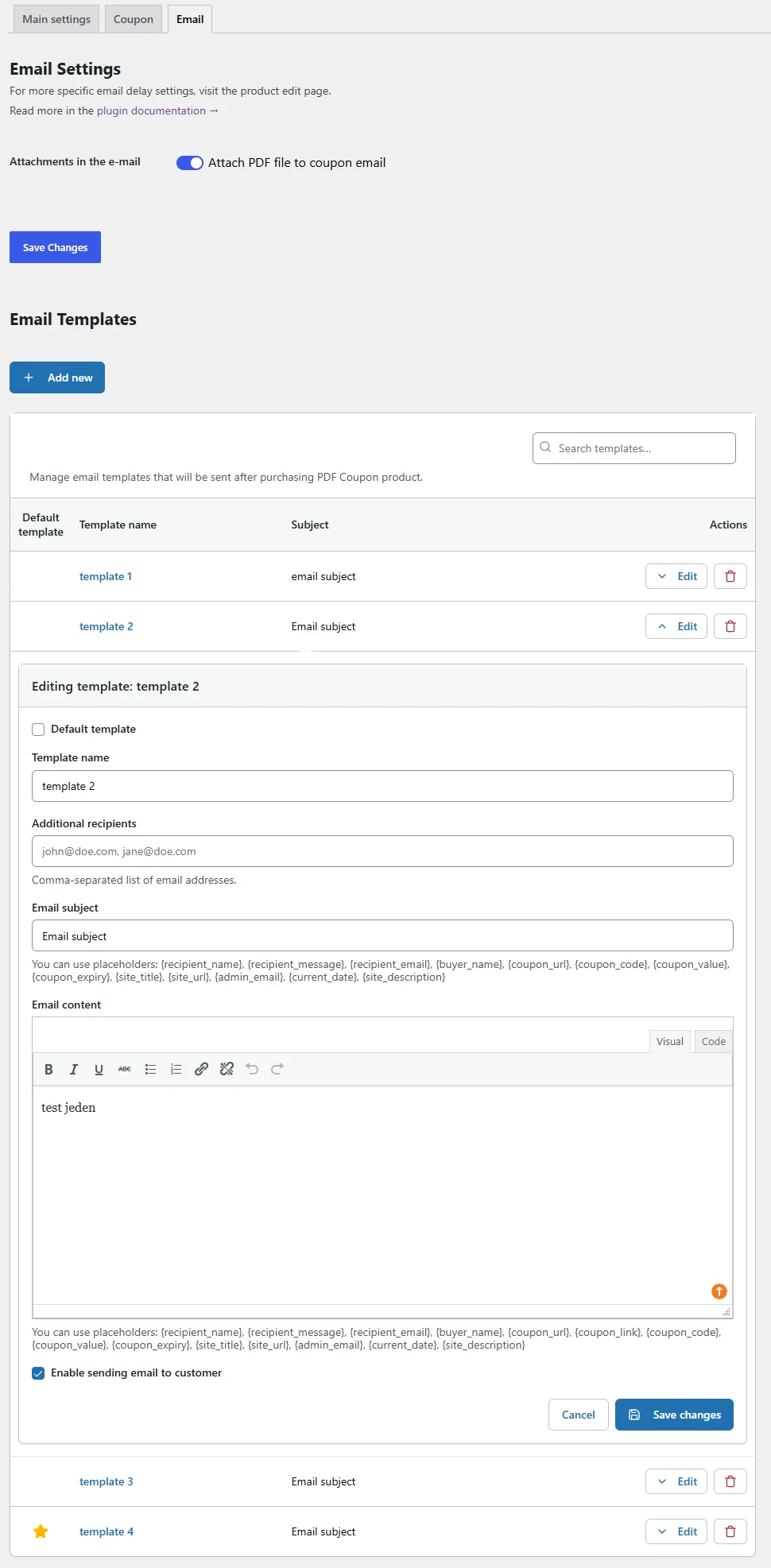
Keep transactional gift card emails separate from general marketing messages where possible. The voucher email should prioritize delivery, redemption, expiration, and support information. For campaign-specific personalization, see how to customize your gift card emails.
Test the Coupon and Gift Card Customer Journey
Do not limit testing to entering the code once. The complete journey starts with the campaign message and ends when the discount or gift card has been successfully redeemed.
Run this pre-launch scenario in a staging environment or with a controlled test order:
- Open the campaign page on desktop and mobile.
- Add an eligible product and confirm that the advertised saving is applied.
- Add an excluded product and confirm that it does not receive the discount.
- Test a cart below the minimum spend and verify that the rejection message is understandable.
- Test a cart above the threshold and calculate the expected total independently.
- Add a sale item and verify the configured sale-item rule.
- Add a gift card product and confirm whether it is correctly included or excluded.
- Attempt to combine the Cyber Monday code with another coupon.
- Complete the checkout using a test customer account.
- Confirm that the coupon usage count and per-user limit update correctly.
- If a gift card is generated, check the value, code, template, expiry, and eligible products.
- Verify delivery to the buyer or recipient and inspect the message on a mobile device.
- Redeem the generated gift card in a second test order.
- Test the campaign after the planned expiry condition to confirm rejection.
Also test guest checkout if it is enabled. A per-user limit may depend on account or billing information, so your campaign terms should not promise controls that have not been verified with both registered and guest customers.
Launch-Day Checklist and Common Troubleshooting Steps
Launch-Day Checklist
Before activating ads and emails, confirm the following items:
- The coupon is published or scheduled for the correct time.
- The code in WooCommerce matches every banner, email, and advertisement.
- The discount amount and type are correct.
- The minimum and maximum spend rules match the campaign terms.
- Eligible and excluded products have been tested.
- Gift card products are excluded unless intentionally included.
- Individual use and sale-item settings are correct.
- Total and per-user usage limits are configured.
- The expiry date and timezone are clearly communicated.
- Gift card generation and email delivery have passed a real test order.
- Customer support has the final terms and troubleshooting instructions.
- Mobile cart and checkout remain easy to use.
Common Cyber Monday Coupon Problems
If a customer cannot apply the code, check the entered code, expiry, spend range, eligible products, billing email restrictions, and remaining usage limits. WooCommerce uses these settings when determining whether a coupon is valid for the current cart and customer.
If the discount is larger than expected, inspect coupon stacking, sale items, quantities, and the selected discount type. A fixed-product discount can multiply across eligible units, while a fixed-cart discount is deducted once from the cart.
If a gift card has not been generated or delivered, confirm that the order reached the status selected for automatic coupon generation. Also verify the recipient address, enabled email notification, spam folder, and any configured delay. With Advanced Sending, automatic delivery still depends on the required order status being reached. (flexiblecoupons.net)
If the coupon appears to expire earlier than expected, review the store timezone and the specific date entered in the coupon. For voucher-specific communication, follow the process used to display a coupon expiration date on WooCommerce gift cards.
What to Do with Cyber Monday Coupons After the Campaign
Once the promotion ends, remove the code from banners, menus, pop-ups, email automations, and landing pages. An expired coupon may correctly reject checkout use while outdated promotional content continues to attract customers and generate support requests.
Keep the campaign data long enough to evaluate total uses, revenue, average order value, excluded-product performance, gift card liability, refunds, and support issues. Avoid reusing the same public code for a future campaign. Previously delivered emails, cached pages, and shared social posts may continue circulating long after Cyber Monday.
For the next promotion, duplicate the campaign structure and review every restriction rather than simply changing the discount amount. Product ranges, margins, sale prices, email templates, and gift card conditions may have changed.
Key Conclusions
The most important lessons for creating controlled Cyber Monday deals are:
- Choose the offer model before configuring the coupon.
- Use a fixed cart discount when predictable promotional exposure is a priority.
- Combine percentage discounts with product restrictions and realistic high-value cart tests.
- Set the expiry, total usage limit, and per-user limit before publishing the code.
- Prevent stacking when the offer has not been priced for additional discounts.
- Exclude gift card products unless discounted stored value is an intentional part of the campaign.
- Treat sold gift cards and purchase-reward gift cards as separate workflows.
- Synchronize coupon timing, email delivery, customer terms, and store timezone.
- Test the initial purchase and later gift card redemption as one complete journey.
Summary
Knowing how to create Cyber Monday deals in WooCommerce is primarily a matter of controlling eligibility and timing. Select a clear percentage, fixed-cart, discounted gift card, or bonus gift card model. Then configure product restrictions, minimum spend, stacking rules, the WooCommerce coupon expiry date, and usage limits around that model.
Finally, test every customer-facing step: campaign message, cart eligibility, checkout totals, gift card generation, email delivery, expiry, and later redemption. A carefully limited offer may appear less aggressive than an unrestricted discount, but it creates a more dependable experience for both the customer and the store.
