




Imagine a world where your WooCommerce store doesn’t just sell products, but actively fuels your mission, transforms customer engagement, and creates lasting impact. A world where every donation, every symbolic adoption, every course completion becomes a beautifully personalized, instantly delivered PDF certificate. This isn’t a futuristic dream; it’s the tangible reality you can build today with a robust WooCommerce PDF Certificate Generator. This innovative system transforms your online store into a powerful platform for selling intangible value, such like symbolic animal adoptions, tree planting initiatives, or course completion certificates. By leveraging the flexibility of WooCommerce with advanced plugins, businesses and non-profits can automate the creation and delivery of fully personalized, professional PDF certificates, directly engaging customers and monetizing their mission without manual overhead. For agencies and freelancers managing multiple WooCommerce projects, this solution represents a new frontier in delivering exceptional value and efficiency to clients.
The Vision: Why Your Business Needs a Custom Certificate Builder
In today’s digital landscape, consumers seek more than just transactions; they crave connection, purpose, and recognition. For charities, environmental initiatives, or educational platforms, selling an experience or a symbolic gesture—like a tree planting certificate or a symbolic animal adoption plugin—can be far more impactful than a simple donation request. However, the manual process of creating and sending personalized acknowledgments can quickly become a bottleneck, consuming precious time and resources.
This is where a dedicated custom certificate builder for WooCommerce steps in, transforming a logistical headache into a seamless, automated, and deeply personal experience. It allows you to offer unique charity gift cards or a formal award certificate generator directly from your store, scaling your impact without scaling your workload. By providing a tangible, personalized memento, you not only acknowledge your customers’ contributions but also reinforce their emotional investment in your cause. This level of professional presentation and automated delivery elevates your brand, fostering trust and encouraging repeat engagement, ultimately helping you to sell donation certificates more effectively.
Ready to deliver projects faster and with greater impact? Start building your own charity certificate system in WooCommerce today.
Flexible PDF Coupons PRO WooCommerce £59
Design your own PDF coupons and sell them as gift cards, tickets, or service vouchers. Use extra add-ons and insert your own shortcodes, delay sending coupons by email, or even generate QR codes.
Add to cart or View DetailsFrom Concept to Certificate: The Power Duo of Flexible Product Fields PRO & Flexible Coupons PRO
At the heart of this transformative system lies the strategic synergy between two powerful WooCommerce plugins: Flexible Product Fields PRO and Flexible Coupons PRO. While Flexible Product Fields PRO empowers you to capture all the unique personalization details your customers desire—from the name of the adopted animal to a custom dedication message—Flexible Coupons PRO, with its often-underestimated capabilities, acts as the sophisticated engine for generating and delivering these custom PDF certificates. Think of it not as a tool for discounts, but as a versatile WooCommerce PDF Certificate Generator capable of producing unique, branded documents. When combined with the Flexible PDF Coupons PRO – Custom Shortcodes add-on, these plugins unlock an unparalleled level of customization, allowing every piece of customer-inputted data to be dynamically embedded into a stunning, professional PDF. This integration ensures that every certificate is as unique as the individual receiving it, turning a simple purchase into a memorable and meaningful interaction.
Step-by-Step: Building Your WooCommerce PDF Certificate Generator
Creating your bespoke certificate system might sound complex, but with the right tools, it’s a straightforward journey to enhanced customer engagement and operational efficiency. Follow these steps to set up a powerful WooCommerce PDF Certificate Generator that truly reflects your brand’s mission and values.
1. Setting Up Your Symbolic Product in WooCommerce
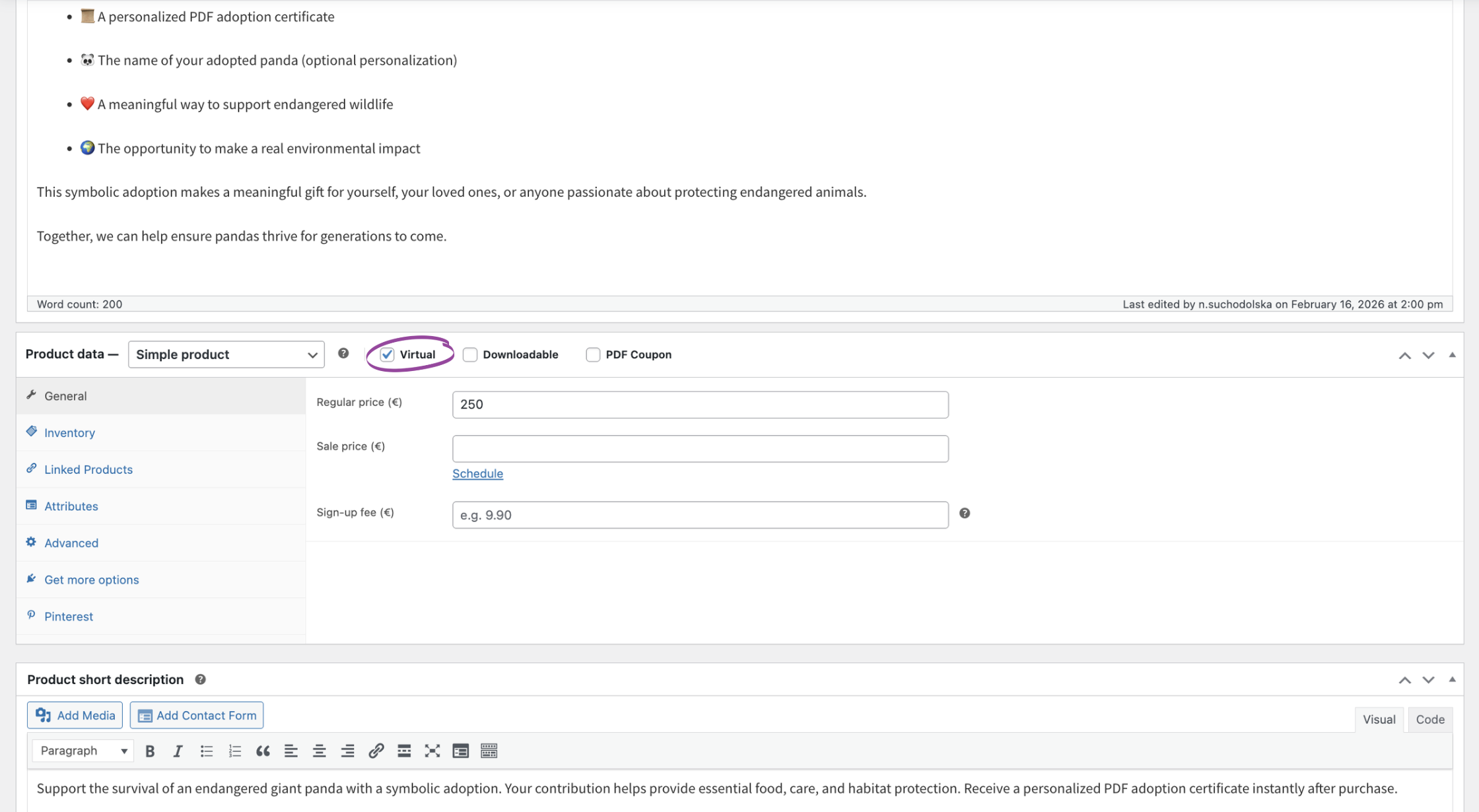
Begin by creating a new product in WooCommerce, which will represent your symbolic offering. This could be anything from a “Virtual Panda Adoption” to a “Sponsor a Tree” initiative, or a “Course Completion Certificate.” For charity or symbolic adoptions, it’s best to set this as a ‘Virtual’ product, ensuring no shipping costs are calculated. Assign a clear price, as this will be the value your customers pay for the certificate. This product will serve as the foundation, making it easy for customers to purchase their chosen symbolic item.
2. Personalization Power: Custom Fields with Flexible Product Fields PRO
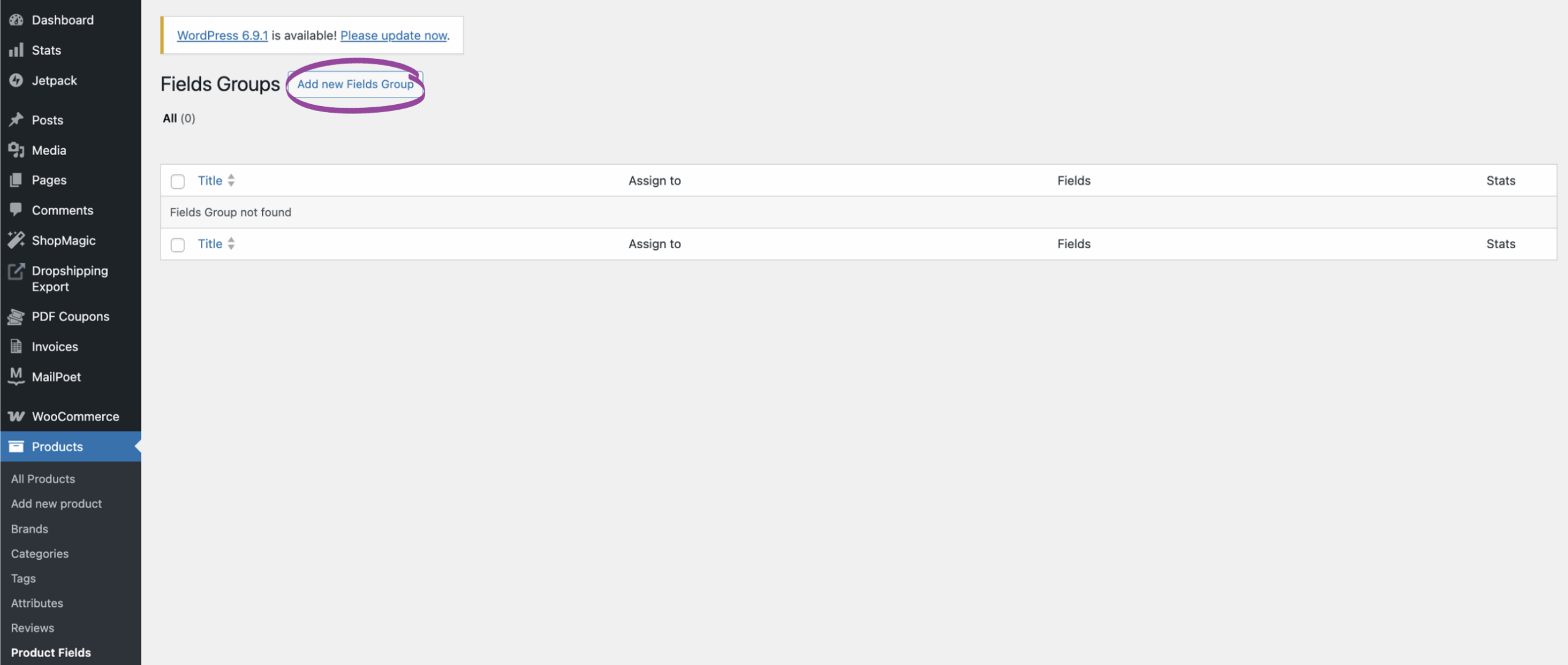
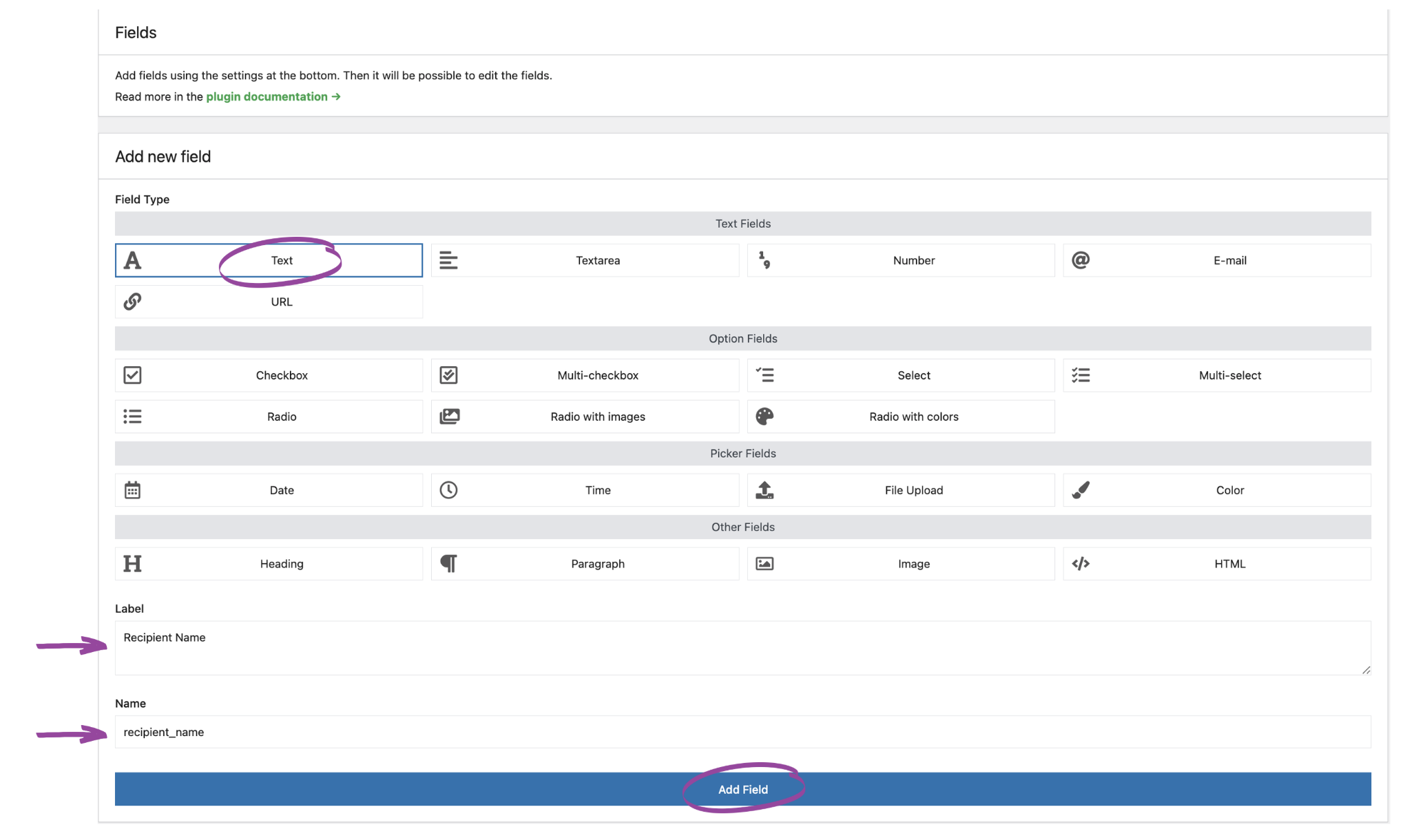
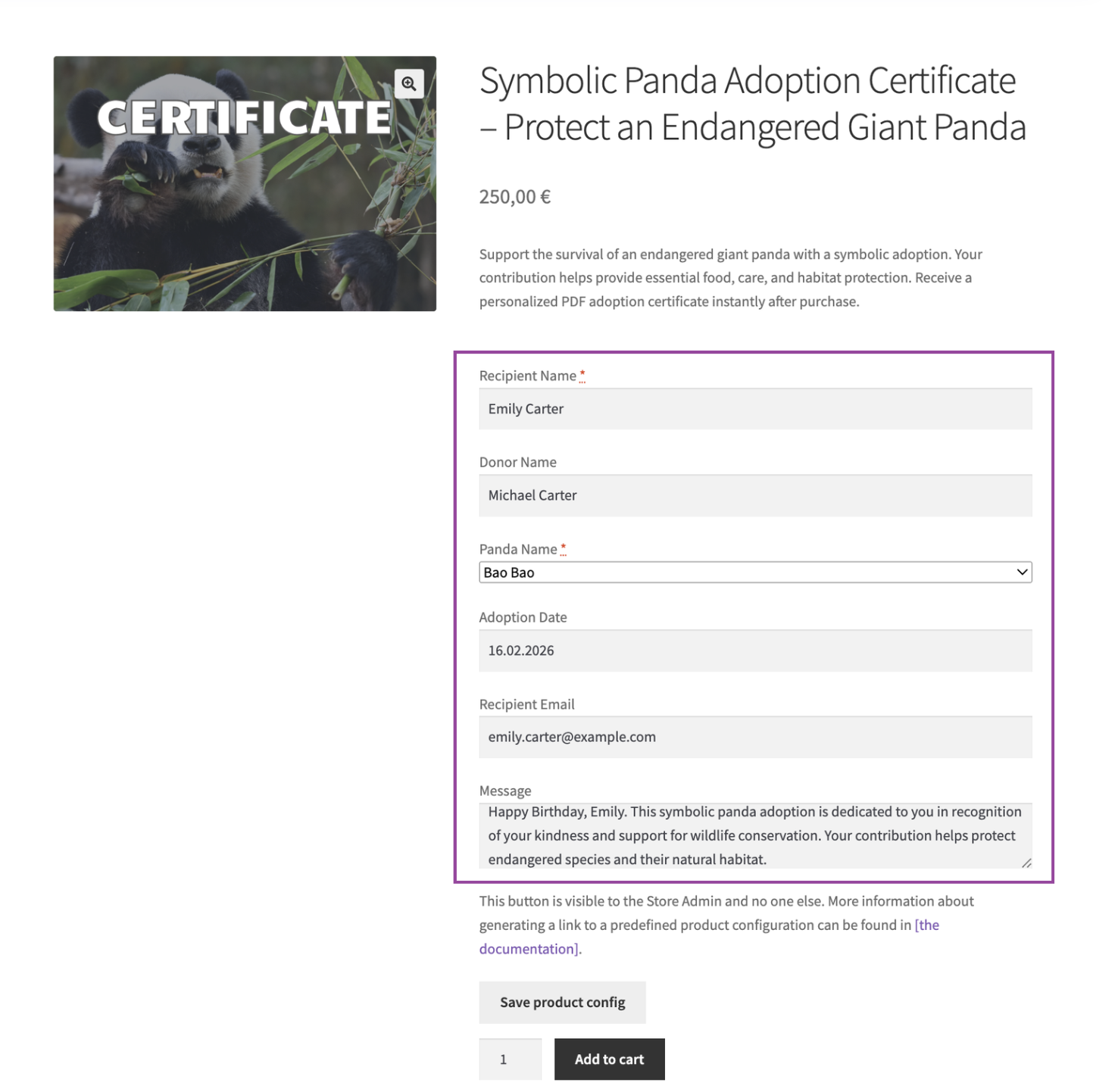
This is where the magic of personalization begins. With Flexible Product Fields PRO, you can add any number of custom fields to your product page, allowing customers to tailor their certificate. Imagine fields like:
- “Recipient’s Name”
- “Your Name (Donor)”
- “Message for Recipient”
- “Name of Adopted Animal”
- “Tree Species for Planting”
- “Course Title”
- “Date of Completion”
These fields capture vital information, making each certificate truly unique. You can set fields as required, use dropdowns for predefined choices (e.g., different certificate designs), or even add extra costs for premium personalization options. For example, you might offer a “premium certificate design” for an additional fee, enhancing your revenue streams. This flexibility ensures that your custom certificate builder meets every need. For more insights on adding dynamic pricing or extra costs to products, you can explore our guide on how to add extra cost to a WooCommerce product like a gift card.
3. Transforming Coupons into Certificates: Configuring Flexible Coupons PRO
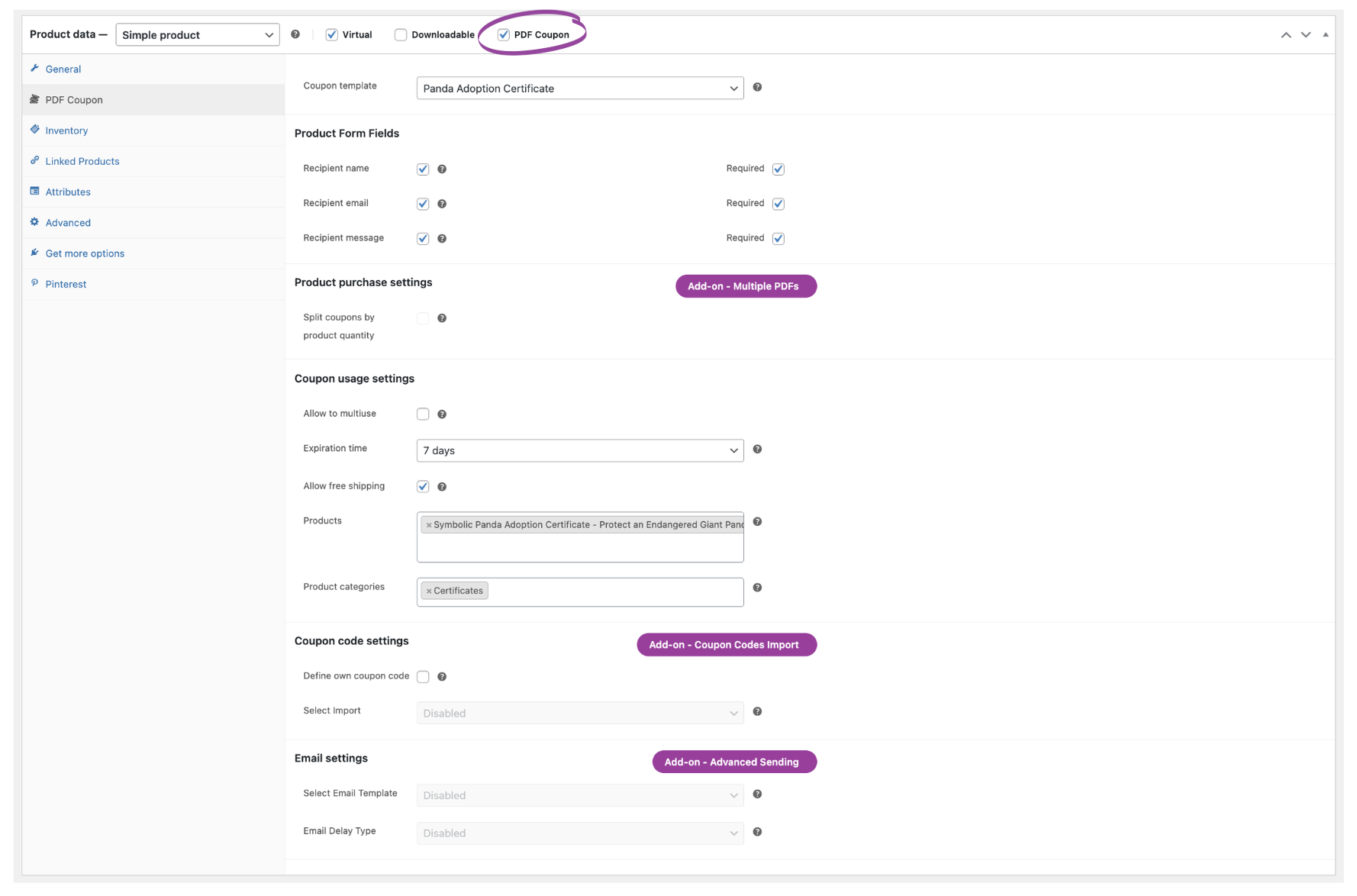
Now, let’s redefine the role of a coupon. Instead of a discount, we’re using Flexible Coupons PRO to generate a unique PDF certificate for each purchase. Navigate to your product’s settings and enable the “PDF Coupon” option under the “Product data” metabox. Here, you’ll configure how the “coupon” (now a certificate) behaves. Key settings include:
- Enable PDF Coupons: Turn this on for your certificate product.
- Coupon Template: Select or create a template specifically for your certificates.
- Recipient Name/Email/Message: These fields, crucial for gift-giving or direct delivery, can be made mandatory. This is a core feature of the PRO version, as detailed in the Flexible Coupons Product Edit Screen documentation.
- Expiration Time: While traditional coupons expire, a certificate might not. Adjust this as needed.
Upon purchase, Flexible Coupons PRO will automatically generate a unique “coupon code” which, in our context, becomes the unique identifier for your personalized certificate. This ingenious repurposing is key to building an automated WooCommerce PDF Certificate Generator.
4. Design Your Masterpiece: Crafting the PDF Certificate Template
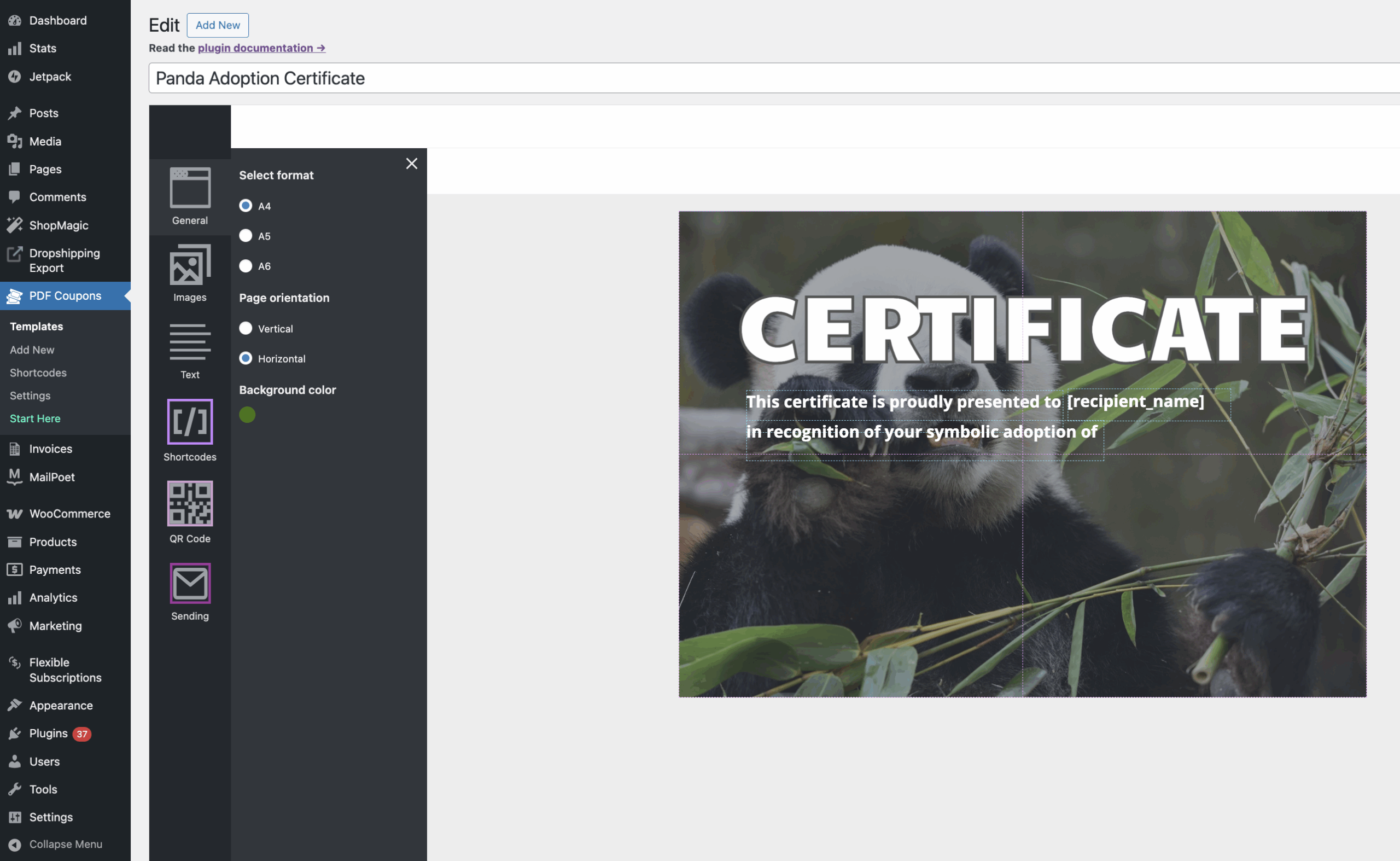
The visual appeal of your certificate is paramount. Flexible Coupons PRO offers a powerful graphic editor to design professional, branded PDF templates. Here, you can:
- Choose Format & Orientation: A4, A5, A6, portrait or landscape.
- Upload Background Images: Brand your certificates with your logo, cause-related imagery, or elegant designs.
- Add Text Areas: Place dynamic text, static messages, and crucial information.
This editor is your canvas to create stunning award certificate generator designs or heartfelt tree planting certificate layouts. Remember, a well-designed certificate isn’t just a document; it’s a piece of your brand’s story that your customer will cherish. Explore the options for customizing coupon templates to truly make your certificates shine.
5. Dynamic Data: Integrating Custom Fields with Shortcodes
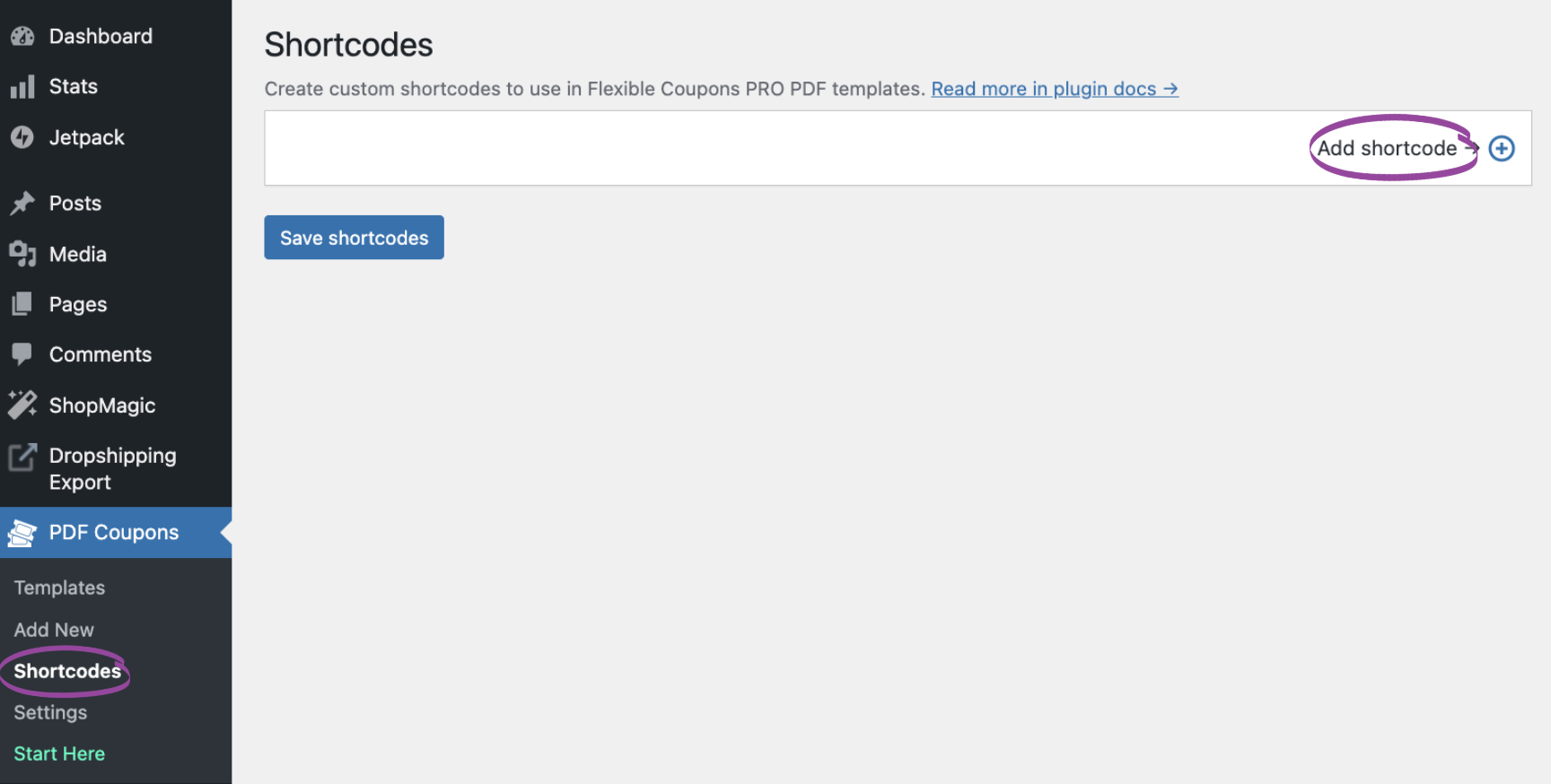
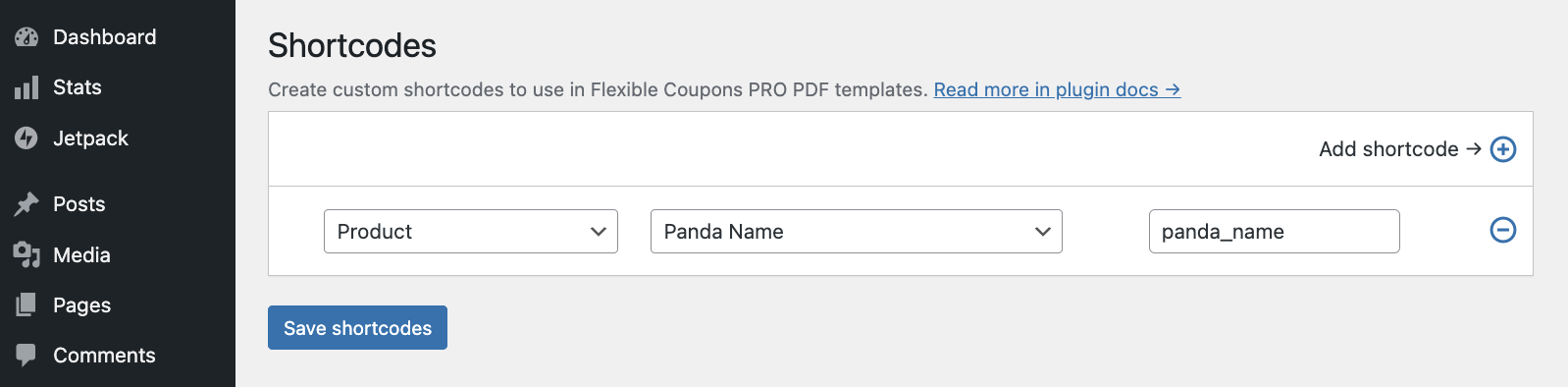
This is where Flexible Product Fields PRO and Flexible Coupons PRO truly integrate. To pull the personalized data (like “Recipient’s Name” or “Animal Name”) from your custom product fields onto the PDF certificate, you’ll use the Flexible PDF Coupons PRO – Custom Shortcodes add-on. This add-on allows you to create specific shortcodes that map directly to your Flexible Product Fields.
How it works:
- Install and activate the Flexible PDF Coupons PRO – Custom Shortcodes add-on.
- Add a new shortcode: select “Product” in the first column, then choose the specific field you created (e.g., “Panda Name”). The shortcode name will auto-fill (e.g., panda_name).
- Place this shortcode directly into your PDF certificate template in the graphic editor.
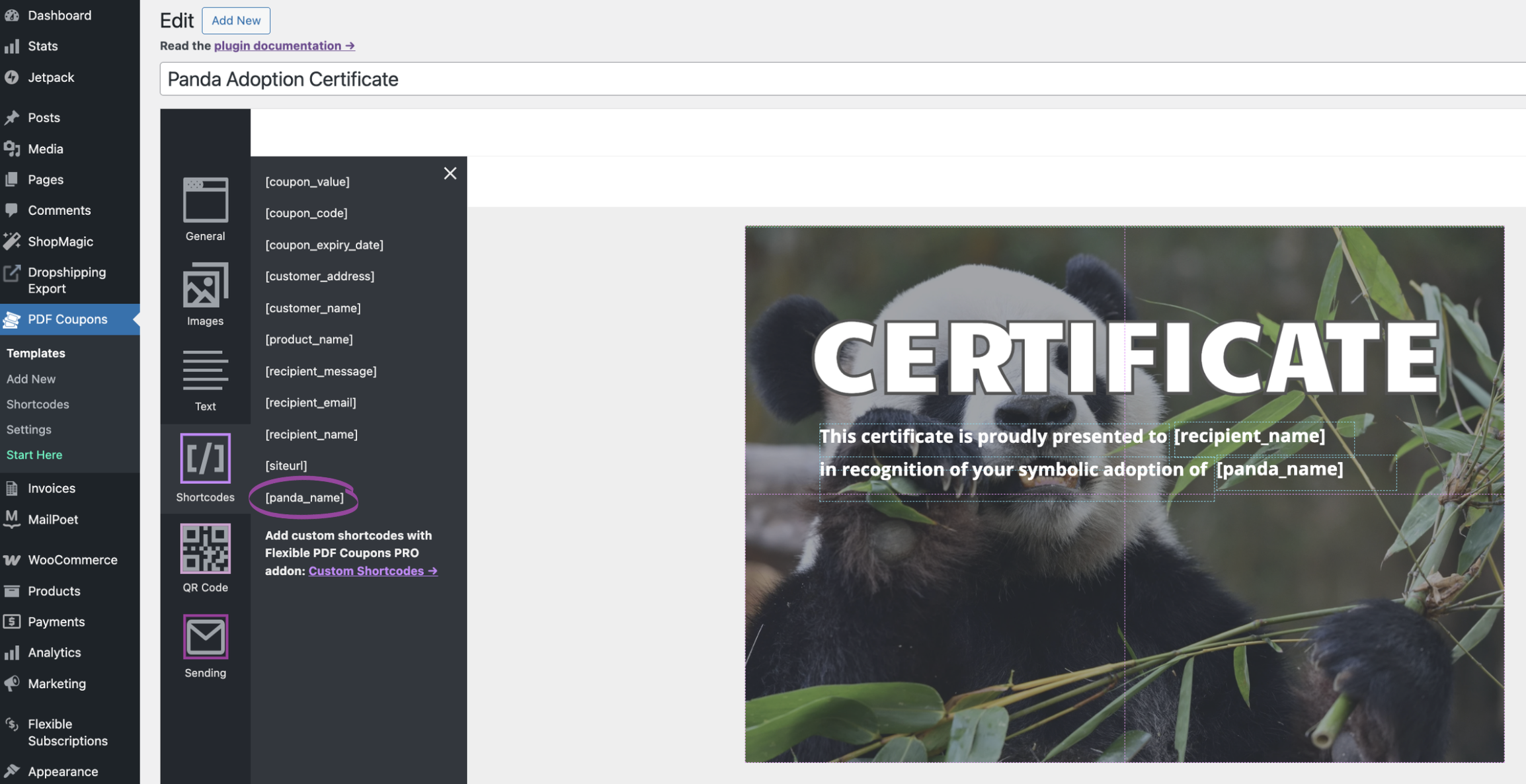
When a customer purchases the product and fills in the custom fields, the [panda_name] shortcode on the PDF will dynamically display the entered panda name. This powerful feature enables you to create a truly custom certificate builder, ensuring every detail is accurately captured and personalized for each order. For a deeper dive into this integration, refer to our documentation on Flexible Coupons PRO – Custom Shortcodes, which details how values from Flexible Product Fields are imported. You can also learn more about using WooCommerce PDF gift cards with custom shortcodes to see this functionality in action for different use cases.
6. Seamless Delivery: Automating Certificate Distribution
Once a purchase is complete, your personalized PDF certificate needs to reach its recipient. Flexible Coupons PRO handles this with advanced delivery options, ensuring your WooCommerce PDF Certificate Generator provides a smooth experience.
- Email Attachments: The generated PDF certificate can be automatically attached to the order confirmation email sent to the customer, or even directly to the specified recipient’s email address (a PRO feature). This is managed through the Advanced Sending for Flexible Coupons settings.
- QR Codes for Verification: For event tickets, course completion verification, or unique symbolic adoptions, you can embed a QR code directly into your PDF certificate. This feature, available with the Flexible Coupons PRO – Event Ticket QR Scanner add-on, transforms your certificate into a scannable credential, adding a layer of authenticity and utility. Read more about generating a QR code on the PDF.
This automated delivery system saves countless hours, eliminates manual errors, and ensures that your customers receive their meaningful certificates promptly, reinforcing their positive experience with your brand.
Real-World Impact: Transforming Your Mission into Measurable Success
Imagine “Green Earth Foundation,” a non-profit dedicated to reforestation. Before discovering this system, their tree planting certificate program was a manual nightmare. Donors would contribute, and a small team would painstakingly personalize each certificate, print it, and mail it out. The process was slow, expensive, and limited their reach.
By implementing a WooCommerce PDF Certificate Generator with Flexible Product Fields PRO and Flexible Coupons PRO, Green Earth Foundation revolutionized their operations. Donors could now instantly purchase a symbolic tree planting, personalize the certificate with a dedication message, and have a beautiful PDF delivered to their inbox or a loved one’s, all within minutes. This shift not only saved them hundreds of hours in administrative work but also allowed them to scale their impact globally. Donations surged, customer engagement soared, and their brand image as an innovative and efficient charity was solidified. They even started offering unique charity gift cards for special occasions, tapping into new revenue streams. This is the power of a system that truly works for you, allowing you to focus on your mission while the technology handles the heavy lifting.
Why Choose WP Desk for Your WooCommerce PDF Certificate Generator?
When your reputation—and your clients’ success—hinges on reliable, high-performing solutions, choosing the right tools is paramount. WP Desk is committed to providing “plugins that just work,” ensuring seamless integration and robust functionality for your WooCommerce store. Our Flexible Product Fields PRO and Flexible Coupons PRO, along with their powerful add-ons like Custom Shortcodes and Advanced Sending, are not just features; they are keys to unlocking new possibilities for your business.
Our plugins are designed for:
- Full Compatibility: Seamlessly integrates with WooCommerce, ensuring stability and performance.
- Ease of Installation & Configuration: Get up and running quickly, saving valuable project time.
- Real Business Impact: Drive conversions, increase customer engagement, and automate complex processes.
- Exceptional Support & Documentation: Comprehensive guides and responsive support mean you’re never left guessing. Our changelogs, like the changelog for Flexible Coupons PRO – Custom Shortcodes, demonstrate our continuous commitment to improvement and compatibility with the latest WordPress and WooCommerce versions.
With WP Desk, you’re not just buying a plugin; you’re investing in a partner dedicated to your success, providing the expert tools you need to deliver projects faster and with unparalleled quality.
Start building your own charity certificate system in WooCommerce today.
FAQ
How to sell donation certificates in WooCommerce with PDF delivery?
To sell donation certificates in WooCommerce with PDF delivery, combine Flexible Product Fields PRO for custom donation details and Flexible Coupons PRO to generate and attach personalized PDF certificates to order confirmation emails. This automates the entire process, from data collection to delivery.
Can I use a WooCommerce PDF certificate generator for charity campaigns?
Absolutely. A WooCommerce PDF certificate generator built with Flexible Product Fields PRO and Flexible Coupons PRO is ideal for charity campaigns. It allows you to offer personalized donation certificates, symbolic adoption papers, or thank-you awards, enhancing donor engagement and streamlining operations.
How can I build a custom certificate builder using Flexible Product Fields and coupons?
To build a custom certificate builder, use Flexible Product Fields PRO to define input fields on your product page. Then, leverage Flexible Coupons PRO to create PDF templates. The Flexible PDF Coupons PRO – Custom Shortcodes add-on links the data from your product fields directly to the PDF template, enabling dynamic, personalized certificates.
What are the benefits of using a digital award certificate generator in WooCommerce?
Using a digital award certificate generator in WooCommerce offers significant benefits: automation saves time and resources, personalization enhances recipient value, eco-friendliness reduces paper waste, and instant delivery improves customer satisfaction and engagement for various awards or recognitions.
Can I add QR codes to my WooCommerce PDF certificates for verification?
Yes, with the Flexible Coupons PRO – Event Ticket QR Scanner add-on, you can easily add scannable QR codes to your WooCommerce PDF certificates. This is perfect for verifying course completions, event attendance, or the authenticity of symbolic adoptions, adding a layer of functionality and trust.
