



Tiered loyalty programs for WooCommerce turn repeat purchases into lasting customer status—not just another checkout discount. This guide shows how to define VIP levels, calculate qualifying spend, manage upgrades and downgrades, and offer benefits that customers value without losing control of your margins.
What a Tiered WooCommerce Loyalty Program Is—and What It Is Not
For this guide, a tiered loyalty program means an ongoing system in which customers earn a level through qualifying activity over a defined period. That level unlocks benefits and remains active according to published renewal rules. The essential distinction is persistent customer status, rather than a discount calculated for one transaction.
A customer who earns Gold status might receive early access and preferential pricing on later purchases. By contrast, a cart offering 5% off above one spending threshold and 10% above another uses temporary promotional discount tiers. Those discounts do not, by themselves, establish an ongoing VIP relationship.
Keep earned status separate from paid membership and manually assigned customer roles. A membership fee purchases access; an administrator can assign a role; an earned loyalty level must follow your qualification rules. Similar labels do not make these arrangements interchangeable.
Define Your Loyalty Goal and Choose a Qualification Metric
Start with a measurable objective: encourage a second purchase, shorten the interval between orders, or retain customers across replenishment cycles. Then choose a qualification metric that supports that objective without making the program difficult to explain.
Spend, Order Frequency, or Points?
Eligible spend is a straightforward option when purchase values vary considerably. Customers progress toward a monetary threshold, while your rules determine which purchases count.
Order frequency suits a program focused on repeat visits. Define a qualifying order carefully: for example, require a minimum eligible merchandise value so that splitting one purchase into several tiny orders does not accelerate progress.
Points can combine purchases with other activities. However, decide which actions count toward status and which earn only redeemable rewards. Keep qualification points separate from a spendable balance so that redeeming a reward does not unexpectedly reduce someone’s VIP level.
For an initial launch, choose one primary metric. Add a second requirement only when it solves a clear problem, such as requiring both a spending threshold and more than one completed order.
Design WooCommerce VIP Levels with a Worked Tier-and-Benefit Matrix
The following text-based matrix is an illustrative design, not a universal recommendation. It uses eligible spending during January 1–December 31, with immediate upgrades after qualifying orders reach Completed status. An earned VIP level lasts for the remainder of the qualification year and the following calendar year, unless a refund invalidates its supporting award.
For benefit-cost estimates only, assume $800 of annual purchases eligible for the Silver discount and $2,000 eligible for the Gold discount, measured before that VIP discount. Assume annual service-cost allocations of $2 and $4 respectively. These are planning assumptions, not forecasts.
- Member: $0–$499.99 in annual qualifying spend. Standard shopping access, with no additional VIP pricing. This is the baseline level when no earned VIP award remains active. Estimated incremental benefit cost: $0 in this simplified model.
- Silver: $500–$1,499.99 in annual qualifying spend. Benefits: 3% off eligible merchandise and 24-hour early access to selected launches. Renewal requires at least $500 in the calendar year preceding the protected status expiry. Illustrative annual cost: $24 in discounts plus $2 in service allocation, totaling $26.
- Gold: $1,500 or more in annual qualifying spend. Benefits: 5% off eligible merchandise, 48-hour early access, priority service, and two standard-shipping subsidies of up to $6 each per calendar year. Each subsidy requires at least $75 in eligible merchandise after discounts and is limited to the stated delivery area. Renewal requires at least $1,500 in the calendar year preceding protected status expiry. Illustrative annual cost: $100 in discounts, $12 in shipping subsidies, and $4 in service allocation, totaling $116.
These benefit bundles replace one another: Gold receives 5%, not Silver’s 3% plus another 5%. Define early access as a specific purchasing window and priority service as a deliverable support process—not an undefined promise.
Before choosing your actual thresholds, review purchase histories and model how many customers would qualify. A level should be attainable enough to motivate progress without granting expensive benefits to nearly every existing customer.
Set WooCommerce Loyalty Program Qualification Rules
Choose Rolling or Calendar-Based Evaluation
With a rolling window, evaluate activity during a moving period, such as the preceding 12 months. Purchases leave the window as they age. Specify whether this changes status immediately or only at a separate renewal date.
With a calendar-based window, evaluate a fixed period shared by all members. In the worked example, qualification progress resets on January 1. Active status does not disappear merely because progress resets: the protected expiry date is a separate field.
Define the timestamp used to place an order in a qualification period. This example uses the moment an order reaches Completed status, interpreted in the store’s timezone. Publish that rule so an order placed late on December 31 but completed in January is not a surprise.
Define Eligible Spend Explicitly
For the worked example, calculate eligible merchandise value after discounts, excluding tax and shipping, minus eligible merchandise refunds. Exclude canceled, failed, pending, and unpaid orders. Exclude gift-card purchases and other stored-value top-ups.
Count eligible merchandise purchased using paid stored value at redemption, rather than counting both the original stored-value purchase and its later use. If an integration records that redemption as a coupon discount instead of a payment, require an adjustment that distinguishes paid stored value from promotional discounts.
Promotional credit should follow its own published rule. In this example, the promotional portion does not earn qualification spend. Keep the underlying transaction types identifiable rather than treating every voucher as identical.
This distinction also matters for purchasable Gold, Silver, and Bronze voucher packages. Those names describe products customers buy; they do not establish earned WooCommerce customer loyalty tiers.
Decide How Refunds Affect Status
Subtract partial refunds using the refunded eligible merchandise amount, not the entire order total. Associate the reversal with the original qualification period, including when the refund occurs in a later year.
Under this example’s policy, a refund can invalidate the upgrade it supported. If $1,510 of qualifying spend earned Gold and a $40 eligible refund reduces that award period to $1,470, recalculate the customer’s protected awards. Remove Gold if no other valid award supports it, while preserving any still-valid Silver entitlement.
Do not automatically charge customers for benefits already consumed. Publish how future benefits change, and route exceptional cases through a documented support process.
Define WooCommerce Loyalty Tier Upgrades and Downgrades
Make upgrades effective after the qualifying order is completed. In this example, the new price applies to subsequent purchases, not retrospectively to the order that crossed the threshold.
For example, Gold earned on May 15, 2027 remains protected through December 31, 2028. Qualification progress restarts on January 1, 2028, but Gold remains active. At expiry, evaluate 2028 activity to determine the next level. If that year’s qualifying spend was $700, Silver becomes active on January 1, 2029, unless another valid award protects Gold.
Schedule renewal assessments and expiry enforcement even when the customer places no new order. Send advance warnings—for example, 30 days before the protected expiry date—rather than relying on customers to discover a downgrade at checkout.
The worked example has no automatic post-expiry grace period. If you offer one, define its duration, whether benefits continue, and whether new purchases can resolve a renewal shortfall. Do not silently let purchases from a new calendar year rewrite the previous year’s total.
Manual adjustments should record the operator, reason, effective date, and end date. A support-approved extension must not become permanent status simply because nobody remembers to remove it.
Choose Sustainable WooCommerce VIP Customer Benefits
Permanent discounts are only one possible benefit. Early access, reserved purchasing windows, priority service, and carefully capped shipping assistance can make levels distinct without discounting every product.
Before enabling a pricing benefit, define margin-based exclusions. For the example, exclude sale items, gift-card purchases, and designated low-margin categories from VIP discounts. Qualification eligibility and discount eligibility are separate policies: a product can count toward status without receiving a VIP price.
Set a short benefit-combination policy. For example: apply only the highest active VIP percentage; do not combine it with another merchandise promotion; permit one eligible shipping subsidy per order; and treat paid stored value as payment where the integration supports that treatment.
Do not assume a coupon’s combination controls automatically govern role-based price adjustments. The documented pricing implementation can apply coupons on top of adjusted prices, so verify precedence and enforce your chosen policy explicitly.
Keep Birthday Discount Vouchers Optional
A birthday reward needs an eligibility workflow before it needs an attractive email. Define the birthday information required, the customer’s active tier on the eligibility date, a once-per-year issuance rule, and what happens when someone edits their birthday after receiving a reward.
Voucher scheduling is a different capability. The official voucher documentation illustrates delivery after a delay, on a fixed date, or on a customer-selected date; the documented scheduling add-on also has a required PRO dependency. Those settings concern delivery and should not be interpreted as an earned-status or birthday-eligibility engine.

Delivery settings illustrate when a voucher email can be sent. A separate loyalty workflow must establish whether the customer qualifies for a birthday reward.
Map the Program to WooCommerce: Status, Pricing, and Automation
WooCommerce core coupons are not a complete tier-management system. Core provides percentage, fixed-cart, and fixed-product discount coupons, with restrictions and usage limits. Those controls configure a discount; the documented coupon settings do not provide the qualification ledger, protected status periods, and renewal workflow described here.
Choose an implementation approach by checking its actual capabilities against your rules, rather than assuming that a “loyalty” or “VIP” label guarantees the necessary behavior.
Dedicated Loyalty Functionality
Dedicated loyalty functionality can provide customer tier records, points histories, and tier administration. These are documented capabilities in WooCommerce’s extension ecosystem. Nevertheless, verify your exact requirements for date windows, refunds, protected expiry, and renewals before adopting an implementation.
Membership or Role-Based Approaches
Membership functionality can hold access for a defined term and restrict purchasing or content. Some implementations also assign roles to active and inactive members. This can form a benefits layer, but purchase-based qualification still needs to match the earned-status policy.
WooCommerce pricing by user role can deliver different prices to logged-in customers assigned to a particular role. Role-based pricing follows the role; it does not, by that fact alone, establish how someone earned it or when it should expire.
Dynamic Pricing for WooCommerce and Custom Automation
Use dynamic pricing for WooCommerce as a benefit-enforcement layer where the selected implementation supports your customer groups and exclusions. Pricing tools can support role, quantity, category, or cart-total rules, but those are distinct rule types—not interchangeable definitions of loyalty status.
For custom automation, require a clear separation between the order ledger, qualification calculation, active-status record, pricing rules, scheduled reassessment, and notifications. Keep loyalty roles separate from administrative permissions, and avoid replacing unrelated customer roles during an upgrade.
If vouchers are part of the benefits, review WooCommerce coupon settings and restrictions. Coupon data supports expiry, product and category restrictions, email restrictions, and usage limits. An email restriction is not a live check of current VIP status, so add that check where the benefit requires active membership.
Implement the Workflow from Qualifying Order to Active VIP Benefits
Build one predictable workflow for purchases, refunds, and scheduled reviews. The following sequence is an implementation specification, not a claim that these actions are available together in WooCommerce core.
- Identify the customer. Associate the order with a verified account under your guest-order policy.
- Record qualifying activity. When the order reaches the chosen status, calculate eligible spend and store its qualification date, order reference, and calculation details.
- Evaluate the relevant window. Calculate progress and check whether a new award is earned. Preserve other valid protected awards.
- Save the status change. Record the tier, effective date, expiry, supporting period, and policy version.
- Enforce benefits. Update the relevant entitlement or role and recalculate eligible storefront and checkout benefits.
- Issue rewards and notifications once. Use a unique record for each customer, reward event, and entitlement period to prevent duplicate issuance during retries.
- Reassess later. Process refunds and scheduled renewals, remove unsupported or expired benefits, and reconcile any failed updates.
For capped benefits, keep a usage ledger. A role can indicate Gold eligibility, but a separate record must establish whether the customer has already used both annual shipping subsidies.
Explain Tier Progress, Benefits, and Status Changes to Customers
Your account area should distinguish current status, qualification progress, and renewal requirements. Display the evaluation period, remaining amount to the next level, protected expiry, available benefits, and exclusions.
For example: “Silver is active through December 31, 2028. You have earned $1,250 in qualifying spend during 2027 and need $250 more to reach Gold.” This explains both the current entitlement and the next milestone.
Send separate messages for upgrades, upcoming expiry, successful renewal, refund-related corrections, and downgrades. Explain when a change takes effect and where the customer can review its calculation.
For voucher-based benefits, separate the eligibility decision from delivery. The official documentation illustrates an order-linked workflow that generates and emails a PDF voucher when the configured order status is reached. This is a delivery mechanism, not evidence that a customer’s loyalty level has been calculated.
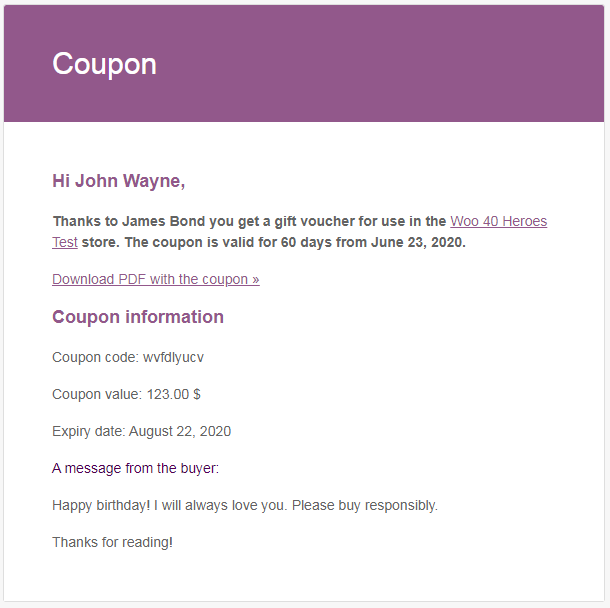
Voucher-delivery example from the official documentation. Its sample dates and values are illustrative, not loyalty-program settings.
If you need WooCommerce to send a coupon by email automatically, specify both the trigger and delivery component. Core documentation distinguishes sharing coupon codes from automated coupon-email functionality.
Test Thresholds, Refunds, Benefit Eligibility, and Account Edge Cases
Before launch, test with ordinary customer accounts, not just administrator accounts. Create expected results for the following cases and repeat them whenever pricing or loyalty integrations change.
- Exact thresholds: verify $499.99, $500, $1,499.99, and $1,500, including the chosen rounding policy.
- Upgrade timing: confirm the qualifying order does not receive a retrospective VIP discount and subsequent eligible purchases do.
- Refunds: test partial refunds after an upgrade, refunds across qualification years, and preservation of another valid award.
- Renewal and expiry: reset progress without deleting protected status; enforce expiry without requiring a new purchase.
- Guest purchases: confirm whether they count, how ownership is verified, and when they become associated with an account.
- Linked history: prevent the same historic order from contributing twice after account linking, imports, or account merges.
- Benefit eligibility: check exclusions, shipping areas, minimum spend, coupon combinations, and annual benefit caps.
- Retries and duplicate events: repeated order updates or failed email retries must not issue additional rewards.
- Downgrades: remove obsolete pricing, access, and unearned benefits, including from existing carts and cached account views.
- Manual exceptions: verify that temporary adjustments expire and leave an audit trail.
Decide whether qualifying history predating launch will count. If it will, run a reconciliation before sending status announcements and show customers which period was imported.
Measure Retention, Tier Movement, and Profitability After Launch
Track repeat purchase rate and retention over a consistent interval suited to your buying cycle. Also monitor time to second purchase, upgrades, renewals, downgrades, and the share of customers remaining close to a threshold.
WooCommerce Analytics provides sales reporting and CSV exports. Its net-sales definition subtracts returns and coupons from gross sales; it does not, by itself, represent contribution margin after all loyalty-program costs.
Calculate contribution after product costs, payment and fulfillment costs, shipping subsidies, reward costs, and incremental service costs. Do not subtract discounts twice: if your revenue figure already reflects VIP reductions, deduct only costs not already included.
Compare customers with similar pre-launch spending, tenure, and acquisition characteristics. Where practical, use a controlled rollout or holdout group. Higher spending among Gold customers alone does not establish program uplift, because spending was the condition used to select them.
Review benefit use alongside cost. A rarely used perk may need clearer communication; an expensive perk may need redesign. Apply policy changes prospectively and explain how existing protected entitlements will be treated.
Key Takeaways
Use these principles as the final check before launching tiered loyalty programs for WooCommerce.
- Define earned, persistent status separately from promotional discount bands and purchasable vouchers.
- Publish qualification periods, eligible-spend calculations, refund treatment, and renewal conditions.
- Store progress, protected status, and redeemable rewards separately.
- Use pricing and coupons to deliver benefits—not as a substitute for tier management.
- Make upgrades, expiry, refunds, and reward retries predictable and auditable.
- Judge success through comparable customer cohorts and contribution after benefit costs.
Summary
A workable WooCommerce loyalty program begins with clear qualification and status rules. Decide what earns progress, how long a level lasts, and what happens after refunds or missed renewal thresholds. Then connect those rules to status tracking, pricing, scheduled reassessment, and customer communication.
Start with a small number of understandable levels and benefits you can cost reliably. Test the complete lifecycle before launch, then refine the program using retention and profitability evidence—not VIP spending alone.
