



Black Friday marketing for WooCommerce should be managed as one coordinated commercial campaign—not a last-minute discount. The strongest plan connects profitable offers, coupons, gift cards, email, landing pages, checkout performance, inventory, customer service, and post-sale retention around clear financial goals.
How to Build a WooCommerce Black Friday Marketing Strategy
A successful WooCommerce Black Friday campaign begins with a business objective. Before choosing a coupon value or designing a banner, decide whether the campaign should acquire new customers, increase average order value, move selected inventory, reactivate previous buyers, or generate future revenue through gift cards.
Next, define which audiences, products, and channels support that objective. A store trying to clear seasonal stock may prioritize product bundles and category discounts. A business with limited inventory may focus on gift vouchers, services, or offers reserved for existing customers. A growing brand might accept a lower first-order margin if the acquired customers are likely to purchase again.
Your holiday ecommerce strategy should coordinate five elements:
- Commercial goals: revenue, contribution margin, customer acquisition, order value, and inventory targets.
- Offer structure: discounts, bundles, gifts, free shipping, gift cards, and eligibility rules.
- Campaign timing: preparation, early access, Black Friday, Cyber Monday, and follow-up.
- Store experience: landing pages, product information, cart, checkout, and mobile usability.
- Operations: stock, fulfillment, customer support, analytics, and contingency procedures.
Treat these elements as dependencies. A strong email campaign cannot rescue an unclear landing page, while an attractive discount can still lose money if stacking rules, shipping costs, or product margins were not checked.
Set Campaign Goals, Budgets, and Performance Targets
Choosing an arbitrary sitewide discount is one of the fastest ways to reduce profit without creating meaningful incremental demand. Start by calculating the financial room available for each product group and customer segment.
Define the primary campaign objective
Select one primary goal and a limited number of supporting goals. For example, your campaign may aim to increase contribution margin while using a bundle to improve average order value. Alternatively, it may prioritize new-customer acquisition while protecting full-price bestsellers from discounts.
Useful campaign targets include:
- incremental revenue compared with a suitable baseline period,
- gross and contribution margin after discounts and variable costs,
- conversion rate by traffic source and device,
- average order value and units per transaction,
- new-customer acquisition cost,
- gift card revenue and later redemption value,
- inventory sold from selected categories,
- repeat purchases from campaign-acquired customers.
Build a promotion budget
Your budget should include more than advertising spend. Account for the discount itself, free products, subsidized shipping, payment fees, additional fulfillment labor, email or automation tools, creative production, and expected returns.
Estimate profitability at order level. Begin with order revenue after discounts, then subtract cost of goods, payment fees, shipping subsidies, packaging, fulfillment, commissions, and variable advertising costs. This gives a more useful picture than gross sales alone.
Create a Black Friday Campaign Timeline
Black Friday should not be treated as a single launch day. Divide the project into phases so that pricing decisions, creative work, WooCommerce configuration, and testing do not compete for attention at the last moment.
A practical timeline includes:
- Eight to twelve weeks before: objectives, budgets, forecasts, inventory, campaign ownership, and technical requirements.
- Five to seven weeks before: offer approval, audience segmentation, landing-page structure, copy, and creative production.
- Three to four weeks before: coupon configuration, gift card preparation, email automation, analytics, and store optimization.
- One to two weeks before: end-to-end testing, staff training, launch approval, and contingency planning.
- Campaign week: early access, Black Friday launch, weekend adjustments, and Cyber Monday offers.
- After the campaign: fulfillment, customer follow-up, retention activity, gift card promotion, and profitability analysis.
For 2026 planning, Black Friday falls on November 27, 2026, followed by Cyber Monday on November 30, 2026. Your internal deadlines should be set well before those dates rather than using them as configuration deadlines.
For a detailed operational schedule with responsibilities and approval gates, use the guide on how to build a WooCommerce Black Friday campaign timeline.
Choose the Right Promotions and Sales
The best promotions and sales are matched to customer intent, product economics, and inventory. You do not need to give every shopper the same incentive or discount every product by the same percentage.
Percentage and fixed-cart discounts
A percentage discount is easy to communicate and scales with order value, but it can become expensive when applied to premium or low-margin products. A WooCommerce fixed cart discount gives you greater control over the maximum value surrendered per order and can work well with a minimum spend.
For example, a fixed discount above a basket threshold can encourage customers to add another product without reducing the price of every item. Percentage discounts may be better for a tightly controlled category in which margins are consistent.
Bundles and tiered promotions
Bundles can move complementary products while increasing units per transaction. Tiered offers—such as a larger saving at a higher basket value—can raise average order value, provided the thresholds are realistic and clearly displayed.
Model how customers could reach each threshold. If the gap between typical basket value and the first tier is too large, the promotion may be ignored. If the threshold is too low, you may discount orders that customers would have placed anyway.
Flash sales and limited offers
Flash sales can create urgency around selected products, but frequent changes require accurate scheduling, clear start and end times, and close inventory monitoring. Use them for a defined commercial reason rather than changing discounts simply to create activity.
You can compare Black Friday promotion ideas for WooCommerce to choose between bundles, flash sales, tiered discounts, gift cards, and non-discount incentives.
Use WooCommerce Coupons Without Damaging Margins
Black Friday coupons should have a clear audience, purpose, validity period, and profitability limit. Avoid creating multiple codes with overlapping eligibility unless you have tested exactly how they interact.
WooCommerce core supports percentage, fixed-cart, and fixed-product coupon types. It also provides restrictions for minimum and maximum spend, products, categories, sale items, email addresses, individual use, and usage limits. Coupons can be scheduled through their publication settings, while an expiry date controls when they stop working.
Choose restrictions before creating the code
Determine whether the WooCommerce discount coupon code should apply to existing sale items, premium products, subscriptions, gift cards, or low-margin categories. Define these rules in the commercial brief before someone configures the coupon.
Important controls include:
- a minimum or maximum eligible spend,
- included and excluded products or categories,
- exclusion of products already on sale,
- individual-use settings that prevent combination with other coupons,
- a total usage limit for the campaign,
- a usage limit per customer,
- a maximum number of eligible items where applicable,
- a tested expiry and publication schedule.
Pay particular attention to mixed carts. A customer may combine excluded, full-price, and sale products in one order, producing a result that differs from a simple single-product test.
Control coupon distribution
Use memorable public codes for broad campaigns and unique or restricted codes for segments such as VIP customers, affiliates, or customer-service recovery. If you use advanced bulk coupon generator plugins, confirm that generated codes inherit the intended restrictions and can be attributed to the correct channel.
WooCommerce core expects customers to enter a coupon at the cart or checkout and does not automatically apply ordinary coupon codes. If your campaign promises automatic savings, verify that the selected implementation actually delivers that experience.
If you need setup instructions for how to create a discount code on WooCommerce, including the available fields and restrictions, see the complete guide to creating WooCommerce coupons.
Add Gift Cards and Vouchers to Your Black Friday Offer
Gift cards can complement discounted products without forcing you to reduce the price of your entire catalog. They are particularly useful when inventory is limited, customers are buying presents, or the recipient may prefer to choose a product or service later.
Structure profitable Black Friday gift card deals
Black Friday gift card deals can use several models. You might provide a modest bonus value, add a complimentary product, create a gift-ready voucher, or offer a future-purchase benefit to the buyer. Always define how the promotion affects revenue recognition, redemption, expiration, taxes, and unused balances in your operating market.
Gift cards should be presented as gifting products rather than hidden among ordinary coupons for Black Friday. Show the available value, delivery method, recipient options, redemption conditions, eligible products, and any excluded costs before checkout.
If gift cards form part of your long-term offer, you can use Flexible Coupons to create and sell PDF gift cards alongside vouchers and coupon products in WooCommerce.

Recipient fields can make a WooCommerce gift voucher easier to purchase as a personalized present. Confirm which fields and delivery options are available in your selected configuration.
The current Flexible Coupons documentation describes support for coupon products, templates, recipient information, expiration settings, product or category eligibility, and PDF access. Specific recipient delivery and attachment options can depend on the installed version and add-ons.
Before launch, review the Black Friday gift card plugin guide and decide whether you want to create and sell PDF gift cards in WooCommerce. If the campaign requires different values or designs, explore WooCommerce voucher variations for Black Friday.
Stores planning a broader voucher program can also review the Flexible Coupons resources for related gift card and voucher options.
Plan Your Black Friday Email and Promotion Channels
A complete gift card email campaign or discount campaign needs more than one launch message. Assign every communication a specific audience, offer, action, and place within the customer journey.
Build a coordinated email sequence
Your sequence may include teaser messages, VIP early access, the main launch, product recommendations, cart recovery, final-hours reminders, Cyber Monday communication, and post-purchase follow-up. Not every subscriber needs every message.
Segment contacts by engagement, customer status, previous purchases, product interest, order value, and location where relevant. Existing customers may respond to personalized recommendations, while new subscribers may need more explanation of the brand and promotion.
Use behavior-based messages
Prepare automated messages for abandoned carts, abandoned checkouts, unsuccessful payments, and unpaid orders where appropriate. These emails should preserve the correct offer, send customers back to a working cart or checkout, and stop when the order is completed.
For message timing, segmentation, testing, and measurement, follow the detailed process to plan your Black Friday email campaign.
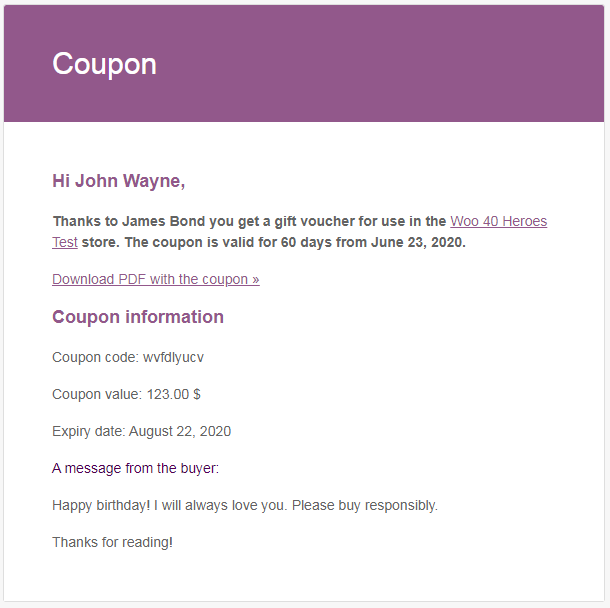
A gift card email should clearly show the sender or buyer information, voucher value, validity, redemption details, and a prominent download or access link.
Coordinate additional promotion channels
Email should match the offer presented through paid advertising, organic social media, affiliates, on-site banners, push notifications, and customer service. Use consistent conditions and destination pages so shoppers do not encounter different prices, dates, or exclusions across channels.
Assign distinct campaign identifiers or coupon codes where this improves attribution. However, avoid creating unnecessary code variations that make customer support and testing harder.
Optimize Your WooCommerce Store for Conversions
Campaign traffic has little value if shoppers cannot understand the offer or complete checkout. Review the full journey on desktop and mobile, beginning with the campaign message and ending with the order confirmation.
Create focused landing pages
A Black Friday landing page should explain the main benefit immediately, show eligible products, state the deadline, and provide a clear route to purchase. Place important exclusions close to the offer instead of hiding them in a distant policy page.
For tiered discounts, tell customers how much more they need to spend to reach the next level. For bundles, show what is included and how the promotional value compares with purchasing items separately. For gift cards, explain delivery and redemption before the add-to-cart action.
Reduce cart and checkout friction
Test whether the coupon field is easy to find and whether the discount label is understandable. Confirm that shipping costs, payment methods, taxes, and delivery estimates are presented before the final action.
Review the campaign experience for logged-in users, guests, returning customers, and shoppers using accelerated payment methods. If a promotion depends on an email restriction or account status, make sure the customer receives a useful message when they are not eligible.
Prepare the store for higher demand
Optimize heavy images, remove unnecessary scripts, check caching behavior, and monitor checkout errors. Avoid significant theme, payment, shipping, or plugin changes immediately before launch unless they are essential and fully tested.
Operational readiness matters as much as page speed. Confirm inventory accuracy, fulfillment capacity, customer-service coverage, refund procedures, and escalation contacts before increasing traffic.
Test the Complete Campaign Before Launch
Do not test each component only in isolation. Complete test orders using the same paths, devices, codes, customer states, and payment methods that real shoppers will use.
A structured testing process should cover the following steps:
- Create carts that should qualify for each offer and confirm the expected discount.
- Create ineligible carts to verify product, category, spend, email, and sale-item restrictions.
- Test coupon stacking, individual-use behavior, usage limits, and expiry conditions.
- Place gift card or voucher orders and inspect the product page, checkout, emails, PDF, and customer account.
- Open every campaign email on desktop and mobile, then test all links and coupon codes.
- Complete checkout with key payment and shipping methods.
- Confirm analytics, advertising tags, email attribution, and order data.
- Test refunds, cancellations, failed payments, and customer-service procedures.
Record the result of every test, the person responsible, and any remaining risk. Define a rollback process for incorrect prices, broken checkout behavior, duplicate emails, or excessive coupon use.
Manage Black Friday, Cyber Monday, and Extended Offers
Campaign management continues after the first email is sent. Assign someone to monitor sales, margin, inventory, coupon use, payment failures, site performance, advertising spend, and support requests throughout the promotion.
Use distinct campaign phases
Early access can reward valuable customers without immediately discounting the entire catalog. The main Black Friday promotion can focus on the widest commercial opportunity, while Cyber Monday may use a digital-first offer, selected categories, or a different basket threshold.
Extended offers should have a reason. Instead of repeatedly claiming that a sale has ended and then reopening it, consider a clearly announced second phase with different products or benefits. This protects customer trust and gives each message a meaningful purpose.
Manage gift card delivery timing
If customers are buying presents, scheduled delivery can prevent a voucher email from arriving too early. Flexible Coupons documentation describes an Advanced Sending option that can use a delay, a fixed date, or a customer-selected delivery date, subject to the required configuration and order status.

When delayed delivery is part of the offer, test the selected order status, delivery date, time zone, email template, and fallback process before accepting campaign orders.
For detailed configuration guidance, see how to schedule gift card delivery.
Measure Campaign Performance and Profitability
Gross sales do not show whether your Black Friday marketing for WooCommerce was genuinely successful. Compare performance with a suitable baseline and account for discounts, product costs, shipping subsidies, advertising, payment fees, refunds, and operational costs.
Measure incremental results
Incremental revenue is the additional revenue that would probably not have occurred without the campaign. Compare results with ordinary trading periods, previous seasonal performance, customer cohorts, and unaffected product groups where appropriate.
Review these metrics together:
- Net revenue: revenue after discounts, returns, cancellations, and relevant deductions.
- Contribution margin: net revenue after variable product, fulfillment, transaction, shipping, and acquisition costs.
- Conversion rate: orders relative to qualified sessions or users.
- Average order value: net order revenue divided by completed orders.
- Units per order: useful for evaluating bundles and tiered promotions.
- Coupon performance: redemptions, net revenue, margin, and customer type by code.
- Customer acquisition cost: campaign acquisition spend divided by new customers.
- Customer quality: repeat purchases, refunds, engagement, and later margin from acquired buyers.
- Gift card performance: sold value, redemption timing, incremental basket value, and unused liability.
Analyze segments, not only totals
Break results down by promotion, product group, device, customer type, acquisition source, and geography where useful. One segment may generate high revenue but low margin, while another produces fewer orders with stronger long-term customer value.
Document which offers created incremental demand, which merely discounted existing demand, and where customers experienced friction. Use these findings to improve future Black Friday promotions rather than repeating the same percentage discount automatically.
WooCommerce Black Friday Campaign Checklist
Use this checklist before approving your campaign for launch:
- Campaign revenue, margin, acquisition, average order value, and inventory goals are documented.
- Every offer has an owner, target audience, eligible products, dates, and approved margin model.
- Percentage, fixed-cart, bundle, tiered, flash-sale, and gift card options have been compared.
- Coupon restrictions, sale-item behavior, stacking rules, and usage limits are configured.
- Gift card purchasing, recipient information, PDF access, and email delivery are tested.
- Landing pages explain discounts, thresholds, exclusions, deadlines, and redemption conditions.
- Email segments, automated messages, links, codes, and mobile layouts have been verified.
- Cart, checkout, payments, shipping, taxes, order emails, and account pages have been tested.
- Analytics and channel attribution record orders and campaign identifiers correctly.
- Inventory, fulfillment, customer support, and refund procedures are ready.
- Monitoring responsibilities and escalation contacts are assigned.
- Cyber Monday, extended offers, post-purchase communication, and campaign reporting are planned.
Key Takeaways
The most important conclusions for a profitable WooCommerce Black Friday campaign are:
- Start with financial and operational goals, not an arbitrary discount percentage.
- Match the promotion type to product margin, inventory, customer segment, and desired basket value.
- Coordinate coupons, gift cards, emails, landing pages, checkout, and fulfillment as one campaign.
- Use restrictions and usage limits to prevent stacking, misuse, and unexpected margin erosion.
- Test eligible and ineligible purchase paths before launch.
- Manage Black Friday, Cyber Monday, and follow-up activity as separate but connected phases.
- Evaluate incremental revenue, contribution margin, customer quality, and repeat behavior—not gross sales alone.
Summary
Effective Black Friday marketing for WooCommerce combines commercial planning with careful execution. Set measurable goals, choose promotions that support those goals, protect margins with appropriate coupon rules, and use gift cards where they improve gifting convenience or future revenue opportunities.
Build the campaign around a phased timeline, coordinated promotion channels, a clear store experience, end-to-end testing, and active launch monitoring. When the event ends, measure profitability and customer quality alongside sales. This turns Black Friday from a short discount event into a repeatable and sustainable part of your holiday ecommerce strategy.
