




Choosing the best WooCommerce coupon plugin is not about finding the longest feature list. The right option depends on the campaign you want to run, the number of codes you manage, the restrictions you need, and whether customers receive a checkout discount, store credit, or a personalized digital voucher.
Quick Comparison: The Best WooCommerce Coupon Plugins by Use Case
Before comparing individual features, define the job the plugin must perform. A store running occasional percentage discounts has very different requirements from a business distributing thousands of unique codes or selling branded PDF gift cards.
Best for standard discount codes: WooCommerce core
Native WooCommerce coupons are sufficient for percentage, fixed-cart, and fixed-product discounts. Core settings also cover expiry dates, free shipping, minimum and maximum spend, product and category restrictions, email restrictions, sale-item exclusions, individual use, and usage limits.
Best for advanced discount rules: Advanced Coupons Premium
Advanced Coupons Premium is a strong choice when campaigns depend on layered cart conditions, BOGO offers, automatic application, free products, customer history, user roles, or more precise scheduling. Its conditions can be combined to control exactly when a coupon becomes available.
Best for bulk generation and an all-in-one coupon system: Smart Coupons
The WooCommerce Marketplace Smart Coupons extension is suited to stores that need bulk code generation, coupon CSV import, email distribution, gift cards, store credit, and extended promotion rules within one system. Generated batches can be saved in the store, exported, or emailed to recipients.
Best for coupon import, export, and migration: WebToffee Import Export
Order, Coupon, Subscription Export Import for WooCommerce is designed for structured data operations. It supports coupon import and export, field mapping, batch processing, saved templates, updates to existing records, and scheduled transfers. This makes it more appropriate for migration and database administration than a campaign-only coupon generator.
Best for digital coupons and PDF vouchers: Flexible PDF Coupons PRO WooCommerce
This is the relevant category when a coupon must become a sellable product with a branded PDF, recipient details, a message, and email delivery. It is fundamentally different from a standard code entered at checkout because the presentation and delivery of the voucher are part of the customer experience.
Best for focused customer and location restrictions: WooCommerce Coupon Restrictions
This extension is a practical narrow-scope option for restricting promotions by customer status, user role, country, or postal code and for introducing enhanced usage checks. It supports classic and block-based checkout and declares HPOS compatibility.
When Do You Need a WooCommerce Coupon Plugin?
You do not automatically need an additional plugin to configure a WooCommerce discount. Core WooCommerce already provides the three principal WooCommerce coupon discount types: percentage discount, fixed cart discount, and fixed product discount. It can also exclude sale items, prevent combination with other codes, restrict eligible products, and limit redemptions per coupon or customer.
The native limit usage to X items setting applies to qualifying items covered by percentage or fixed-product coupons; it does not turn a fixed-cart discount into an item-limited promotion. Core also lets you schedule the coupon post for future publication, but it does not automatically apply coupon codes or provide a complete automated delivery workflow.
A dedicated WooCommerce coupon plugin becomes useful when the campaign requires capabilities such as BOGO logic, conditions based on order history, automatic application, unique links, bulk code generation, CSV synchronization, gift cards, reusable balances, or personalized PDF vouchers.
If you first need to understand native settings and basic code creation, consult the complete guide to WooCommerce coupons. The remainder of this comparison focuses on situations in which core features are no longer sufficient.
How We Evaluate WooCommerce Coupon Plugins
The best WooCommerce coupon plugins should be evaluated as operational tools, not collections of marketing features. The following criteria help identify whether an extension will remain reliable after the first campaign.
- Campaign fit: Can the plugin implement the exact offer without workarounds?
- Restriction depth: Can it validate products, categories, quantities, customer attributes, cart values, checkout methods, and previous purchases?
- Coupon lifecycle: Does it support start dates, expiry dates, generation, distribution, redemption tracking, and cleanup?
- Management at scale: Can administrators search, categorize, import, export, update, and audit large code collections?
- Checkout behavior: Does the promotion work with the store’s cart, checkout blocks, taxes, shipping methods, and other discounts?
- Data portability: Can coupon records and relevant metadata be exported without becoming dependent on one vendor?
- Maintenance quality: Are compatibility declarations, documentation, updates, and support suitable for a production store?
When reviewing WooCommerce add-ons, give more weight to the two or three functions your campaign genuinely needs than to dozens of features that will remain unused.
Best WooCommerce Coupon Plugins: Feature-by-Feature Comparison
Discount types and calculation logic
Every serious option should preserve the standard WooCommerce coupon discount types. The important difference is what happens before the discount is accepted. Advanced plugins can add quantity thresholds, checkout conditions, customer-history rules, BOGO structures, free products, or logic based on the cheapest and most expensive cart items.
Do not assume that every discount engine is also a coupon manager. Dynamic pricing plugins may change prices without creating a customer-facing code, while a coupon extension normally works with identifiable codes, usage records, and redemption restrictions.
WooCommerce coupon restrictions
Core restrictions cover many common promotions, including spend thresholds, selected or excluded products and categories, allowed billing emails, individual use, and sale-item exclusions. Plugins become valuable when eligibility depends on user roles, location, payment or shipping method, product quantity, previous orders, lifetime spend, or multiple groups of conditions.
For campaigns where a WooCommerce coupon individual use only rule is sufficient, core may be all you need. If the code can combine with selected coupons but not others, or must react to another coupon already in the cart, an advanced rules extension is more appropriate.
Start dates, expiry dates, and scheduling
A WooCommerce coupon expiry date is available in core, and future publication can provide a basic start mechanism. Premium extensions generally offer more convenient scheduling, including explicit start and end controls, day-of-week activation, time windows, or messages explaining why a coupon is not yet available.
Generation, delivery, and redemption
These are separate capabilities. A plugin may generate codes without emailing them, import codes without creating PDF vouchers, or sell gift cards without being optimized for database migration. Reliable WooCommerce coupon management requires a clear understanding of where codes originate, how they reach customers, and whether they are single-use or balance-based.
Best Plugin for Advanced Discount Rules and Coupon Restrictions
Advanced Coupons Premium is the most suitable recommendation when the primary requirement is conditional promotion logic. Its cart conditions can evaluate cart contents, quantities, totals, customer roles, order history, and previous spending. Conditions can be chained into groups, allowing a campaign to target narrowly defined customer or basket scenarios.
It is particularly useful for automatic coupons, BOGO deals, free products, shipping offers, loyalty-oriented campaigns, and coupon links. The plugin also documents support for WooCommerce Cart and Checkout Blocks, although stores should still test every feature used by their own configuration.
WebToffee Smart Coupons for WooCommerce is a credible alternative when advanced restrictions must be combined with BOGO offers, giveaway products, store credit, bulk generation, or coupon imports. Its settings can incorporate payment methods, shipping methods, customer roles, locations, product attributes, purchase history, start dates, and active weekdays.
If you only need new-customer, existing-customer, role, or location controls, the smaller WooCommerce Coupon Restrictions extension may be easier to operate than a broad marketing suite. The best choice is the one that introduces the least complexity while enforcing the campaign correctly.
Best Plugin for Bulk Coupon Generation and Campaign Management
For hundreds or thousands of unique codes, the WooCommerce Marketplace Smart Coupons extension provides a comprehensive bulk workflow. A generated batch can share common discount settings, restrictions, usage limits, and expiry rules, while each coupon receives an individual code. Batches can be added to the store, exported to CSV, or emailed to recipients.
WebToffee’s WooCommerce Coupon Generator is another focused advanced bulk coupon generator plugin. It can add generated codes to the store, download them as CSV, and send unique or shared codes to selected recipients. It is a practical choice when bulk creation is the main job and a larger coupon suite would be excessive.
Before generating a large batch, decide whether every code really needs to exist in the WooCommerce database immediately. Creating more records than the campaign requires can increase administrative noise and make searches, exports, backups, and audits harder to manage.
Best Plugin for Coupon Import, Export, and CSV Workflows
A general WooCommerce coupon import transfers coupon records and their settings. This can include discount type, amount, restrictions, usage counts, expiry, product relationships, and custom metadata. For migrations and recurring data synchronization, choose a tool with column mapping, update rules, duplicate handling, batching, logs, and saved templates.
Order, Coupon, Subscription Export Import for WooCommerce is a strong option for this job because it handles structured import and export workflows rather than only generating promotional codes. Its advanced workflows support filters, field mapping, batch processing, multiple file formats, and scheduled operations.
There is an important distinction between migrating the WooCommerce coupon database and importing a stock of external codes for voucher products. Flexible PDF Coupons PRO – Coupon Codes Import performs the second job: it supplies predefined codes that can be assigned automatically when PDF coupons are generated. It is not a replacement for a complete coupon database migration tool.
For a focused explanation of this workflow, see how to import predefined coupon codes from a file.

The code import settings show separate uploaded lists together with the number of available and used codes.
The add-on reads codes from the first column of an uploaded file and lets administrators maintain multiple code lists. This is useful when a store sells access codes, partner-issued vouchers, prepaid services, or other digital coupons in WooCommerce that must use a predefined inventory.
Best Plugin for Email Delivery, Digital Coupons, and PDF Vouchers
Standard WooCommerce can create a coupon code, but core does not turn that code into a personalized, sellable document. When customers are purchasing a gift, service voucher, ticket, or printable certificate, consider a dedicated WooCommerce gift card and voucher plugin that treats presentation and delivery as part of the product.
Flexible PDF Coupons PRO WooCommerce is designed for branded PDF coupons with recipient information, personalized messages, configurable code formats, reusable vouchers, and email attachments. Coupons can be generated automatically after an order reaches the selected status or generated manually from an order.
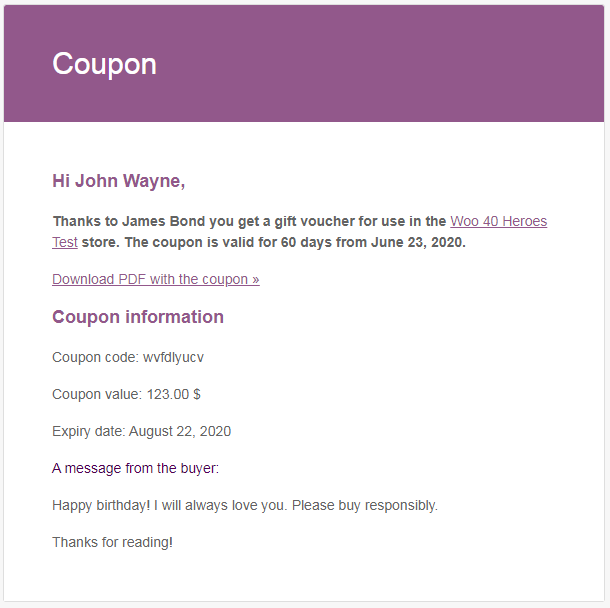
A digital voucher email can provide a download link, while the PRO edition can also attach the PDF directly to the message.
If campaign success depends on the message sent to the recipient, learn how to customize gift card email delivery. Email subject lines, content, timing, sender configuration, attachments, and delivery logs deserve the same attention as the voucher design.
Stores planning a broader voucher program can also review the available Flexible Coupons solutions and select only the extensions required for their delivery and redemption workflow.
Best Plugin for Store Credit, Redeemable Coupons, and Gift Cards
Store credit is not identical to a standard fixed-cart coupon. A conventional coupon usually applies a defined discount to an eligible order, whereas store credit may retain a remaining balance after partial redemption. This difference affects refunds, customer accounts, reporting, and repeat purchases.
The WooCommerce Marketplace Smart Coupons extension combines store credit, gift cards, bulk generation, imports, and coupon email features. WebToffee Smart Coupons for WooCommerce also provides store-credit functionality and allows credit to be redeemed repeatedly until the available amount is exhausted.
For a branded voucher that customers may redeem over multiple visits, a PDF coupon system can be more appropriate. Read how to create reusable WooCommerce gift cards before deciding whether your offer should behave as store credit, a multi-use voucher, or a conventional discount code.
Essential Features to Compare Before Choosing
Feature names vary between vendors, so compare the actual behavior of each plugin. The following capabilities have the greatest effect on day-to-day campaign management.
- Discount calculation: percentage, fixed-cart, fixed-product, free product, BOGO, store credit, or final-price offers.
- Stacking rules: individual use, selected combinations, exclusion groups, and calculation order.
- Product eligibility: included and excluded products, categories, tags, attributes, brands, and sale items.
- Customer eligibility: billing email, user role, account status, location, order history, and previous spending.
- Usage control: limits per coupon, per user, per eligible item, or per promotion.
- Scheduling: start date, expiry date, time of day, active weekdays, and timezone handling.
- Application method: manual code, auto-apply, URL coupon, account display, or email link.
- Distribution: manual sharing, automated email, bulk email, PDF attachment, or external marketing platform.
- Data operations: bulk generation, CSV mapping, updates, exports, backups, logs, and migration.
- Redemption model: single use, repeated use, or remaining-balance credit.
A plugin should also explain how restrictions interact. For example, excluding sale items, enabling individual use, and limiting discounted quantities may produce different results depending on whether the campaign uses a fixed cart discount or a product-level discount.
Free vs Pro WooCommerce Coupon Plugins
Free tools are often sufficient for basic percentage or fixed discounts and may include selected extended coupon features such as simple BOGO rules, role restrictions, URL coupons, start dates, or automatic application. The limitations usually become visible when a campaign requires automation, advanced condition groups, large batches, personalized delivery, reusable balances, recurring imports, or vendor support.
Premium plans commonly add broader conditional logic, precise scheduling, bulk processing, email customization, PDF attachments, more code-format controls, integrations, and support. However, the boundary between free and premium is different for every vendor and can change over time.
For voucher campaigns, compare Flexible Coupons plans before purchasing so that you can verify current licensing, support, included updates, and whether the required function is part of the core plugin or a separate add-on.
Do not buy a premium edition solely because it contains more settings. Upgrade when a paid feature removes a confirmed operational limitation, reduces manual work, or prevents campaign misuse.
How to Match a Coupon Plugin to Your Use Case
A scenario-based decision is more reliable than ranking every extension from best to worst. Match your campaign to the following patterns.
- Standard seasonal promotion: Use WooCommerce core when you need a shared percentage, fixed-cart, or fixed-product code with normal product restrictions and usage limits.
- Complex cart promotion: Choose an advanced rules plugin when eligibility depends on quantities, customer roles, previous orders, payment methods, combined conditions, BOGO logic, or automatic application.
- Unique-code marketing campaign: Use a bulk generator when affiliates, newsletter subscribers, event visitors, or partners require individual trackable codes.
- Large coupon migration: Choose a dedicated coupon export and import tool with mapping, duplicate handling, updates, batches, logs, and metadata support.
- Personalized digital voucher: Use a PDF coupon plugin when the customer buys a present, service, ticket, or certificate that should be designed, personalized, and delivered professionally.
- Repeat-redemption program: Select store credit or reusable voucher functionality when customers must retain unused value after the first order.
- External code inventory: Use a predefined-code add-on when the store must distribute codes supplied by another system instead of generating new WooCommerce codes.

Different PDF coupon products can be assigned to different imported code lists, keeping separate inventories for separate offers.
This product-level assignment is useful when one store distributes codes from several suppliers or maintains different code pools for services, events, locations, or partners.
Compatibility, Performance, and Data Ownership Questions
Coupon functionality touches product prices, taxes, orders, customer records, cart sessions, checkout validation, emails, and refunds. Compatibility should therefore be treated as a purchasing criterion rather than a technical detail to review after installation.
WooCommerce recommends that extension developers declare and test compatibility with current WordPress and WooCommerce versions, Cart and Checkout Blocks, and High-Performance Order Storage. HPOS changes how order data is stored, so extensions that read or write order information must use compatible WooCommerce APIs.
Before selecting a plugin, obtain clear answers to the following questions.
- Does the developer declare compatibility with your WooCommerce and WordPress versions?
- Does every required feature work with the cart and checkout format used by your store?
- Does the plugin declare HPOS compatibility where order data is involved?
- Can coupon records, balances, usage data, and custom metadata be exported?
- What happens to existing coupons if the extension is deactivated?
- Are imports and bulk generation processed in batches or background jobs?
- Can expired or exhausted coupons be archived or removed safely?
- How frequently are updates and documentation published?
- Does support cover conflicts with payment, subscription, multilingual, tax, and checkout plugins?
For a large coupon database, ask for evidence of background processing, batch controls, and retry or logging mechanisms. A feature that works with 20 codes in a demonstration may not be appropriate for a campaign containing tens of thousands of records.
How to Test a Coupon Plugin Before Launching a Campaign
Test the final campaign in a staging environment that mirrors the production store. This includes the active theme, checkout type, payment gateways, shipping rules, tax configuration, currencies, and other discount extensions.
A structured test plan should cover the following sequence.
- Create an eligible cart and confirm the expected discount amount.
- Test carts below and above every spend or quantity threshold.
- Add excluded products, categories, sale items, and product variations.
- Combine the coupon with allowed and prohibited codes in different application orders.
- Test guest users, registered customers, new customers, and customers who reached a usage limit.
- Verify taxes, free shipping, paid shipping, payment-method restrictions, and refunds.
- Check the coupon before its start date, during its active period, and after expiration.
- Confirm that customer and recipient emails arrive with the correct code, message, link, or PDF attachment.
- Place and refund test orders to verify usage counts, balances, and reusable voucher behavior.
- Review the resulting order in administration, analytics, exports, and customer account pages.
Repeat the most important tests after plugin, WooCommerce, checkout, tax, or payment updates. Coupon behavior is a calculation and validation workflow, so seemingly unrelated changes can affect the final result.
Final Selection Checklist and Recommendations
Before making the final decision, reduce the comparison to the requirements that can determine whether the campaign succeeds or fails.
- Use WooCommerce core for straightforward shared discount codes with standard restrictions and limits.
- Choose Advanced Coupons Premium when complex cart conditions and promotion logic are the primary requirements.
- Choose Smart Coupons when you need a broad combination of bulk generation, store credit, gift cards, imports, and distribution.
- Choose a dedicated import and export plugin for migrations, recurring CSV workflows, mass updates, and data portability.
- Choose Flexible PDF Coupons PRO WooCommerce for sellable, branded, personalized PDF vouchers and gift-oriented email delivery.
- Add Flexible PDF Coupons PRO – Coupon Codes Import when voucher products must consume predefined codes from external inventories.
- Prefer a focused restriction extension when customer status, location, or anti-abuse limits are the only missing functions.
- Verify free versus premium limits before building the campaign around a feature that may require another plan or add-on.
- Confirm compatibility and export options before importing or generating a large coupon database.
- Complete staging tests before publishing or distributing any live codes.
Summary
The best WooCommerce coupon plugins solve different problems. Core WooCommerce is capable enough for standard promotions, while advanced rules plugins handle complex eligibility and stacking logic. Bulk generators support unique-code campaigns, import and export tools manage data at scale, and PDF voucher plugins provide the presentation and delivery required for gift cards, services, and digital certificates.
Define the discount model, restrictions, code volume, delivery channel, redemption behavior, and data requirements before comparing plans. A smaller plugin that precisely supports the campaign is usually a better investment than an all-in-one suite whose additional features increase configuration and maintenance without solving a real business need.
