




Imagine a world where your WooCommerce store doesn’t just sell products, but crafts unforgettable experiences. A world where every gift card isn’t just a generic code, but a beautifully designed, deeply personal token of affection, complete with custom messages and stunning PDF designs. This isn’t a distant dream; it’s the tangible reality you can build today, transforming your e-commerce into a hub for thoughtful, customizable gifting.
Generic gift cards often fall flat, lacking the emotional resonance that truly makes a present special. Your customers crave the ability to personalize, to imbue their gifts with unique messages and aesthetic appeal. For you, the store owner, this represents an incredible opportunity to elevate your brand, delight your customers, and unlock new revenue streams. By embracing WooCommerce personalized gift cards, you’re not just selling a discount; you’re selling a bespoke gifting solution that stands out in a crowded market.
In this comprehensive guide, we’ll walk you through the process of setting up a dynamic system that allows your customers to design their own gift cards, complete with recipient names, personal messages, and occasion-specific PDF templates. Leveraging the powerful synergy of Flexible Product Fields PRO and Flexible PDF Coupons PRO from WP Desk, you’ll discover how to transition from offering mundane coupons to delivering exquisite, ready-to-print digital vouchers that captivate and convert.
What are WooCommerce Personalized Gift Cards?
WooCommerce personalized gift cards are digital or printable vouchers that customers can customize with specific details, such as the recipient’s name, a personal message, and a chosen design theme, before purchase. Beyond a simple discount code, they offer a tailored gifting experience, automatically generating an aesthetic PDF coupon that can be printed or emailed. This capability transforms a standard transaction into a thoughtful gesture, boosting customer satisfaction and brand loyalty while providing store owners with a powerful tool to sell customizable gift cards and increase sales.
The Vision: Transform Your Gift Card Strategy into an Experience
Think beyond the transactional. Imagine your customers not just buying a gift card, but crafting a memorable present. They select a value, then effortlessly add a heartfelt message, the recipient’s name, and even pick a design that perfectly matches the occasion – be it a birthday, anniversary, or holiday celebration. The result? A stunning, ready-to-print or email PDF voucher that reflects genuine care and thoughtfulness. This level of personalization elevates your brand from a simple e-commerce store to a trusted partner in creating cherished moments.
For agencies and developers, this means delivering exceptional value to your clients. You’re not just implementing a plugin; you’re enabling a strategic shift that drives customer engagement, increases average order value, and sets their stores apart. Your reputation, built on delivering solutions that truly ‘just work,’ will soar as you empower businesses to offer online gift vouchers that resonate deeply with their audience.
The Challenge: Why Generic Gift Cards Fall Short
In today’s competitive landscape, generic gift cards are often overlooked. They lack the personal touch that makes a gift truly special. Store owners face the frustration of offering a valuable product that doesn’t quite connect with customers, leading to missed opportunities for increased sales and customer loyalty. Manually generating personalized vouchers is time-consuming, prone to errors, and simply not scalable for a growing business. This often leaves businesses struggling to meet the demand for truly unique and meaningful gifts, hindering their ability to design your own gift card WooCommerce solutions efficiently.
The pain points are clear: a clunky process, dissatisfied customers yearning for more, and a significant drain on administrative resources. This is where the right tools become not just an advantage, but a necessity to unlock your store’s full potential.
Unlocking Personalization: The Power Duo of Flexible Product Fields PRO & Flexible PDF Coupons PRO
At the heart of transforming your gift card strategy lies the strategic synergy between two powerful WooCommerce plugins: Flexible Product Fields PRO and Flexible PDF Coupons PRO. Together, they create a seamless, automated system for selling personalized gift cards that delights customers and streamlines your operations. Flexible Product Fields PRO empowers your customers to customize every detail, while Flexible PDF Coupons PRO elegantly transforms those details into beautiful, ready-to-deliver PDF vouchers.
It’s about more than just adding fields; it’s about building an experience. This combination is your key to moving beyond basic coupon generation to offering a sophisticated, automated solution for creating memorable gifts. You can even explore how to add extra costs to these customizable options, for instance, a premium design fee, by reading our guide on how to add extra cost to a WooCommerce product like a gift card.
Flexible Product Fields PRO: Capturing Every Detail
Flexible Product Fields PRO is your ultimate tool for gathering all the unique personalization details your customers desire. From the recipient’s name and email to heartfelt messages and chosen occasions, this plugin allows you to add any number of custom fields directly to your product page. It provides the flexibility to create various field types—text inputs, dropdowns, checkboxes, and more—making it easy for customers to tailor their gift card precisely to their needs. This ensures that every piece of information needed for a truly personalized gift card with recipient name WooCommerce can be captured effortlessly.
Flexible PDF Coupons PRO: Crafting the Perfect Digital Gift
Once you have captured the personalization data, Flexible PDF Coupons PRO steps in to transform it into a stunning, professional PDF voucher. This powerful WooCommerce PDF gift voucher plugin allows you to design custom templates with your branding, background images, and dynamic text areas. It automatically generates a unique coupon code and embeds all the customer-provided details onto the PDF, ready for immediate download or email delivery. This means you can offer a truly aesthetic and functional gift card with custom message and PDF, ensuring a delightful experience for both the buyer and the recipient.
Flexible PDF Coupons PRO WooCommerce £59
Design your own PDF coupons and sell them as gift cards, tickets, or service vouchers. Use extra add-ons and insert your own shortcodes, delay sending coupons by email, or even generate QR codes.
Add to cart or View DetailsStep-by-Step: Building Your WooCommerce Personalized Gift Card System
Creating your bespoke personalized gift card system might sound complex, but with the right tools, it’s a straightforward journey to enhanced customer engagement and operational efficiency. Follow these steps to set up a powerful system that truly reflects your brand’s mission and values.
1. Setting Up Your Gift Card Product in WooCommerce
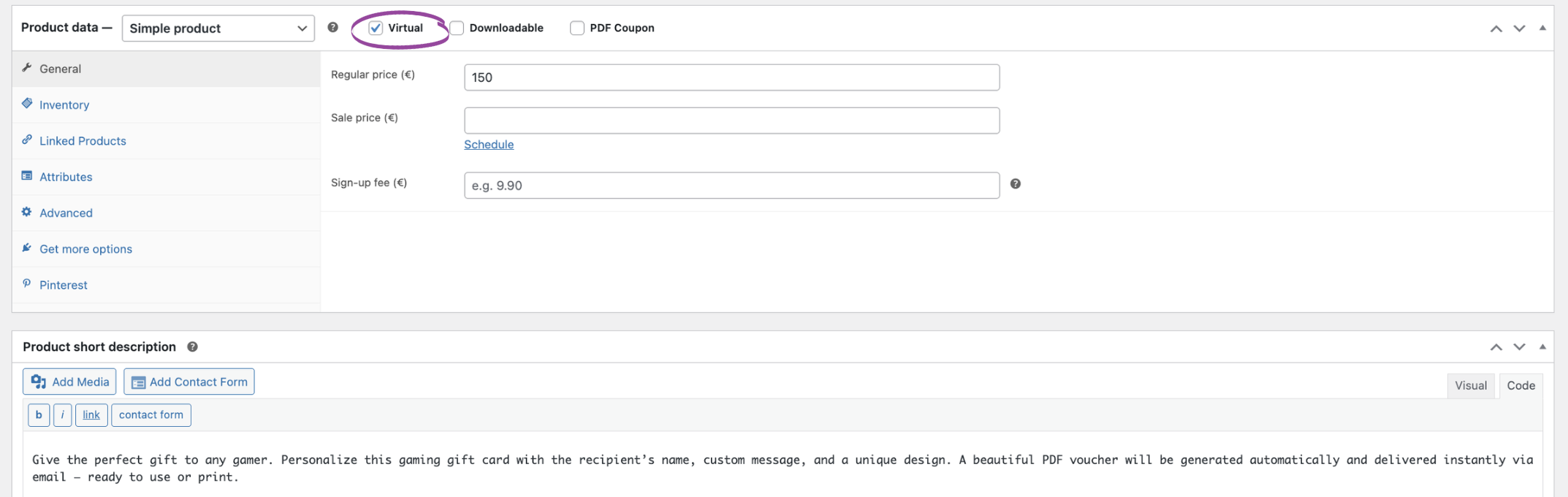
Begin by creating a new product in WooCommerce that will serve as your customizable gift card. For digital delivery, it’s crucial to set this product as ‘Virtual’ and ‘Downloadable’ in the Product Data meta box. This ensures no shipping costs are calculated and enables the automated delivery of the PDF. Assign a clear price, as this will be the value your customers pay for the gift card. This product will serve as the foundation, making it easy for customers to purchase their chosen personalized gift.
2. Empowering Customization with Flexible Product Fields PRO
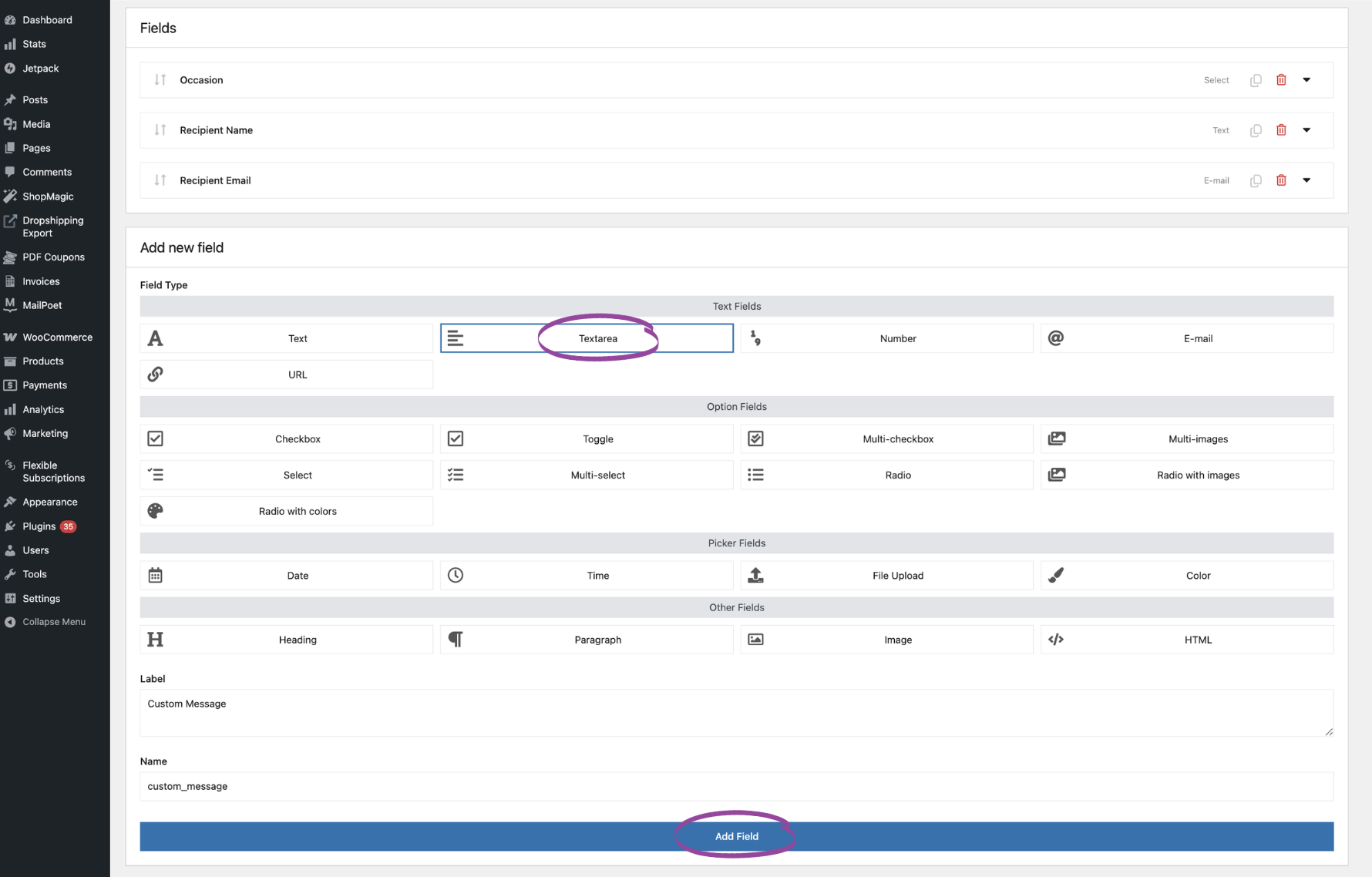
This is where Flexible Product Fields PRO truly shines, allowing you to add all the necessary fields for personalization. Navigate to WooCommerce > Flexible Product Fields and create a new Field Group. Assign this group to your newly created gift card product. Now, add the following field types:
- Recipient Name (Text Field): Label it clearly, e.g., “Recipient’s Name”. Make it required.
- Recipient Email (Email Field): Crucial for direct delivery. Label it “Recipient’s Email” and make it required.
- Custom Message (Textarea Field): Allow customers to write a personal message. Label it “Your Message” and set a character limit if desired.
- Occasion (Select/Dropdown Field): Offer options like “Birthday,” “Holiday,” “Anniversary,” etc. This will be used to dynamically change the PDF design.
These fields will appear on your product page, enabling customers to easily input their personalization details. This is how you empower your customers to design their own gift card WooCommerce experience.
3. Designing Your PDF Voucher Template
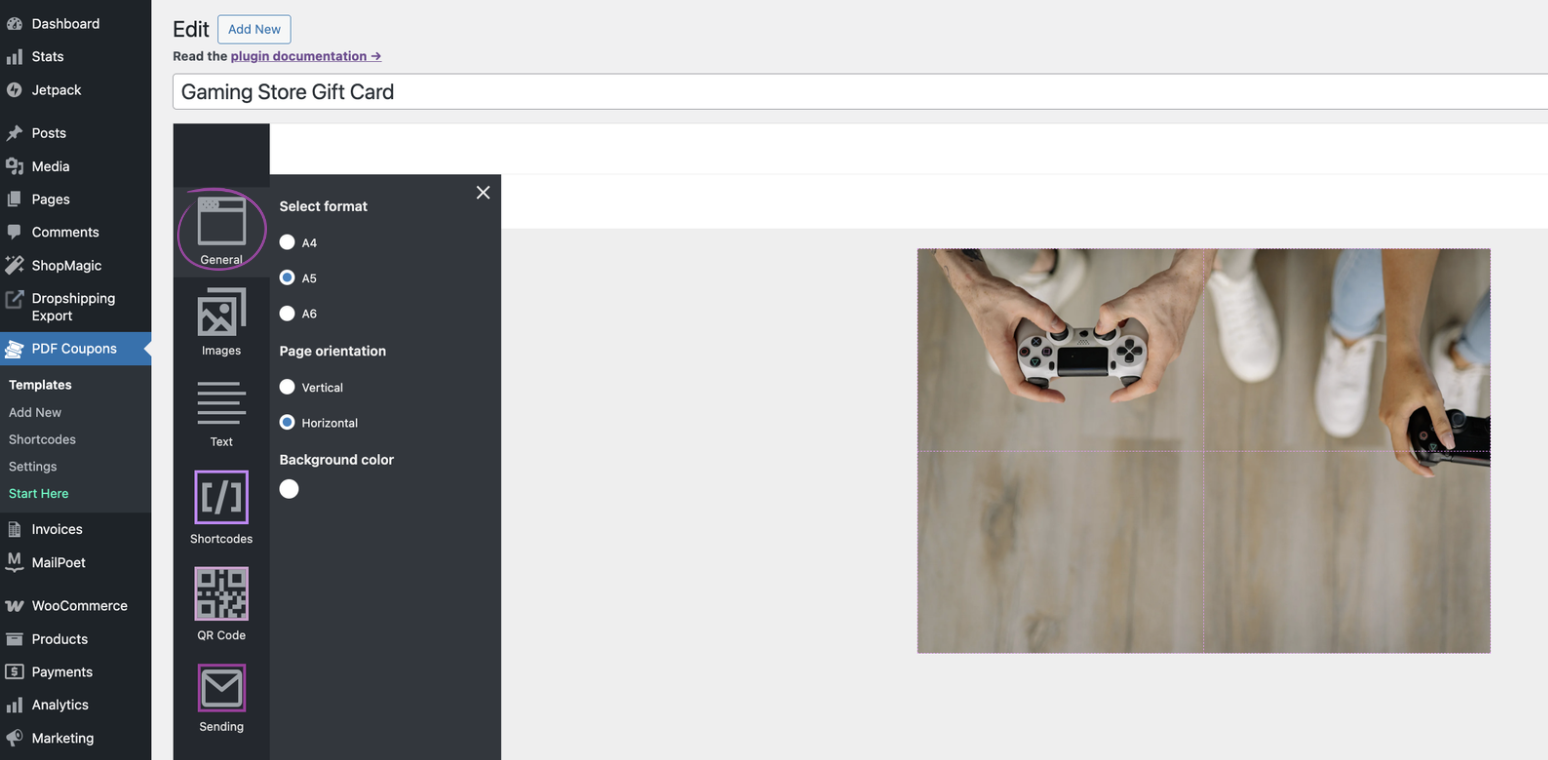
Now, let’s create the visual representation of your personalized gift card. Go to PDF Coupons > Templates and click ‘Add New’. Here, you’ll design the aesthetic layout:
- Choose Format & Orientation: Select the size (e.g., A4, A5) and orientation (portrait/landscape).
- Upload Background Images: Brand your certificates with your logo and unique designs. You can create different background images for each occasion (e.g., a birthday theme, a holiday theme).
- Add Text Areas: Use the editor to place static text and, crucially, placeholders for dynamic content.
This editor is your canvas to create stunning designs. Remember, a well-designed PDF is a powerful extension of your brand. You can explore the options for creating new coupon templates and personalizing them with more fields.
4. Dynamic Integration: Connecting Custom Fields to PDF Templates
This is where the magic happens! To pull the personalized data from your Flexible Product Fields onto the PDF, you’ll use the Flexible PDF Coupons PRO – Custom Shortcodes add-on. This powerful add-on allows you to create specific shortcodes that map directly to your custom product fields. If you are looking for a robust coupon generator that dynamically inserts customer data, this is it.
The Custom Shortcodes add-on is a game-changer for truly personalized gift cards. It allows you to dynamically embed any data collected by Flexible Product Fields PRO directly into your PDF templates, ensuring every voucher is unique.
How it works:
- Install and activate the Flexible PDF Coupons PRO – Custom Shortcodes add-on.
- Go to PDF Coupons > Custom Shortcodes and click ‘Add New’.
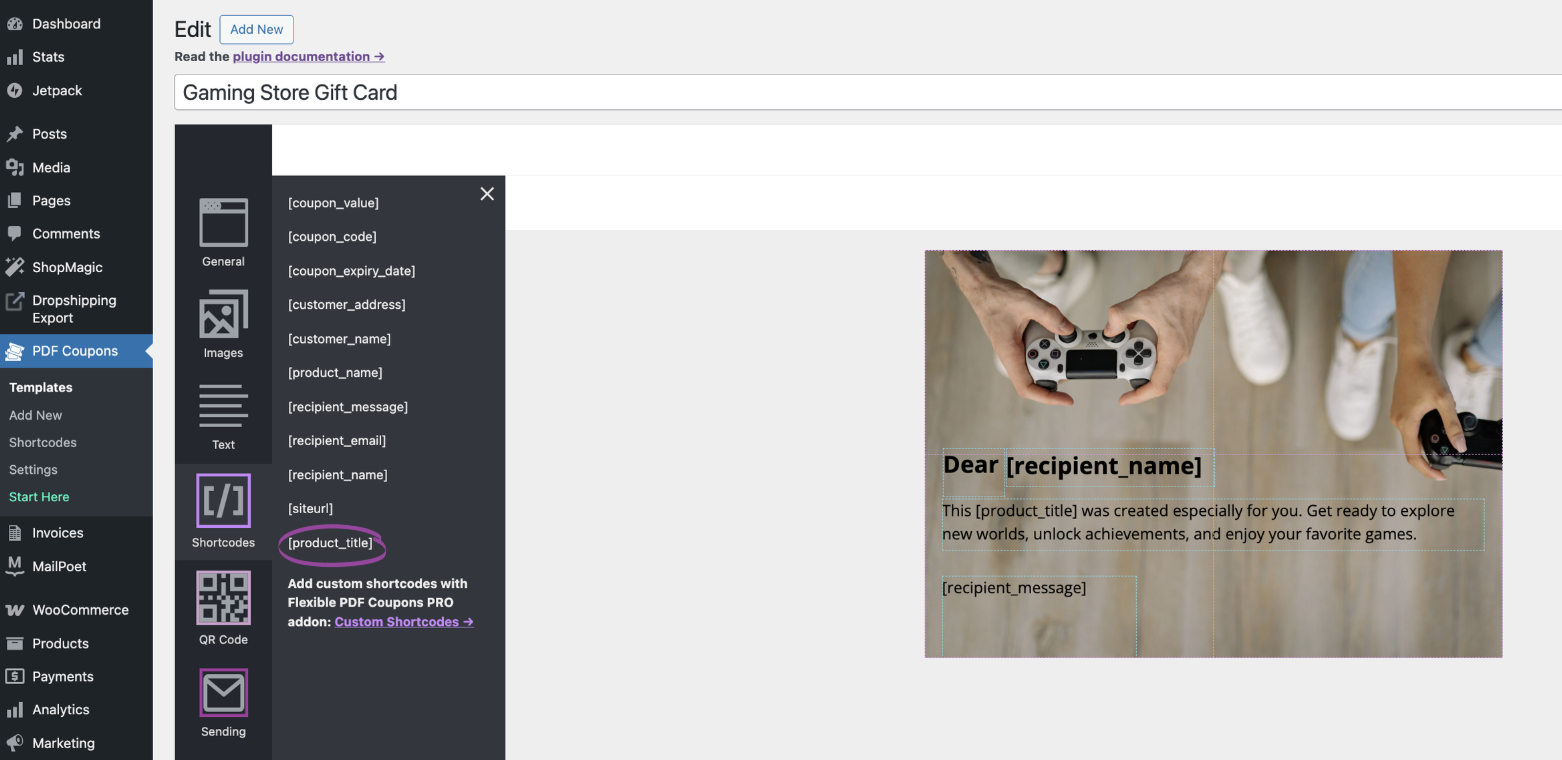
- In the first column, select ‘Product’. In the second, choose the specific field you created with Flexible Product Fields (e.g., Product title). The shortcode name will auto-fill (e.g., [product_title]).
- Place these shortcodes directly into your PDF template in the graphic editor.
When a customer purchases the gift card and fills in the custom fields, the shortcodes on the PDF will dynamically display the entered data. For the ‘Occasion’ field, you can even use conditional logic within your PDF template to display different background images based on the selected occasion, making your WooCommerce personalized gift cards truly adaptive!
5. Seamless Delivery: Automating Your Personalized Gift Vouchers
Once a purchase is complete, your beautifully personalized PDF gift card needs to reach its recipient. Flexible PDF Coupons PRO handles this with advanced delivery options, ensuring your system provides a smooth experience:
- Automatic Email Attachments: The generated PDF voucher can be automatically attached to the order confirmation email sent to the buyer. Crucially, with the PRO version, it can also be sent directly to the specified recipient’s email address, a core feature detailed in the documentation on emailing coupons.
- Downloadable from My Account: Customers can also download the PDF directly from their ‘My Account’ area in your store, ensuring easy access.
- Admin Management: Store administrators can view and download generated PDFs directly from the order edit screen, offering full control and oversight.
This automated delivery system saves countless hours, eliminates manual errors, and ensures that your customers and their recipients receive their meaningful gift cards promptly, reinforcing their positive experience with your brand.
Beyond the Basics: Advanced Personalization and Revenue Streams
The power of Flexible Product Fields PRO and Flexible PDF Coupons PRO extends far beyond simple personalization. Imagine these possibilities:
- Tiered Pricing for Designs: Offer a basic PDF design for free, but charge a small premium for an ‘exclusive’ or ‘animated’ design option, configured via Flexible Product Fields PRO’s pricing rules.
- Event-Specific Vouchers with QR Codes: For experiences or tickets, embed a unique QR code onto your personalized PDF gift card. This feature, available with the Flexible Coupons PRO – Event Ticket QR Scanner add-on, transforms your gift card into a scannable credential for entry or redemption.
- Multiple Recipients for Bulk Gifting: Allow customers to purchase multiple personalized gift cards for different recipients in a single order, perfect for corporate gifting or family celebrations.
- Charity & Symbolic Adoptions: Repurpose this system to create stunning PDF certificates for donations or symbolic adoptions, engaging customers on a deeper, emotional level. This is a powerful application, as detailed in our article Unlock New Revenue: Build a WooCommerce PDF Certificate Generator for Charity & Symbolic Adoptions.
These advanced features allow you to continually innovate your offerings, meet diverse customer needs, and open up exciting new revenue streams for your WooCommerce store. The ability to generate PDF gift cards automatically and customize them extensively is a game-changer.
Summary
You’ve seen how combining the power of Flexible Product Fields PRO and Flexible PDF Coupons PRO can revolutionize your WooCommerce store’s gift card offerings. From capturing personalized messages and recipient names to generating beautiful, custom PDF designs, you now have the blueprint to create a truly engaging and profitable gifting experience. This approach not only streamlines your operations but also elevates your brand, fostering deeper customer connections and unlocking new revenue potential.
Start selling WooCommerce personalized gift cards today – combine Flexible Product Fields PRO and Flexible PDF Coupons PRO to deliver beautiful, ready-to-print gift vouchers your customers will love.
FAQ: How to Sell WooCommerce Personalized Gift Cards
How to sell personalized gift cards in WooCommerce?
To sell personalized gift cards in WooCommerce, integrate Flexible Product Fields PRO to collect custom details like recipient name and message, then use Flexible PDF Coupons PRO to generate and deliver beautifully designed PDF vouchers with that information.
How can I create a WooCommerce gift card with custom message and PDF?
Create a WooCommerce gift card with a custom message and PDF by using Flexible Product Fields PRO for message input and Flexible PDF Coupons PRO for PDF generation. The Custom Shortcodes add-on links the message from the product field directly to your PDF template.
Can WooCommerce generate PDF gift cards automatically after purchase?
Yes, WooCommerce can generate PDF gift cards automatically after purchase using Flexible PDF Coupons PRO. Once configured, the plugin will create a unique PDF voucher for each order and can automatically email it to the buyer or recipient.
Is it possible to sell printable gift cards WooCommerce?
Absolutely, you can sell printable gift cards in WooCommerce. Flexible PDF Coupons PRO generates high-quality PDF vouchers that customers can easily download and print at home, offering a convenient solution for physical gifting.
