




Black Friday exposes every weak point in an online store. This practical guide explains how to prepare your WooCommerce store for Black Friday by validating products, coupons, checkout, payments, emails, fulfillment, performance, backups, analytics, and support procedures before traffic peaks.
How to Use This WooCommerce Black Friday Checklist
Use this WooCommerce Black Friday checklist as an operational review rather than a campaign-planning guide. Start several weeks before launch, assign an owner to each area, record test results, and set a deadline for correcting issues. Repeat the most important checks after every configuration change.
Create or refresh a staging environment that reflects the live store as closely as possible. Test plugin updates, theme changes, promotion settings, checkout behavior, and integrations there before deploying them to production. WooCommerce specifically recommends performing test orders on staging to avoid complications with live payments and connected services.
Divide your Black Friday store preparation into three phases: configuration, testing, and launch-day monitoring. Avoid combining a major software update, a new payment integration, and an untested promotion immediately before the sale.
Confirm Products, Prices, Inventory, and Promotion Details
Begin with the catalog because an incorrect product price or stock level can invalidate otherwise successful campaign preparation. Compare the final promotion brief against the data customers will see in product listings, search results, category pages, carts, and checkout.
Verify Product and Sale Data
Review every promoted product and variation. Confirm the regular price, sale price, sale schedule, and stock status, as well as backorder settings, purchase limits, tax class, shipping class, images, product description, and customer-facing terms. If variations have different prices or availability, test each promoted option individually.
Pay particular attention to scheduled sale dates and the store time zone. The start and end times displayed in the administration area must match the intended campaign window. Check what happens immediately before the promotion, during the active period, and after the scheduled end.
Reconcile Inventory and Fulfillment Capacity
Compare WooCommerce stock data with the quantity physically available or recorded in your inventory system. Confirm that stock synchronization, low-stock notifications, reservations, bundles, and external warehouse integrations behave correctly under repeated orders.
Document what should happen when an item sells out. Customers should see accurate availability, unavailable variations should not remain purchasable, and support staff should know whether alternatives, backorders, or cancellations can be offered.
Test Black Friday Coupons and Discount Rules
WooCommerce coupon testing should confirm both successful and unsuccessful scenarios. A coupon is not ready merely because it works in one ideal cart. It must also reject products, customers, and order values that do not meet the promotion terms.
WooCommerce core supports percentage discounts, fixed cart discounts, and fixed product discounts. If you still need to configure your campaign codes, use the complete guide to creating WooCommerce coupons rather than changing settings without a documented promotion plan. WooCommerce also provides separate usage restrictions and usage limits for each coupon.
Prepare a compact test matrix for every Black Friday coupon. It should include the following scenarios:
- An eligible product with the correct discount.
- An excluded product that must remain at its normal price.
- A mixed cart containing eligible and excluded products.
- A cart below the minimum spend.
- A cart exactly at the minimum spend.
- A cart above any maximum spend.
- A guest customer and a registered customer.
- A coupon entered with different letter capitalization.
- A coupon applied on both mobile and desktop.
- An order containing multiple quantities of the same product.
Confirm that the discount shown in the cart matches the offer advertised on landing pages, banners, emails, and social posts. Check the final order total rather than relying only on the discount line.
Review Coupon Restrictions, Limits, and Stacking
Review every setting under coupon usage restrictions and usage limits. Check eligible and excluded products, categories, sale items, minimum and maximum spend, allowed customer emails, the total usage limit, the per-user limit, and the option to limit usage to a specific number of qualifying items.
If you need a WooCommerce coupon for a specific user, verify the customer account and email conditions using the same journey the shopper will follow. Test logged-in use, guest checkout where available, and an unrelated email address that should be rejected.
Coupon stacking deserves its own tests. Apply Black Friday coupons in different orders and combine them with automatic discounts, free shipping offers, account credit, gift cards, or previously issued codes. If a coupon must not be combined with another promotion, confirm that the individual-use restriction produces a clear result.
WooCommerce applies item discounts before tax calculation, while standard coupon discounts do not automatically remove shipping charges unless free shipping is configured separately. Include tax and shipping in your expected-order calculations to prevent discrepancies at checkout.
Test the Complete Cart and Checkout Journey
WooCommerce checkout testing must reproduce realistic customer behavior. Test on current mobile and desktop browsers, using both guest checkout and registered customer accounts. Include new visitors, returning customers, autofilled addresses, manually entered addresses, and carts modified during checkout.
Run at least one complete test for each important purchasing path:
- Open the campaign landing page or promoted category.
- Select a product and, where applicable, a variation.
- Add the product to the cart.
- Change the quantity and remove or restore an item.
- Apply and remove the Black Friday coupon.
- Enter the billing and shipping details.
- Select a shipping method and payment option.
- Accept the required terms and place the order.
- Review the order confirmation page.
- Check the order, payment, stock, emails, and analytics in the administration area.
Test validation messages as carefully as successful checkout. Required fields, invalid postcodes, unavailable shipping methods, declined payments, expired coupons, and insufficient stock should produce understandable instructions rather than blank pages or endless loading.
Creating test orders helps assess payment methods, checkout behavior, order emails, analytics, and connected integrations. Remove or clearly identify test data afterward so it is not accidentally fulfilled or included in campaign reporting.
Verify Payment, Tax, Shipping, and Refund Workflows
Test Every Active Payment Method
Place a test order through every payment method that will be available during the promotion. Use sandbox or test mode where the gateway supports it. Verify successful transactions, failed payments, customer cancellations, authentication steps, redirects, webhook processing, and the resulting WooCommerce order status.
Confirm that successful payments move orders into the expected fulfillment workflow. A charge should not remain indefinitely as pending, and a failed or abandoned transaction should not trigger shipment. Review gateway logs and order notes if the payment provider and WooCommerce display different results.
Check Tax, Shipping, and Address Scenarios
Test representative addresses from each important shipping zone. Confirm that the correct methods, rates, delivery options, free shipping conditions, and restrictions appear. WooCommerce shipping zones determine which methods and rates customers see in the cart and checkout.
Verify tax calculations for the locations you serve, including any differences between billing and shipping addresses. Test taxable and non-taxable products, discounted orders, shipping tax, and mixed carts. Use qualified tax guidance for your obligations; the technical test should establish whether the store applies your approved configuration consistently.
Run a Refund Test
Process at least one test refund through each major gateway. Check full and partial refunds, refunded quantities, shipping and tax adjustments, gateway records, WooCommerce order notes, order status, inventory restoration, and customer notifications.
Also test the internal fulfillment handoff. The warehouse or fulfillment team should receive complete product, variation, address, shipping, and customer-note data without having to reconstruct the order manually.
Prepare Gift Cards, Vouchers, and Post-Purchase Delivery
If you plan to sell gift cards in WooCommerce, test the entire lifecycle rather than only the product page. Review recipient fields, voucher value, expiration settings, product eligibility, generated codes, PDF files, email delivery, redemption, partial use where supported, and the customer’s access to the purchased voucher.
Stores using the Flexible Coupons category of solutions should verify that each voucher product and variation uses the intended template and delivery configuration. For seasonal product setup ideas, see the guide to creating WooCommerce voucher variations for Black Friday.
Confirm that recipient name, recipient email, message, coupon template, delivery timing, validity period, and eligible products or categories are configured correctly. Test required fields and intentionally leave optional fields empty to check how the final voucher is generated.

Place an order and verify that the voucher appears at the intended stage of the post-purchase journey. Check whether the buyer or recipient can open the PDF, whether the coupon code is readable, and whether the code can be redeemed under the configured conditions.

Include gift cards in refund and cancellation tests. Establish whether a generated code should be disabled, retained, or adjusted when its source order is refunded, cancelled, or manually edited.
Check Transactional Emails and Scheduled Messages
Test new-order notifications, payment confirmations, processing and completed order emails, refund messages, password emails, downloadable-product access, voucher delivery, and any campaign-specific automation. Confirm the sender name, sender address, recipients, subject lines, branding, links, order data, and mobile presentation.
WooCommerce allows transactional emails to be previewed and test messages to be sent from the email settings. Its email troubleshooting tools also record transactional email attempts in WooCommerce logs, helping distinguish a generation problem from a delivery problem.
For scheduled gift-card delivery, test multiple dates, store time zones, recipient time zones, order statuses, and message variations. Confirm that the correct recipient receives the intended message and PDF attachment at the expected time. The Advanced Sending add-on can be used when delivery must be immediate, delayed by an interval, scheduled for a fixed date, or selected by the customer.
Review the detailed process for customizing and scheduling gift card email delivery, then perform a real inbox test with the same configuration that will be used during the campaign.
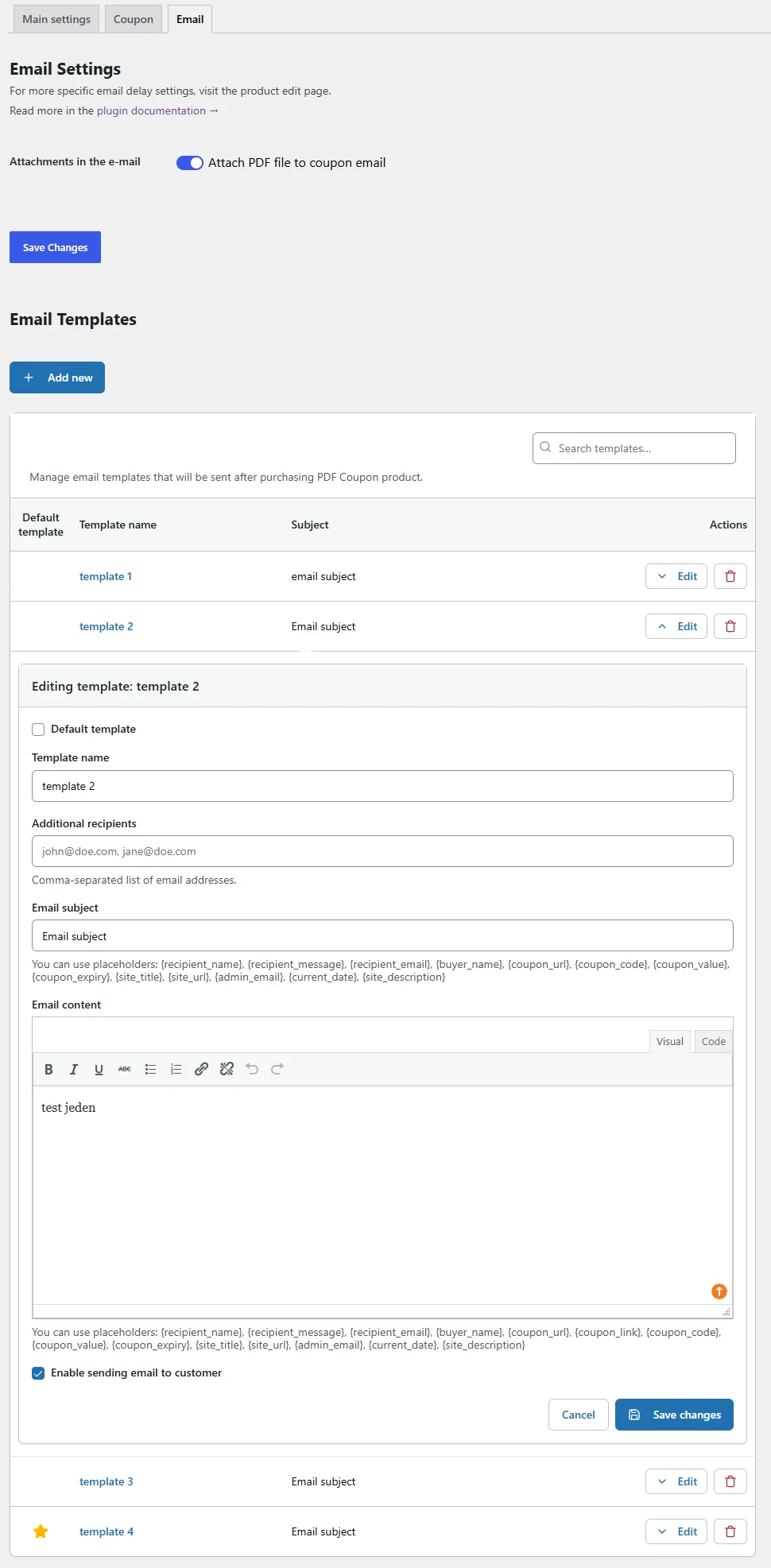
Do not rely only on the administration message that an email was sent. Check delivery in multiple inbox providers, inspect spam placement, open all links, and download every attachment. Use a sender address on your store’s domain and verify the authentication required by your email provider.
Finally, review WooCommerce scheduled actions for pending or failed jobs. Background tasks can affect order notifications, payment processing, scheduled sale prices, and extension-generated emails. WooCommerce lists these tasks under WooCommerce Status and provides logs for failed actions.
Improve Store Speed and Prepare for Traffic Spikes
WooCommerce Black Friday performance should be evaluated on the pages that carry the most commercial risk: campaign landing pages, categories, search results, promoted product pages, the cart, checkout, account pages, and order confirmation.
Test both cached and dynamic pages. Product and campaign pages may benefit from page caching, but cart, checkout, account, and personalized content normally require appropriate exclusions. Verify that caching does not preserve an old price, incorrect stock status, expired promotion, or another customer’s cart data.
Run controlled load tests before the campaign, preferably with your hosting provider or developer involved. Model browsing, product views, add-to-cart requests, coupon application, and checkout activity without directing unsafe test traffic at the live store.
Review image sizes, scripts, fonts, third-party widgets, tracking tags, pop-ups, product filters, search, and external API calls. Remove avoidable campaign additions that delay interaction or introduce a new failure point. Scaling depends on traffic patterns, hosting resources, code quality, caching, database performance, and the concentration of visitors on specific products or pages.
Contact the hosting provider in advance if you expect traffic significantly above normal. Confirm resource limits, monitoring availability, traffic protection, database capacity, and the procedure for escalating a performance incident.
Secure, Back Up, and Update the WooCommerce Store
Create a current backup of both the database and site files, and verify that your team knows how to restore it. A complete WordPress recovery requires both components. Backups should be created before updates and stored in a location that remains accessible if the production server fails.
Updates should be tested on staging before they reach the live store. Review WordPress, WooCommerce, the theme, payment gateways, shipping integrations, coupon tools, email extensions, and custom code together. After updating, repeat checkout and campaign tests rather than assuming compatibility.
Introduce a change freeze before launch. Critical security fixes may still require action, but optional visual adjustments, new extensions, experimental integrations, and large configuration changes should wait until the campaign risk has passed.
Check administrator accounts, shop manager permissions, two-factor authentication where available, unused user accounts, security alerts, SSL behavior, and access to hosting, payment, email, DNS, and analytics systems. Emergency access must not depend on a single unavailable person.
Validate Analytics, Conversion Tracking, and Error Logging
Place test orders and confirm that each important analytics event is recorded once. At minimum, review product views, add-to-cart actions, checkout progression, purchases, transaction value, currency, product data, coupons, refunds, and any advertising-platform conversion events.
Verify coupon attribution before the campaign starts. WooCommerce Analytics can report discounted orders and coupon discount amounts, while external tools may require separate coupon parameters or custom reporting. Confirm that the exact Black Friday code appears in the intended dashboard.
Look for duplicate purchase events caused by repeated order-confirmation page visits, browser refreshes, overlapping plugins, or server-side and browser-side tracking running simultaneously. Also test consent settings so that your implementation behaves as approved for each applicable visitor scenario.
Review WooCommerce system status and logs before launch. Record existing warnings so the team can distinguish old entries from campaign incidents. WooCommerce logs may include fatal errors and gateway-specific information when the relevant logging option is enabled.
Set up simple views for launch day instead of trying to interpret every metric in real time. Prioritize checkout conversion, payment failures, coupon rejections, out-of-stock products, order volume, average order value, page response times, and email delays.
Assign Launch-Day Monitoring and Support Responsibilities
WooCommerce Black Friday readiness depends on people as much as technology. Assign named owners for the storefront, coupons, payments, fulfillment, stock, customer service, hosting, development, email delivery, and analytics.
Create an escalation plan that defines who investigates each issue, who can approve a configuration change, who communicates with customers, and when the promotion should be paused. Include contact details for the host, payment providers, email service, warehouse, developers, and other critical partners.
Prepare response templates for common questions, including invalid coupon messages, excluded products, delayed payments, duplicate orders, missing confirmation emails, sold-out items, delivery estimates, voucher delivery, and refunds.
Define monitoring shifts if the promotion runs outside normal business hours. Each handover should include open incidents, recent changes, affected orders, current metrics, and the next action owner.
Run a Final End-to-End Test Before the Sale Starts
Complete the final test after all approved campaign settings are live but before public traffic is directed to the store. Avoid changing several variables after this test; otherwise, its result will no longer represent the production configuration.
Use a final controlled order to verify the following sequence:
- Confirm that campaign banners and links lead to the correct products.
- Check product visibility, price, stock, and promotion terms.
- Add eligible and excluded items to the cart.
- Apply the Black Friday coupon and verify the discount.
- Complete checkout on a mobile device.
- Process a test payment through an approved test workflow.
- Check the resulting order status, stock reduction, and fulfillment data.
- Open the customer and administrator emails.
- Download any digital product, gift card, or voucher.
- Confirm analytics, coupon attribution, logs, and scheduled actions.
- Cancel or refund the test order and verify the result.
Record the order number, test time, device, browser, customer type, payment method, coupon, expected result, actual result, and reviewer. This creates a useful reference if the live store behaves differently during the campaign.
WooCommerce Black Friday Final Checklist
Use this condensed list for the final approval meeting. Every item should have an owner and a confirmed status:
- Staging: campaign settings and updates were tested before deployment.
- Products: prices, variations, visibility, images, and terms are correct.
- Inventory: stock data and sold-out behavior have been verified.
- Scheduling: sale dates, coupon availability, and time zones are correct.
- Coupons: discount values, restrictions, limits, and stacking were tested.
- Checkout: mobile, desktop, guest, and registered journeys work.
- Payments: successful, failed, cancelled, and refunded transactions were checked.
- Tax and shipping: representative locations produce the expected totals and methods.
- Gift cards: codes, PDFs, recipient data, redemption, and delivery work correctly.
- Emails: transactional and scheduled messages reach the intended inboxes.
- Fulfillment: orders reach the correct team with complete information.
- Performance: critical pages were tested under realistic demand.
- Backups: a current backup and documented rollback process are available.
- Security: access, administrator accounts, SSL, and alerts were reviewed.
- Analytics: purchases, coupon attribution, refunds, and conversion events are recorded.
- Logging: payment, email, fatal-error, and scheduled-action logs are accessible.
- Support: owners, shifts, response templates, and escalation steps are assigned.
- Final order: one complete production-like journey passed after deployment.
Summary: How to Prepare Your WooCommerce Store for Black Friday
The safest answer to how to prepare your WooCommerce store for Black Friday is to test the complete commercial workflow, not isolated settings. Confirm what customers see, what they pay, what WooCommerce records, what staff receive, and what happens when a transaction fails.
A reliable launch combines accurate catalog data, controlled coupon rules, thorough checkout testing, working payment and delivery systems, strong WooCommerce Black Friday performance, recoverable backups, verified analytics, and clear human ownership. Finish these checks before campaign traffic arrives so launch day can focus on monitoring and customer service rather than emergency configuration.
