



Strong gift card campaign ideas start with a reason to give, not a discount. Build a year-round calendar around occasions your customers celebrate, match each one to your catalogue and capacity, and plan what happens before and after the date—not just at Christmas.
Why one seasonal peak is not enough
A Christmas-only plan leaves an important question unanswered: why should someone buy your gift cards during the rest of the year? Start with the relationships and celebrations your business can serve, then give each relevant occasion a place in your calendar.
There is evidence for looking beyond December. NRF’s 2026 Mother’s Day survey includes gift cards, special outings and experience gifts among consumers’ purchasing plans. That makes occasions outside Christmas worth investigating for service businesses, experience providers and local retailers—without assuming every occasion will suit every audience.
Keep your Christmas eCommerce campaign ideas, but treat them as one part of a wider plan. The aim is not to run a sale every month. It is to create a manageable series of relevant reasons to give.
Gift card campaign ideas for a year-round calendar
Build your calendar around three types of occasion: public celebrations, local events and personal milestones. As a starting plan, choose one main occasion per quarter and maintain an evergreen option for birthdays and thank-yous.
The examples below use a U.S.-oriented planning framework. Confirm observance dates, school calendars and local events for your actual customers before scheduling anything.
January–March: shared experiences and personal interests
Consider Valentine’s Day if your catalogue offers something suitable for couples, friends or individual recipients. An experience provider might feature a shared activity; a local store could present flexible credit around the recipient’s interests. Avoid forcing a romantic theme onto an unrelated offer.
For January, test a new-skill or personal-interest angle only where your catalogue supports it. Position the gift around a specific activity rather than making broad promises about transformation or wellbeing.
April–June: appreciation, family occasions and graduation
Shortlist Mother’s Day, Father’s Day, graduation and end-of-school thank-yous. Give each a different role rather than changing only the headline on the same promotion.
For example, an appreciation campaign could emphasize a personal message, while a graduation campaign could feature flexible value for someone whose preferences you do not know. Check local school dates before planning teacher thank-you messaging.
July–September: weddings, hospitality and local occasions
Use this part of the calendar to investigate weddings, anniversaries, host thank-yous and community events relevant to your business. A local experience provider could explore anniversary gifting; a neighborhood retailer might test a housewarming or hospitality theme.
Do not fill an empty month merely to maintain frequency. If your audience has no convincing gifting reason, use the space for preparation or evergreen birthday content.
October–December: recognition and year-end gifting
Consider business anniversaries, employee recognition and local celebrations alongside Christmas. Keep shopping events separate from gifting occasions: Black Friday can be a purchase window, while the gift itself may be intended for a birthday, anniversary or later celebration.
Record that distinction in your plan. A purchase deadline should not imply that the recipient must use the gift on the same date.
All year: birthdays, anniversaries and thank-yous
Keep these occasions available between larger campaigns. They do not require a storewide launch every time. Maintain relevant artwork, clear gift-card information and an easy route to purchase, then feature them when no larger occasion deserves priority.
Map each occasion to your catalogue and capacity
Before approving an occasion, write a short brief identifying the buyer, recipient, gifting reason and suitable catalogue items. For example: a local customer wants to thank someone, needs a present that feels personal, and can choose from services or store credit you already offer.
Then assess audience relevance, catalogue fit and delivery capacity. Prefer an occasion with a clear recipient and a credible offer over a widely recognized holiday with only a weak connection to your business.
Use your own order history, customer questions and booking patterns to prioritize. Google also recommends examining seasonal search patterns and using Google Trends to investigate wider changes in interest, including regional differences. Treat that research as supporting evidence, not a substitute for your store’s results.
Add an operational check for services and experiences: when might recipients want to book? Avoid building a campaign around a popular treatment, class or activity unless you can explain availability and booking requirements clearly.
Choose an offer that fits the occasion
Decide first whether the gift should promise a particular experience or leave the recipient free to choose. A defined service can make the present specific, but it requires a clear description of what is included. Flexible value leaves the selection to the recipient.
For appointment-based businesses, review fixed-service vouchers versus flexible-value gift cards before assigning a format to each occasion. Keep that decision in the calendar so artwork and messaging are based on the right offer from the start.
An occasion does not automatically need a discount. You can build the campaign around presentation, a relevant selection or a personal message. If you do include an incentive, record its cost, eligibility and closing date separately from the underlying gift-card terms.
For every selected occasion, specify one primary objective: attract new gift buyers, support an appropriate service category or test interest in a new gifting theme. Avoid asking one small campaign to accomplish everything.
Plan lead time and production backwards
Work backwards from the gifting date, but allow separate time for approvals, artwork, page updates and testing. The schedule below is an illustrative starting point for a campaign using an existing catalogue—not a guaranteed production or SEO timeline.
- Six to eight weeks before: confirm the audience, offer, capacity, campaign owner and success measure.
- Four weeks before: prepare the landing page, voucher artwork and customer-facing information. Allow extra time for printing or external approvals.
- Two weeks before: begin the planned promotional sequence after testing purchase and delivery.
- During the final days: communicate only delivery options and deadlines you have verified.
- After the occasion: remove expired messaging and hold the initial review.
Give larger campaigns their own preparation window. You can adapt the responsibility-setting and deadline structure from a Black Friday campaign timeline without importing its discount strategy into every occasion.
Prepare a consistent voucher layout before producing occasion-specific versions. The Flexible Coupons documentation shows an editor with editable images and text, allowing the visual treatment to be adapted to the gift. Keep the essential redemption information readable while changing the occasion-specific elements.
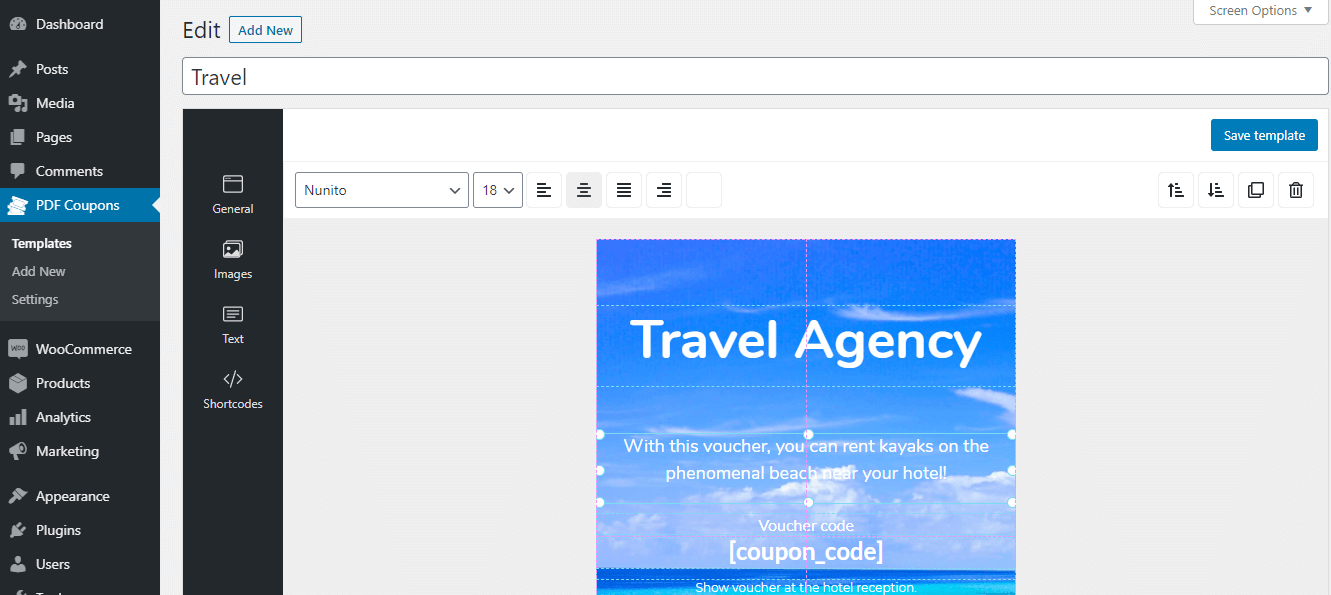
Include a test purchase in every production checklist. Check the selected design, recipient information, delivery route and instructions rather than assuming last season’s setup still matches the current offer.
Reuse one landing-page framework—not unrelated search intent
Maintain a permanent gift-card hub as the year-round destination for general gifting. Update its featured occasion, introductory copy and selected offers while keeping the core explanation and purchase route consistent.
For recurring occasions that justify dedicated pages, reuse the relevant address each year. Google’s published guidance for sales-event pages recommends recurring URLs and early publication so pages can be discovered before the event. It also recommends dedicated pages for distinct promotional events.
Apply that principle carefully: do not turn a page specifically about Mother’s Day into a Father’s Day page simply because the next campaign is approaching. Reuse the structure and relevant URL, not an address that promises a different topic.
Add page-update dates to the calendar alongside email and social dates. Assign responsibility for checking the headline, featured offer, delivery wording and any expired promotional terms.
Sequence email and social activity around the occasion
Plan communications in phases. Introduce the gifting reason first, help customers choose in the middle of the window, and finish with verified delivery information. Adjust the number of messages to the size of the occasion and the relevance of your audience.
Use social content to illustrate the recipient or experience, then let email provide the details needed to decide. Keep both channels aligned with the same landing-page information. For a fuller channel-specific workflow, see the guide to planning a Black Friday email campaign; use it for process rather than as a template for every occasion.
Where purchase data and your email platform allow it, exclude customers who have already bought from repetitive closing reminders. Purchase-based segmentation depends on the connected store and available segmentation features, so confirm what your setup supports before promising an automated sequence.
Separate promotion timing from gift delivery
Decide whether customers need immediate delivery or the option to buy ahead and select a delivery date. The documented scheduling controls require the PRO version of Flexible Coupons plus a separate sending add-on. They include fixed-date and customer-selected delivery; automatic sending also depends on the order reaching the configured status.

Schedule a delivery test before the campaign opens, especially when promoting a last-minute option. Do not describe delivery as instant unless the complete purchase-to-email workflow has been checked.
Measure each occasion as a separate campaign
Give every occasion a consistent campaign name and reporting window. Google Analytics supports campaign parameters such as utm_source, utm_medium and utm_campaign to identify referring campaigns. Use those parameters consistently on external promotional links, even when several campaigns share the same landing page.
Choose the measures before launch. For the initial review, record gift-card orders, cash collected from those purchases, incentive costs, campaign spending and relevant customer-service issues. Where tracking supports it, compare attributed orders with campaign sessions to assess conversion.
Review redemption separately over a suitable follow-up period. For services, note booking pressure and whether recipients could access the offer as described. Do not add gift-card purchase value and its later redemption value together as though they were two separate campaign sales.
Use comparable windows when assessing occasions, and label small tests honestly. For a broader reporting framework, adapt the approach to tracking and analyzing Black Week campaign performance. The objective is to decide which occasions deserve another place in your calendar—not simply which produced the most clicks.
What to do after the date passes
Close the promotion as deliberately as you opened it. Stop scheduled reminders, replace expired banners and update the landing page to show a current gifting option or a clear off-season message. Keep purchase and redemption instructions accessible to existing recipients.
Hold an initial review while the work is fresh, then schedule a later redemption review where appropriate. Record what changed, what customers asked and what your team would need next time.
Classify the occasion as repeat, revise or retire. Keep successful assets, but recheck dates, availability and terms before reusing them. A calendar should improve through evidence rather than grow automatically every year.
Key takeaways
Use these principles when turning individual gift card campaign ideas into a practical annual plan:
- Choose occasions that connect a real gifting need with your catalogue.
- Combine public celebrations with local dates and year-round personal milestones.
- Check service and booking capacity before committing to promotion.
- Plan production, page updates, communication and review dates together.
- Reuse relevant landing pages and designs without confusing different occasions.
- Measure purchases and later redemption separately, then decide what to repeat.
Summary
A year-round gift-card calendar does not require constant promotions. It requires well-chosen occasions, a suitable offer and enough preparation to deliver what you promise. Start with the next two relevant occasions, assign an owner and review date to each, and expand only when the results and workload justify it.
