





Flexible PDF Coupons PRO 2.4.0 makes everyday coupon management clearer for WooCommerce merchants and customers. The update adds more PDF design controls, reorganized product and coupon settings, faster access to coupon sources, and a dedicated order-page table for downloading and reviewing purchased vouchers.
A Closer Look at Flexible PDF Coupons PRO 2.4.0
Flexible PDF Coupons PRO 2.4.0 focuses on practical improvements across the entire voucher workflow. Store owners gain more control over PDF designs and a cleaner administration experience, while customers can access important coupon details directly from their WooCommerce order.
The release is particularly useful for shops selling gift cards, service vouchers, experience credits, and event tickets. Instead of changing how the whole system works, version 2.4.0 improves the tasks merchants and customers perform most often.
What’s New in Flexible PDF Coupons PRO 2.4.0?
Image Rotation and Rich Text Styling in the PDF Editor
The visual editor now includes image rotation controls and basic rich text formatting. You can apply bold or italic styling to selected text and adjust image orientation without preparing a separate image file.
These additions make it easier to create branded WooCommerce PDF coupons with consistent logos, decorative elements, headings, and personalized content. They are useful when adapting one design to different PDF formats or arranging elements in vertical and horizontal layouts.

For a broader overview of template design options, read our guide to using a WooCommerce gift card plugin to customize PDF gift cards.
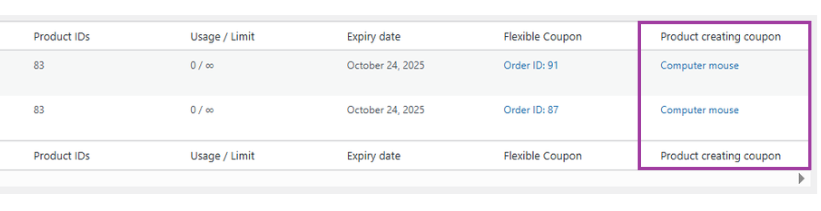
Product Source Column in the Coupons Table
The Coupons list now includes a product source column. It shows which WooCommerce product generated a particular coupon, helping administrators understand where each voucher came from.
This is especially helpful for stores with several gift card denominations, service packages, ticket types, or variable products. Rather than opening coupons individually to identify their source, the merchant can find the relevant product from the table and move directly to the required record.
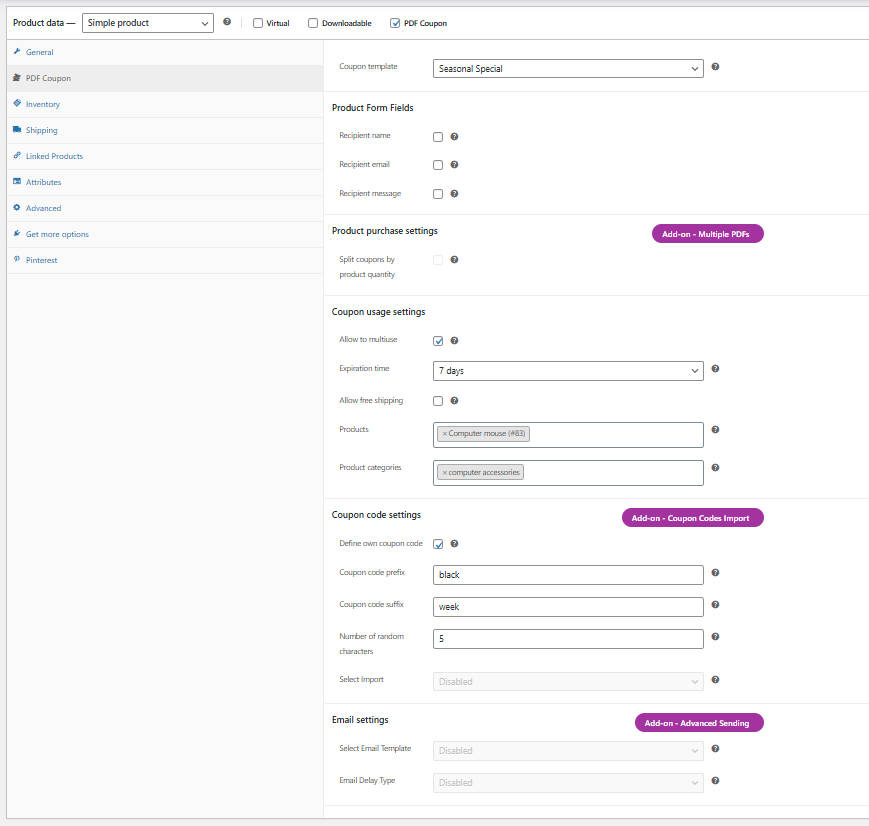
Cleaner WooCommerce Product Settings
Coupon-related settings on the WooCommerce product edit page have been reorganized into clearer groups. Labeled controls make it easier to locate the option you need when configuring a product that will generate a gift card, ticket, or service voucher.
A more structured interface is valuable when a store manages many coupon products. It reduces the time spent searching through settings and helps merchants review configurations more efficiently.
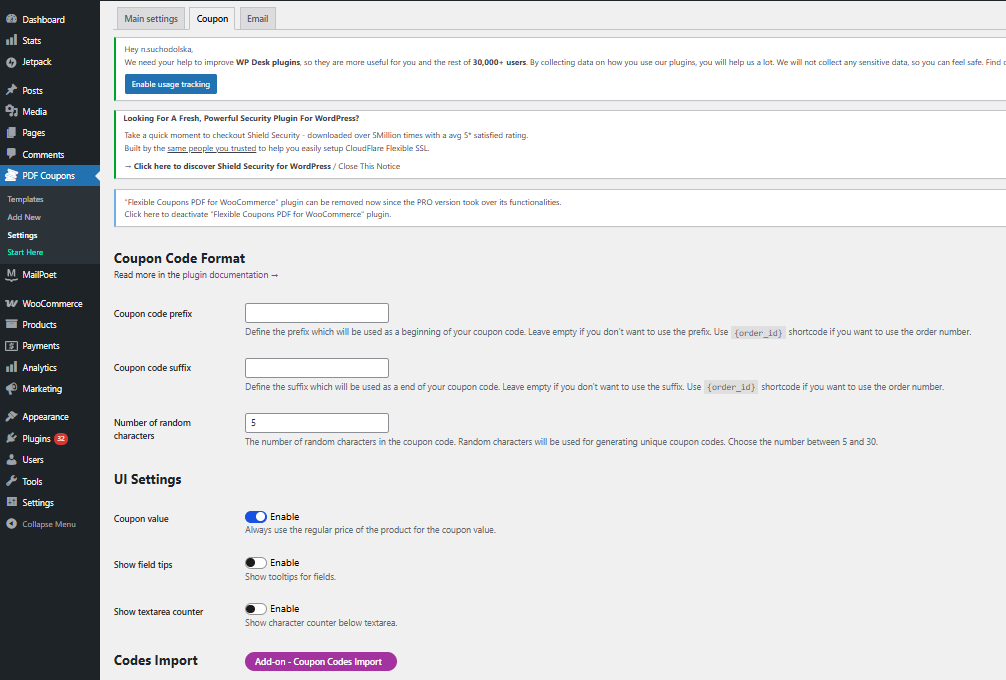
Improved PDF Coupon Editing
The individual coupon editor has also been reorganized. Related settings now appear in logical groups, while buttons and toggles make common actions easier to recognize.
This improvement supports day-to-day tasks such as reviewing coupon details, checking validity, or updating settings. It is a practical change for administrators who regularly manage customer vouchers after purchase.
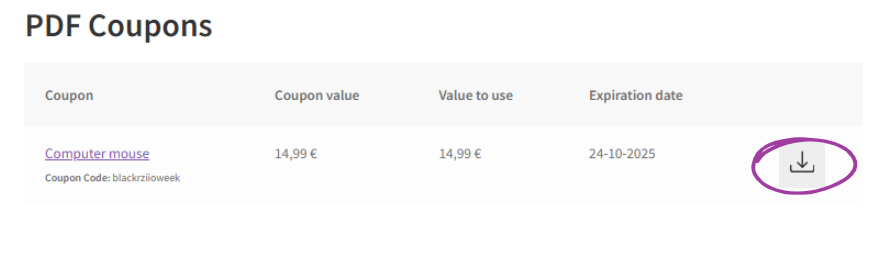
PDF Coupons Table on the WooCommerce Order Page
Customers now see a dedicated PDF Coupons table in their order details. Depending on the coupon configuration, the table can display:
- the purchased PDF coupon,
- the WooCommerce product associated with it,
- the coupon’s total value,
- the remaining usable value,
- the expiration date,
- and a direct PDF download option.
This gives recipients a convenient place to check and retrieve their vouchers after checkout. They do not have to rely only on an earlier email attachment when they want to download the file again or confirm its remaining value.
How Version 2.4.0 Improves Coupon Management
Faster Administration for Busy WooCommerce Stores
The new product source column and reorganized editors reduce unnecessary navigation in the WordPress dashboard. A retail shop can identify which gift card product generated a coupon, while a salon or gym can find the voucher settings associated with a particular service package.
These improvements are also useful for marketplaces, event venues, and businesses offering several types of experiences. Clearer records make it easier to handle customer questions, review expiration information, and manage a growing catalog of coupon products.
A Clearer Post-Purchase Experience
Customers often return to their account after purchase to find a voucher or check its details. The new PDF Coupons table brings this information into the familiar WooCommerce order view.
This creates a more straightforward post-purchase journey for gift cards, printable vouchers, service credits, and PDF tickets. The recipient has quick access to the document, while the buyer can verify which coupon was included in the order.
More Flexible Branded PDF Designs
Image rotation and basic rich text formatting may be small additions, but they provide useful control when refining a template. Merchants can adjust visual elements inside the editor instead of repeatedly editing source images outside WordPress.
Combined with the existing template tools, PDF size options, layouts, colors, images, and customizable text, these controls help store owners prepare designs suited to different business models and occasions.
What Can You Sell with Flexible PDF Coupons PRO?
Flexible PDF Coupons PRO works with WooCommerce products and can support several common ecommerce use cases:
- PDF gift cards for retail stores and online shops,
- printable service vouchers for salons, spas, gyms, and local businesses,
- experience credits for appointments, activities, or packages,
- PDF event tickets for organizers and venues,
- variable-value vouchers where the product configuration allows customers to select or enter a value,
- multi-use coupons that can be redeemed more than once up to their configured limit.
For events that require QR-based admission, the optional Event Ticket QR Scanner add-on can generate and validate QR codes. See how the QR code reader for WooCommerce tickets supports the check-in process.
Key Conclusions from the 2.4.0 Update
- The PDF editor offers more design flexibility through image rotation and bold or italic text styling.
- The Coupons table identifies the product that generated each coupon.
- Product and coupon settings are grouped more clearly for faster administration.
- Customers can access coupon details and download PDFs from their WooCommerce order page.
- Remaining usable value is easier to check for coupons configured for multiple redemptions.
- Minor fixes and interface refinements support a smoother everyday workflow.
Summary: A More Practical WooCommerce PDF Coupon Workflow
Flexible PDF Coupons PRO 2.4.0 improves both sides of the coupon experience. Merchants receive clearer tools for designing, identifying, and editing coupons, while customers gain a convenient order-page view with essential voucher information and direct PDF access.
The update is relevant to any WooCommerce business that wants to sell branded gift cards, service vouchers, credits, or event tickets without building a custom coupon system. You can review the complete product information on the Flexible PDF Coupons PRO page.
Flexible PDF Coupons PRO for WooCommerce
Design and sell branded PDF gift cards, service vouchers, coupons, and event tickets. Automate coupon generation, personalize voucher content, and manage PDF coupons within WooCommerce.
WP Desk
Flexible PDF Coupons PRO 2.4.0 FAQ
How do I install Flexible PDF Coupons PRO 2.4.0?
Download the plugin ZIP file from your account. In WordPress, go to Plugins → Add New → Upload Plugin, select the file, install it, and activate the plugin.
Can I customize the appearance of PDF coupons?
Yes. The visual editor lets you work with text, images, colors, fonts, backgrounds, and layouts. Version 2.4.0 also adds image rotation and basic bold and italic text formatting.
Does Flexible PDF Coupons PRO support variable WooCommerce products?
Yes. Flexible PDF Coupons PRO supports simple and variable WooCommerce products, allowing coupon products to be adapted to different offers and configurations.
Can customers download a coupon after placing an order?
Yes. In version 2.4.0, customers can access the PDF Coupons table from their WooCommerce order details and use the available download option.
Can a coupon be redeemed more than once?
Yes. Multi-use coupons can be configured for multiple redemptions up to the applicable limit. The order-page table can show the remaining usable value.
Do I need coding skills to create PDF coupon templates?
No. The drag-and-drop editor is designed to help WooCommerce store owners create and adjust PDF templates without coding.
Is the Event Ticket QR Scanner included in Flexible PDF Coupons PRO?
No. Event Ticket QR Scanner is an optional add-on used when a ticket workflow requires QR code generation and validation.
