


A WooCommerce gift card for a course or subscription lets customers give access to knowledge, services, or recurring experiences without choosing every detail for the recipient. With Flexible Coupons, you can create branded PDF vouchers, generate coupon codes automatically, and manage delivery directly from your store—without coding.
Why sell a gift card for a course or subscription?
Courses, training sessions, ebooks, podcasts, memberships, gym access, catering plans, and other digital or service-based products are often purchased as gifts. A voucher makes the decision easier because the recipient can redeem the available value for a suitable product or service.
A gift card for a course can be used for online and in-person training. Depending on your WooCommerce coupon and product configuration, it may cover a specific course, a selected product category, a fixed value, or another defined part of the offer.
For subscription-based products, the voucher can be configured for a one-time purchase or an eligible sign-up fee. The exact redemption rules depend on the subscription product and coupon settings used in your store.
- Language courses and professional training
- Video lessons, ebooks, podcasts, and educational packages
- Gym, salon, spa, and wellness services
- Meal plans, coffee subscriptions, or other recurring deliveries
- Memberships, workshops, and access to online content
For a broader overview of the available options, read our guide to discounts, coupons, and PDF gift cards in WooCommerce.
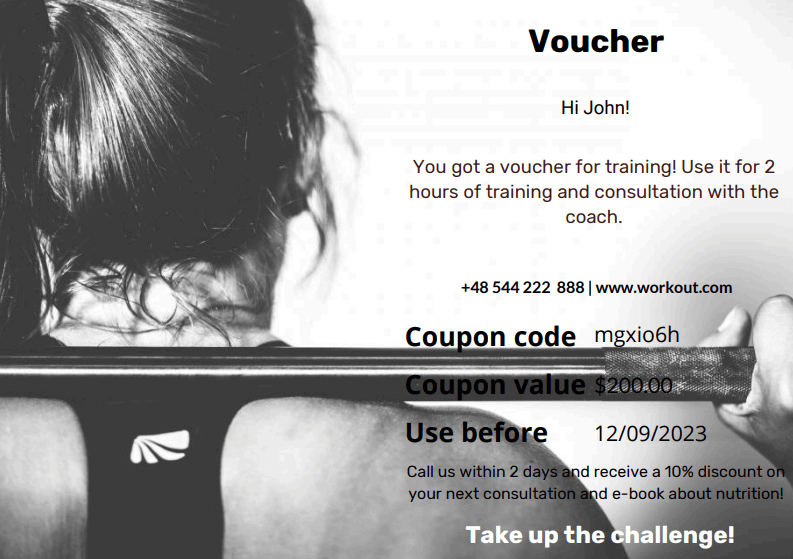
How Flexible Coupons supports WooCommerce course vouchers
Flexible Coupons for WooCommerce connects a sellable WooCommerce product with a PDF coupon template. After the relevant order status is reached, our plugin can generate a coupon code and prepare the voucher for delivery.
The graphic editor helps you create a design that matches your store. You can arrange template elements and customize text, colors, images, and layout. Shortcodes place dynamic information, such as the coupon code and value, inside the PDF instead of requiring you to prepare every voucher manually.
Free and PRO features for course gift cards
The free and PRO versions follow a similar basic workflow, but they support different levels of personalization. The free plugin is suitable for creating a PDF gift card with essential coupon information and sending it to the customer. PRO adds more recipient-focused options and template data.
| Capability | Flexible Coupons Free | Flexible Coupons PRO |
|---|---|---|
| Graphic editor | Included | Included |
| Template shortcodes | Coupon value and coupon code | Additional data including expiry date, product name, customer details, recipient details, message, and site URL |
| Voucher delivery | To the customer | To the customer or a different recipient email address |
| Gift card templates | Included | Included |
| Automatic sending for a selected order status | Included | Included |
| Recipient name, email, and message fields | Not included | Included |
| Coupon expiry date settings | Not included | Included |
| Editable gift card email content | Not included | Included |
| Plugin | Download Flexible Coupons Free | View Flexible Coupons PRO |
How to create a gift card for a course in WooCommerce
The setup consists of creating a PDF template, adding a WooCommerce product, and connecting that product to the appropriate voucher configuration. Before publishing it, decide what the coupon should cover and how customers will redeem it.
- Create the PDF coupon template. Add your logo, course imagery, redemption instructions, and dynamic coupon information.
- Add a WooCommerce product. Create a simple product for one voucher option or a variable product if customers should choose between several predefined variants.
- Connect the template. Assign the relevant PDF coupon template to the gift card product.
- Configure the coupon rules. Define the value and any applicable product or category restrictions.
- Set the delivery workflow. Choose the order status that should trigger voucher generation and sending.
- Test the full purchase path. Place a test order, inspect the PDF, verify the code, and confirm that the redemption rules work as intended.
The following video demonstrates how to create and sell PDF coupons, gift cards, and vouchers with the free plugin:
Create the PDF coupon template
Start with a clear, practical layout. The course name, voucher value, coupon code, validity information, and redemption instructions should be easy to find. Keep decorative elements from competing with the details the recipient needs to use the voucher.


Personalize a WooCommerce gift card for the recipient
Personalization makes a course voucher easier to give as a present. With Flexible Coupons PRO, the buyer can provide recipient details and a message. These details can then be used in the voucher workflow and displayed with the supported template shortcodes.
Useful information may include:
- The recipient’s name and email address
- A personal message from the buyer
- The course or service associated with the voucher
- The coupon value and unique code
- The expiry date, where configured
- Clear instructions explaining how to redeem the gift card
If you need to collect other information on the product page, the free Flexible Product Add-Ons for WooCommerce plugin can add custom product fields. Use additional fields only when the information has a clear operational purpose, and remember that collecting a value does not automatically place it in the PDF template.
Gift card delivery and subscription timing
Delivery is an important part of the customer experience. The free version can send the generated gift card to the customer, while PRO supports sending it to a different recipient email address and provides additional email options.
If your store requires more control over gift delivery, the Advanced Sending add-on can be relevant for customized emails and scheduled delivery. This is useful when a customer purchases a birthday or holiday gift in advance and does not want the recipient to receive it immediately.
For subscription products, make the scope of the voucher explicit. State whether it applies to a sign-up fee, a specific product, or another eligible charge. Avoid wording that suggests the voucher covers all recurring payments unless your actual WooCommerce configuration supports that behavior.
Stores selling digital services across borders may also need to consider their tax and invoicing obligations. This guide explains how to invoice in the European Union using WooCommerce.
Use WooCommerce course gift cards beyond the first order
A redeemed voucher can introduce a new customer to your courses or services. After redemption, you can use your normal WooCommerce processes to communicate about related products, request feedback, or explain the next learning step—provided that your communication follows applicable consent and privacy requirements.
WooCommerce analytics can also help you review orders in which coupons were used. This provides practical information about which vouchers are redeemed and which products customers select.

Key takeaways for selling course and subscription gift cards
- A WooCommerce course gift card can represent training, digital content, services, or another eligible product in your store.
- Flexible Coupons turns a WooCommerce product into a downloadable PDF voucher with an automatically generated coupon code.
- The graphic editor helps you prepare a branded design without creating every PDF manually.
- The free version covers the essential PDF coupon workflow and customer delivery.
- PRO adds recipient fields, personal messages, more shortcodes, expiry options, and delivery to a separate recipient.
- Coupon restrictions should match the promise made on the gift card product page.
- Subscription vouchers require especially clear information about eligible charges and redemption rules.
- Every gift card workflow should be tested before launch.
Summary: create a gift card for a course in WooCommerce
A gift card for a course or subscription in WooCommerce gives customers a practical way to purchase education, services, and experiences for someone else. It can also help course providers, gyms, salons, subscription businesses, and training companies package their existing offer as a gift-ready product.
You can begin with Flexible Coupons Free to create and sell essential PDF vouchers. If you need recipient details, personal messages, additional template shortcodes, expiry settings, or delivery to another email address, compare the options available in Flexible Coupons PRO. You can also inspect the workflow in the plugin demo before deciding which setup fits your store.
