




Gift card email delivery helps you send personalized gift cards, vouchers, or coupons straight to the customer’s inbox. If you want a simple way to customize these emails, you’re in the right place. With Flexible PDF Coupons: Advanced Sending, you can create messages that feel more personal. In this article, we show how to customize the email sent with the Advanced Sending add-on 🚀.
Table of contents
- Flexible PDF Coupons: Advanced Sending
- Send coupons by email
- Create the best coupon e-mail with a voucher
- Conclusion
🎫 Offering vouchers and coupons as gifts is a simple and effective tactic. It helps attract buyers and increase brand visibility. Generic emails often fail, though. Personalizing gift cards and emails leads to better results. Below you’ll learn why personalization matters and how to use it.
Flexible PDF Coupons: Advanced Sending — overview
Since you found this article, you likely have the Advanced Sending add-on. It works with the base Flexible PDF Coupons WooCommerce plugin. If not, check the product page below. It explains everything you need. 👇🏽
Flexible PDF Coupons PRO - Advanced Sending £39
Advanced Sending is an add-on to the Flexible PDF Coupons PRO plugin that lets you send coupons by email and schedule gift card delivery for any day of one's choice.
Add to cart or View DetailsGift card email delivery in WooCommerce
Now let’s move to the key part: gift card email delivery and customizing the messages sent to recipients.
These coupons can appear inside gift cards or vouchers. Recipients can use them during a set period.
After installation, go to your WordPress dashboard and open PDF Coupons > Settings > E-mails.
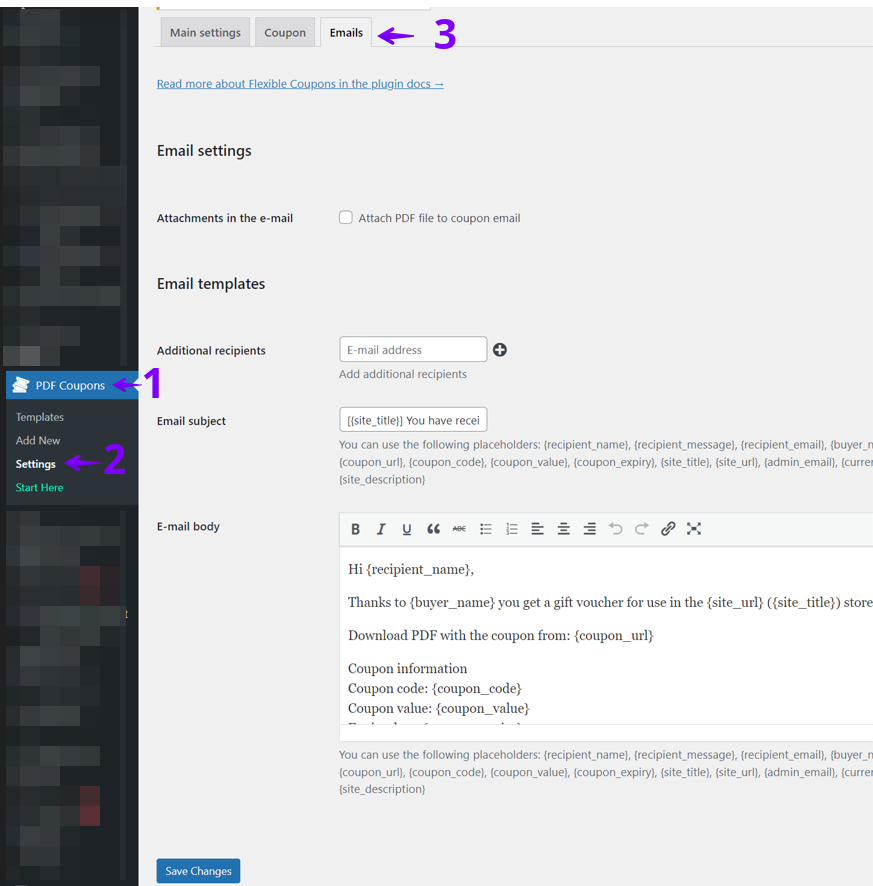
Here you can adjust several email settings:
- Add recipients: Click the plus icon and add an email. Use the minus icon to remove one.
- Email subject: Write the subject shown to the recipient. You may also use shortcodes. *Shortcodes are listed here.
- Email body: This is where you create your message. Use this space to shape your campaign.
How to create an effective gift card email
Repeat after me🧘🏼♂️:
Well-designed coupon emails motivate customers to buy again. Returning customers keep your store growing!
Writing a good coupon email takes planning, but it pays off.
Write compelling and clear content
Your email should be short, clear, and helpful. Include details like the discount, limits, and expiration date. You can edit the message anytime to match your store’s style and build a more personal connection.
👉🏽 Here’s an example of a voucher or coupon sent by email:

This example shows a Valentine’s Day ❤️ gift card. The store customized the content and added a buyer’s message. This small detail made the email feel more personal.
You can adjust your email for any campaign, like Valentine’s Day, Christmas, or Black Friday. The look and tone are fully in your hands.
Appropriate use of humor in gift card emails
Humor adds charm, but use it with care.
⛔ Avoid jokes at the recipient’s expense or anything that feels offensive.
✅ Use light humor linked to the gift card or event. For example, an eyewear store can joke about “seeing things more clearly.” Simple humor can make your message more memorable.
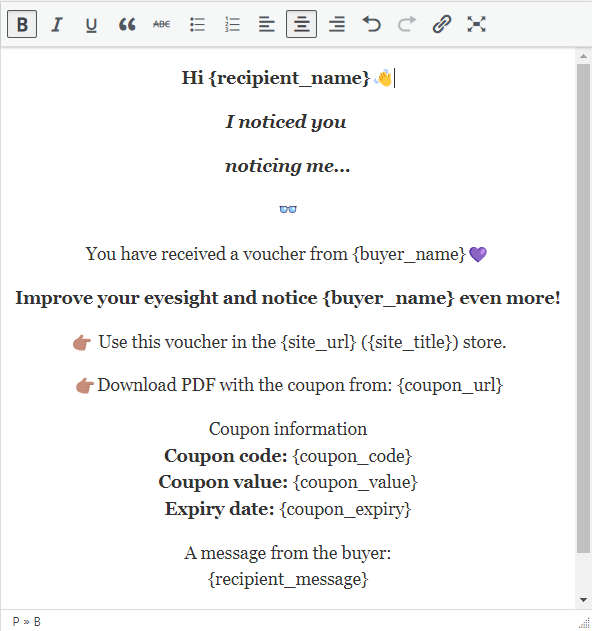
A warm greeting also helps. With a personal salutation and a touch of humor, you create a message that is pleasant and effective.
Conclusion
With Flexible PDF Coupons: Advanced Sending, you can customize coupon emails and offer a more personal experience. Adjust a few settings to control how your emails look and behave. Start now to improve your gift card email delivery workflow and build stronger customer engagement.
Flexible PDF Coupons PRO - Advanced Sending £39
Advanced Sending is an add-on to the Flexible PDF Coupons PRO plugin that lets you send coupons by email and schedule gift card delivery for any day of one's choice.
Add to cart or View Details