




Giving vouchers cards can be a great gift idea, as long as you do it right. The key to success here is to send such a card on a specific day. How to schedule such a gift card mailing in WooCommerce? Read on and find out right away.
Table of contents
- Scheduling Gift Cards in WooCommerce
- Delay options
- The benefits of delaying a gift card delivery
- How to schedule the gift card delivery?
- Best gift card plugin for WooCommerce
Scheduling Gift Cards in WooCommerce
Let’s get straight to the heart of the whole matter.
Scheduling Gift Cards in WooCommerce is possible, however, you will need a specific plugin for this. 🚫By default, WooCommerce will not allow you to do that.
➡️ This is where we come to you with the Flexible PDF Coupons plugin, and more specifically with the Advanced Sending for Flexible Coupons add-on .
➡️ This add-on enables the scheduling and delayed delivery of gift cards, allowing businesses to satisfy their customers’ preferences and enhance the gift-giving experience.
Advanced Sending for Flexible Coupons will allow you to basically delay or schedule the delivery of a specific coupon to the person of one’s choice.
For the add-on to work, you will first need the Flexible Coupons PRO plugin.
Flexible PDF Coupons PRO WooCommerce £59
Design your own PDF coupons and sell them as gift cards, tickets, or service vouchers. Use extra add-ons and insert your own shortcodes, delay sending coupons by email, or even generate QR codes.
Add to cart or View DetailsAfter that, install the addon, which is Advanced Sending:
Flexible PDF Coupons PRO - Advanced Sending £39
Advanced Sending is an add-on to the Flexible PDF Coupons PRO plugin that lets you send coupons by email and schedule gift card delivery for any day of one's choice.
Add to cart or View DetailsAdvanced Sending for Flexible Coupons PRO – what are the delay options?
The plugin offers a range of different types of gift card delivery delay. The delay types were thought up keeping both the store owners and their customers in mind.
Having the Advanced Sending addon active, you can choose from the following delay types:
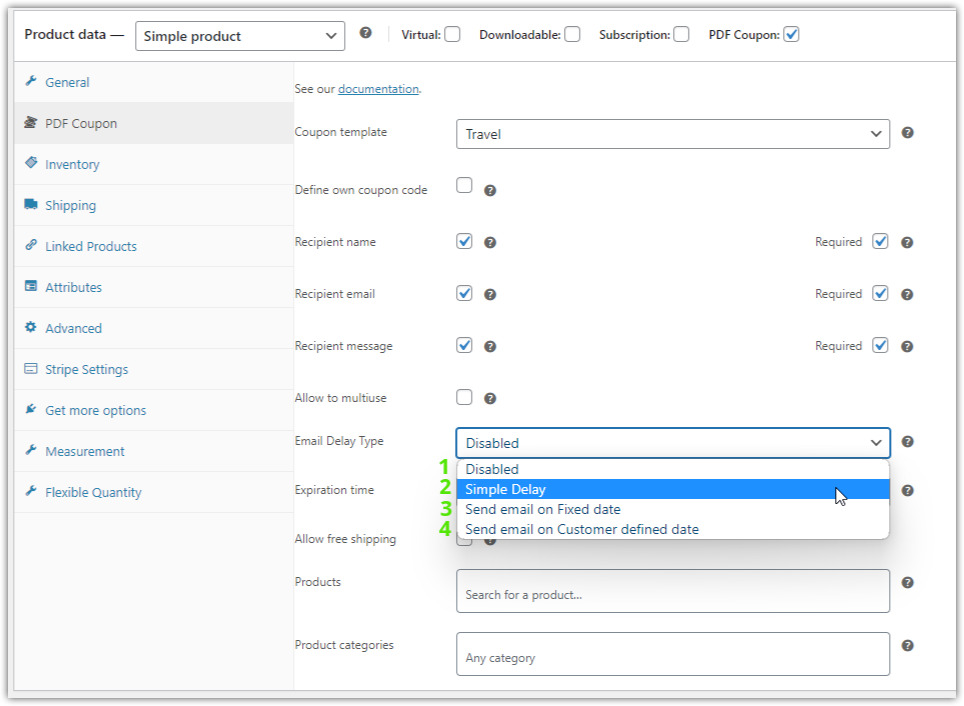
1) Disabled. If you don’t need this option for a particular product, you can turn it off.
2) Simple Delay. Allows store managers to specify a delay period in days, weeks, or months before the gift card is sent to the recipient.
3) Send email on Fixed date. Store managers can set a specific delivery date for the gift card to be sent, making sure it reaches the gift recipient exactly when requested.
4) Send email on Customer defined date. Store managers can match the delivery of a gift card to a specific date given by the customer, such as a birthday or anniversary. In other words, the specific delivery date will appear on the product page – allowing the customer to choose the date of delivery.
The benefits of delaying a gift card delivery
👍🏽 By offering scheduled gift card delivery, online stores and other kind of organizations can increase customer satisfaction and loyalty. Consumers appreciate the ease and considered delivery of gift cards at the right time. This feature not only encourages recurring transactions, but also increases customer engagement and referrals.
In our ( humble) opinion, Advanced Sending, is already revolutionizing the way gift cards are delivered in WooCommerce. Store managers and their customers can now schedule gift card delivery based on theirs and their one’s preferences. Be it a special occasion, birthday surprise 🎁 or holiday gift 🎄, scheduling gift card delivery adds a personalized touch and ensures timely delivery.
What do you gain by delaying the delivery of a gift card?
First of all, tranquility and great management of your time. By scheduling the delivery of a gift card on a specific day, you can easily and quickly plan upcoming gift-giving occasions.
🛒 If you are a customer of a store that offers this option, you don’t have to wait until the day of gift-giving to purchase the product in question. You can purchase it on any day and schedule the delivery of the gift card for a completely different day.
🕴️ On the other hand, if you are the owner of a store that offers such solutions, you gain the orders of the above customers 🤑.
🕴️ Besides, you gain a market advantage over other stores that do not offer such a solution.
Ok so… how to schedule the gift card delivery?
Well, let’s go through the settings together 😊.
Let’s go to the PDF Coupons plugin settings.
Look, after installing the Advanced Sending addon, you will see the options in the following section:
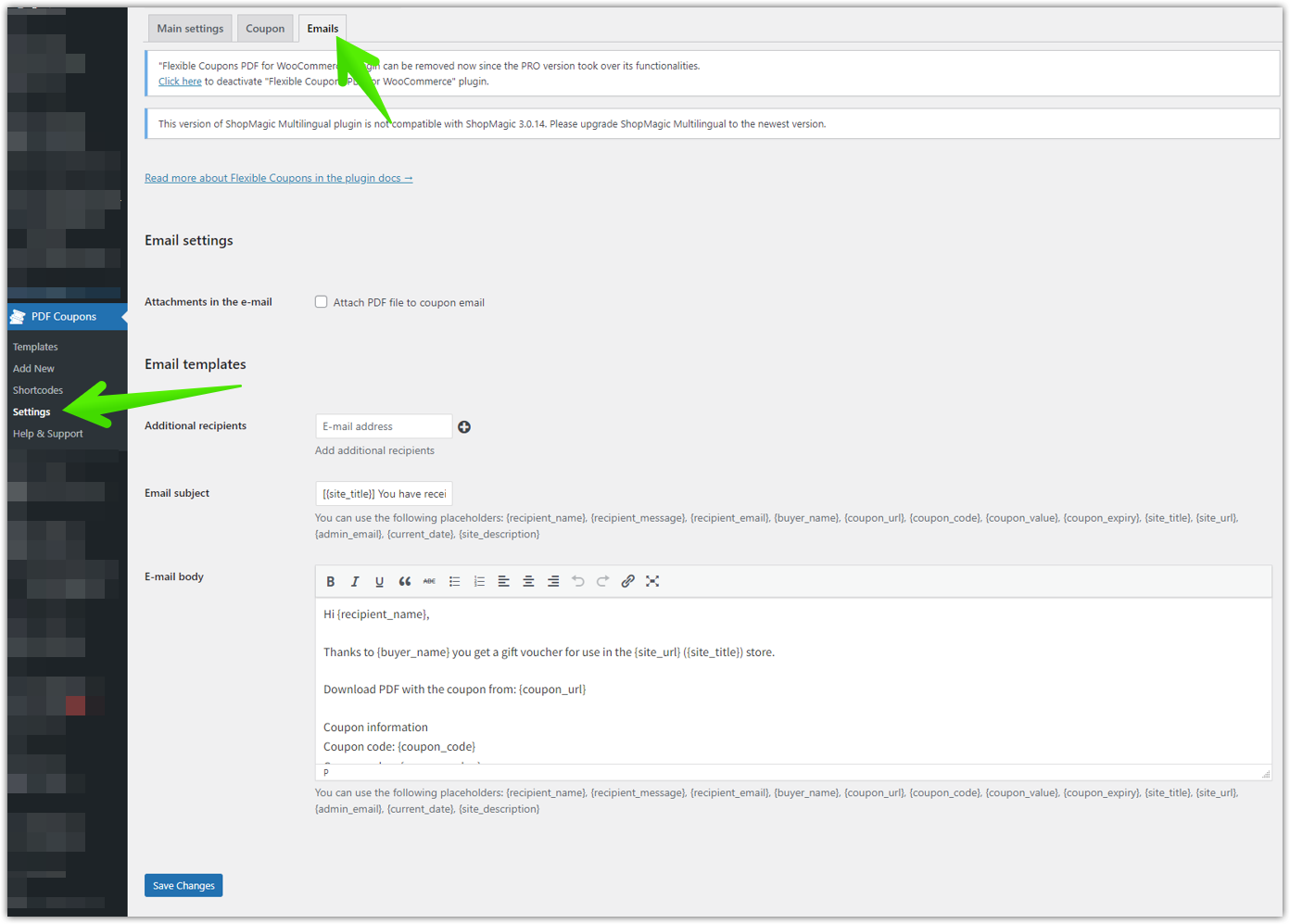
Here you will find the basic settings of this addon.
Add-on settings
If you go to the product settings, you will also see additional features that were previously deactivated:
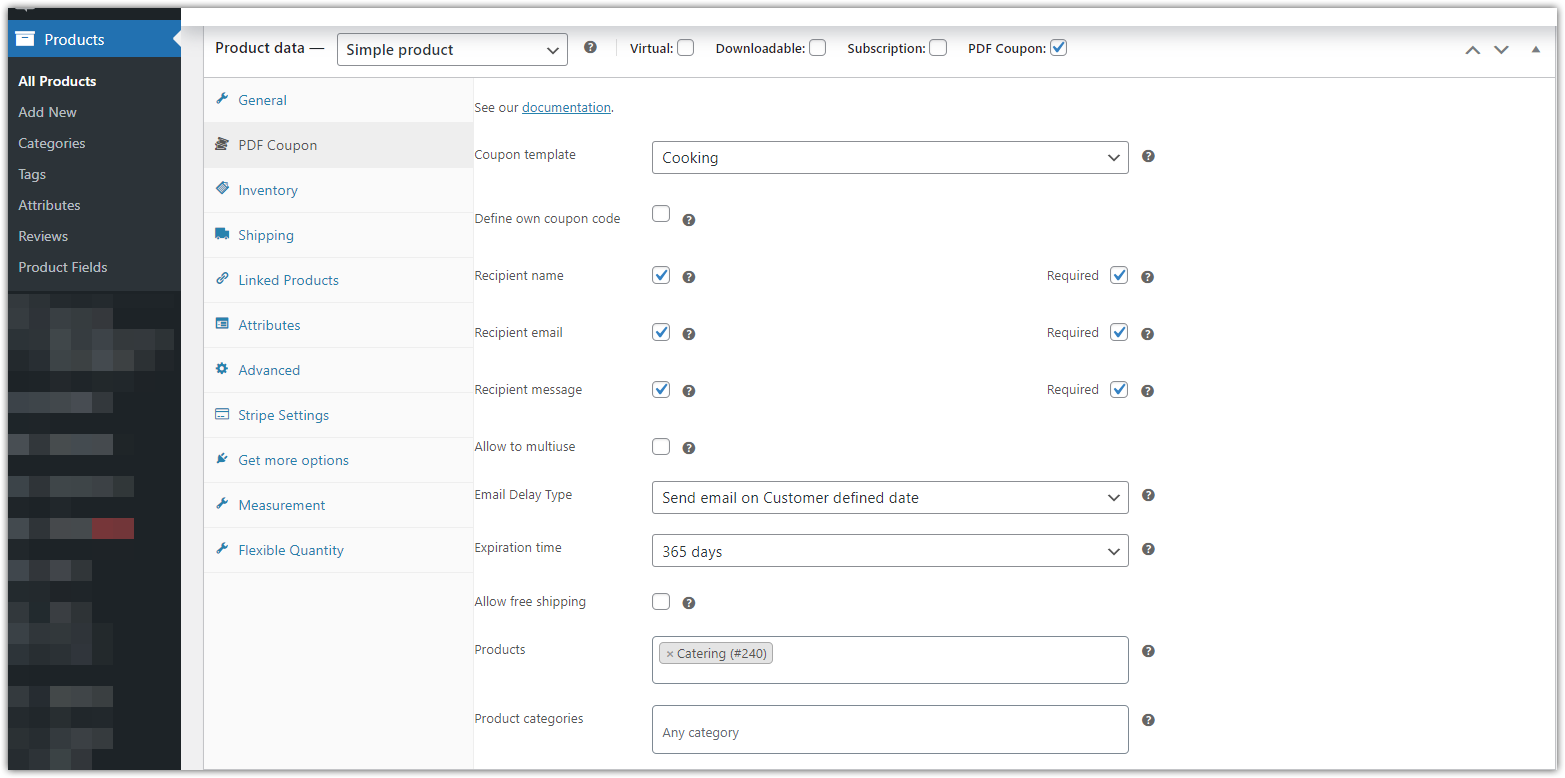
✅ This is where you choose the Coupon template, which will be sent to the customer, define if you want to include the recipient’s name, email and message. This is where you also set the type of gift card delivery delay.
✅ In my case, I choose the Send email on Customer defined date delay type, meaning I want this option to be visible on the product page for the customer. I want the customer to be the one to set the date when the gift card will be mailed.
✅ I have also set a date range for the coupon to expire. Let’s say the coupon will be valid for 1 year (365 days).
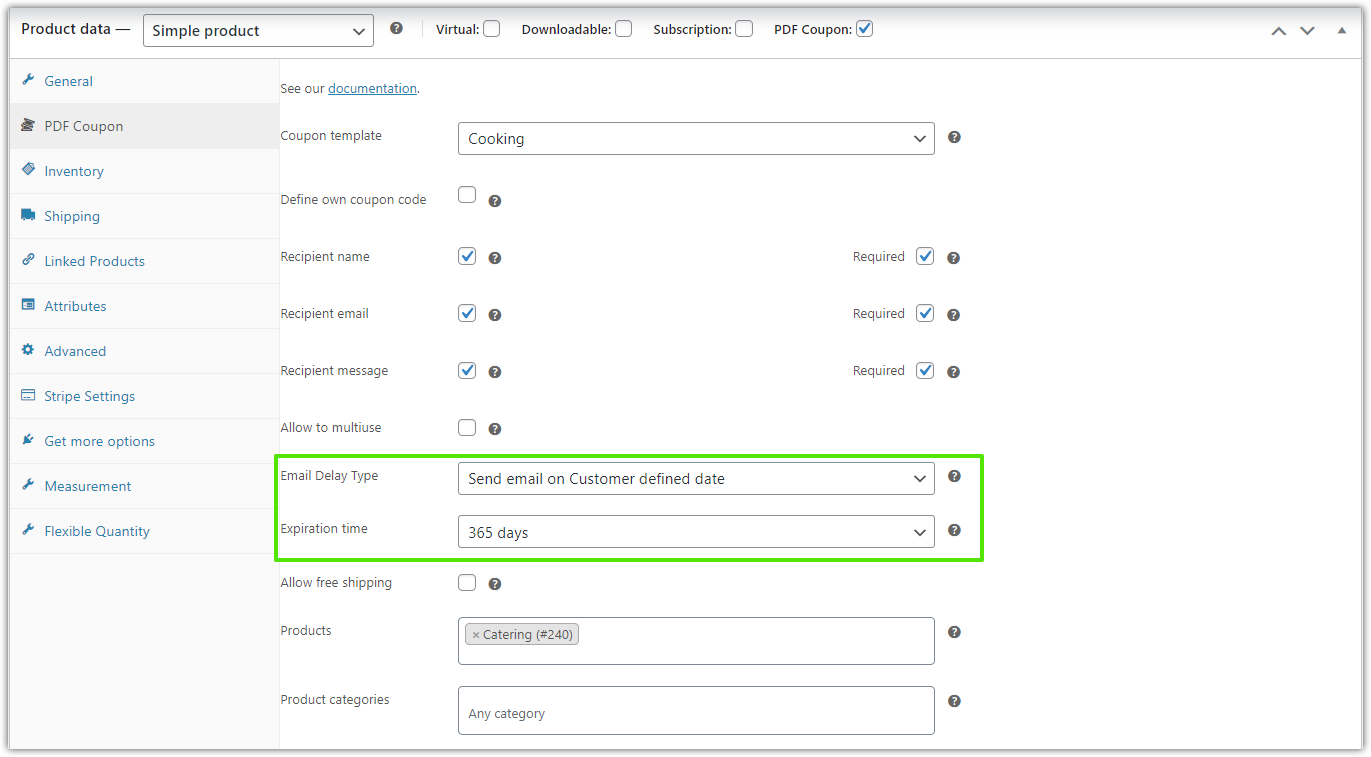
✅ Now I save my changes. And here is the result of what it looks like on the product page:
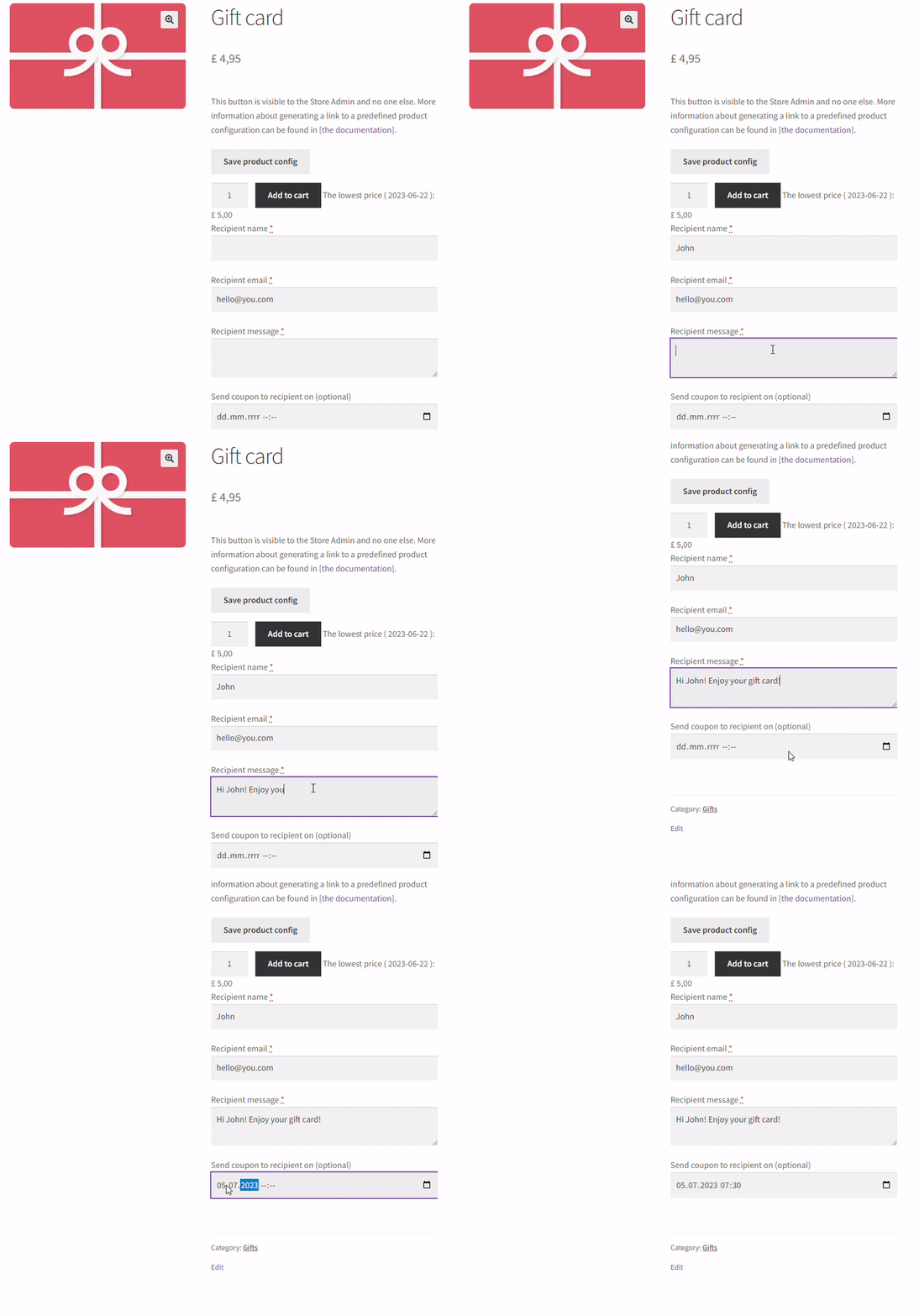
Well then, on the 5th of July 2023, John will receive an email stating that they have received a coupon to use for a particular product (in this case, it’s a gift card).
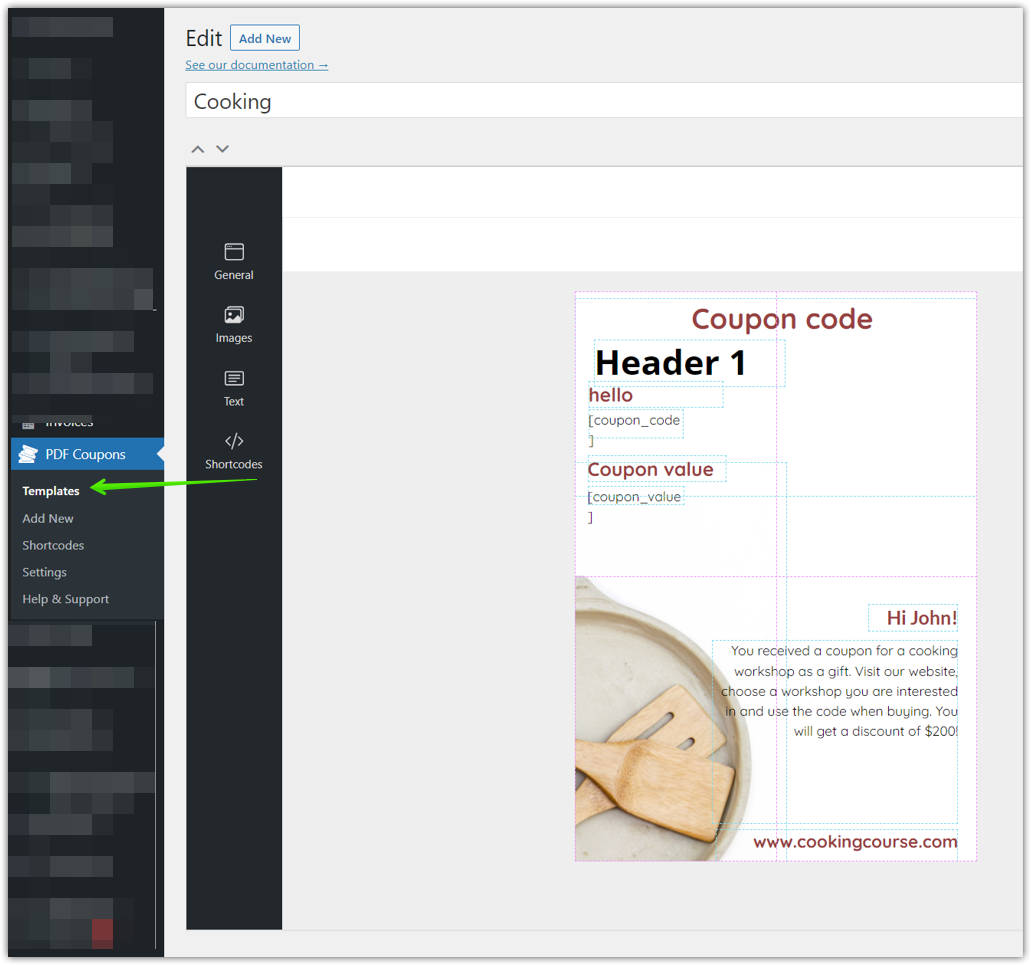
👉 You can check the preview of the PDF coupon that John will receive in the PDF Coupons -> Templates tab:
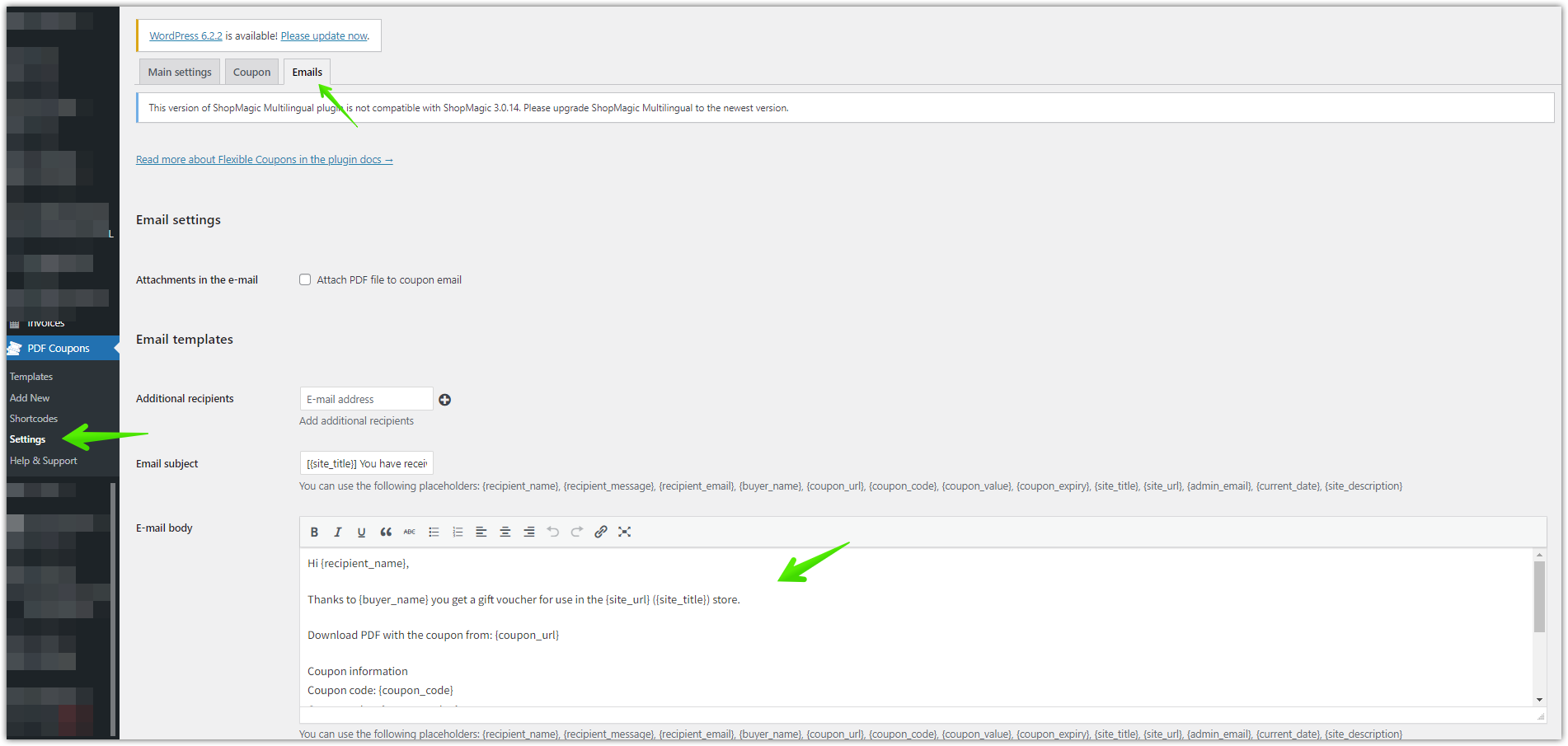
👉 You can preview the email that John will receive in the PDF Coupons -> Settings -> Email tab:
Easy, right?
Advanced Sending for Flexible Coupons PDF PRO is a small addon with a great effect. Trust me 😊.
Flexible Coupons PRO – is it the best gift card plugin for WooCommerce?
Yes 😅. But hang on! Just let me tell you why!
The PDF Coupons for WooCommerce plugin and its Advanced Sending addon, open up some great opportunities for online stores and other businesses in improving gift card mailings in WooCommerce. With the possibility to schedule PDF gift card delivery, store owners can provide their customers with personalized and convenient gift giving. The flexibility of the delay option makes this addon a valuable tool for any WooCommerce store. Using this new feature, stores can improve customer satisfaction, increase loyalty and ultimately, boost revenue.
