





Professional WooCommerce PDF coupons should reflect the same visual identity as your website, packaging, and marketing materials. In this case study, we show how custom PHP filters in Flexible PDF Coupons PRO were used to add a brand font to the coupon editor and make it available when generating PDF gift cards, vouchers, and tickets.
WooCommerce PDF coupon design and the need for consistent branding
A client using our plugin to generate WooCommerce PDF coupons needed the finished documents to follow their brand guidelines more closely. The drag-and-drop editor simplified template creation, but the project introduced two specific requirements:
- Replace the available sans-serif typefaces with serif and display fonts consistent with the brand.
- Use a font size beyond the 72 px limit available in the editor.
The client selected Playfair Display SC and League Spartan. To extend the available typography options, we used the filters provided by Flexible PDF Coupons PRO. This approach made the font available both in the template editor and to the PDF generation engine.
How to customize WooCommerce PDF coupons with a custom font
Adding a font to a WooCommerce PDF coupon template involves two related steps. First, the font must appear in the drag-and-drop editor. Second, its local font files must be registered for PDF generation. Completing only the first step may make the typeface visible in the editor without ensuring that it is used correctly in the downloaded document.
1. Add a custom font to the PDF coupon editor
The following example adds Chango to the font list in the editor:
add_filter( 'fcpdf/core/editor/fonts', function( $fonts ) {
    $fonts['chango'] = [
        'name' => 'Chango',
        'url'  => 'https://fonts.googleapis.com/css2?family=Chango&display=swap',
    ];

    return $fonts;
} );
The array key identifies the font, the name value controls its label in the editor, and the url value loads the corresponding stylesheet. You can adapt the example for another Google Font, including the fonts selected for this project, by using the appropriate font name and verified stylesheet URL.
2. Register the custom font directory for PDF generation
The PDF engine needs access to local font files. In this example, the files are stored in the fonts directory inside WordPress uploads:
add_filter( 'fcpdf/core/fonts/dir', function( $dirs ) {
    $upload_dir = wp_upload_dir();
    $font_dir   = trailingslashit( $upload_dir['basedir'] ) . 'fonts';

    $dirs[] = $font_dir;

    return $dirs;
} );
Create the directory and upload the required .ttf files to:
wp-content/uploads/fonts/Use font files that you are licensed to install and distribute in generated documents. File names and capitalization must match the values used in the font configuration.
3. Map the TTF files to the font styles
The next filter tells the PDF generator which files should be used for regular, italic, bold, and bold italic text:
add_filter( 'fcpdf/core/fonts/data', function( $fonts ) {
    $fonts['chango'] = [
        'R'  => 'Chango-Regular.ttf',
        'I'  => 'Chango-Regular.ttf',
        'B'  => 'Chango-Regular.ttf',
        'BI' => 'Chango-Regular.ttf',
    ];

    return $fonts;
} );
In this example, the same font file is assigned to every style because only one variant is available. If a font family includes separate bold or italic files, each variant should be mapped to the correct file instead.
chango. The TTF file also needs to exist in the registered directory under exactly the same file name specified in the snippet.The screenshot below shows the filters used to extend the available PDF coupon fonts:
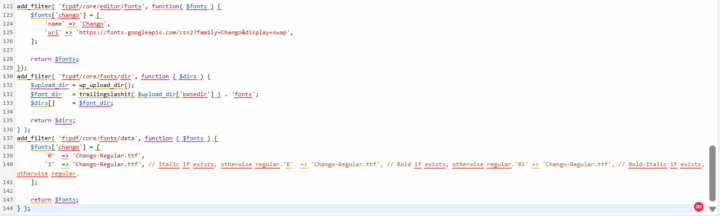
For further configuration guidance, visit the Flexible Coupons documentation.
How to verify the custom font in a WooCommerce PDF coupon
After adding the snippets and uploading the font files, check both the editor and the generated document. A practical test should include the following steps:
- Open the relevant coupon template in the drag-and-drop editor.
- Confirm that the new font appears in the available font list.
- Apply it to a text element and save the template.
- Generate a test coupon through the normal WooCommerce workflow.
- Download the PDF and verify its typography, spacing, special characters, and line breaks.
- Repeat the test for every font weight or style used in the design.
You can also explore the template-building workflow in the WooCommerce PDF Coupon Editor demo.
Case study result: branded WooCommerce PDF coupons
Once the font configuration was complete, the client received a coupon template that aligned more closely with the rest of the brand materials. The implementation delivered three practical results:
- The custom font became available in the coupon template editor.
- The PDF generator could use the corresponding local TTF file.
- The finished coupon followed the client’s typography guidelines more consistently.
The requested font-size increase could not be implemented in the same way because the PDF library used in this setup limited the font size to 72 px. Rather than bypassing that constraint without a verified solution, the layout was adjusted within the supported range.
Common custom font problems in PDF coupons
If the editor shows the font but the generated PDF does not, review the following points:
- Incorrect directory: confirm that the TTF file is stored in
wp-content/uploads/fonts/. - File-name mismatch: check spelling, capitalization, and the
.ttfextension. - Different font identifiers: use the same array key in the editor and PDF configuration.
- Missing font variants: map bold and italic styles to their corresponding files when those variants are used.
- Unsupported characters: ensure that the selected font contains the glyphs required for your customers’ names and messages.
- Caching: clear relevant WordPress, browser, or server caches before testing the updated template again.
If you need assistance with the plugin configuration, you can contact Flexible Coupons support.
Why customize WooCommerce PDF coupons?
Typography is only one part of a useful coupon design, but it can have a significant effect on consistency and readability. A branded PDF can help customers immediately recognize who issued a gift card, service voucher, or event ticket.
Flexible PDF Coupons PRO supports practical template customization through features such as:
- A drag-and-drop editor for building PDF layouts.
- Customizable text, colors, images, and design elements.
- PDF coupons connected with WooCommerce products and orders.
- Personalized voucher information and recipient-facing content.
- PHP filters for advanced development requirements, including custom font registration.
This flexibility is relevant to retail stores, salons, spas, gyms, event organizers, venues, and other businesses selling products, services, or experiences as printable documents.
Key takeaways for custom WooCommerce coupon fonts
- A custom font must be configured for both the visual editor and the PDF generator.
- The PDF engine requires a local, correctly named font file.
- Matching identifiers connect the editor font with its PDF configuration.
- Separate font weights should use their appropriate TTF files when available.
- Font licensing and character support should be checked before launch.
- A generated PDF should always be tested instead of relying only on the editor preview.
- Some layout limits, including the 72 px font-size limit in this case, may still apply.
Summary
This case study shows how custom fonts in WooCommerce PDF coupons can be implemented with Flexible PDF Coupons PRO and its PHP filters. Registering the font in the editor, providing local TTF files, and mapping those files for PDF generation creates a consistent workflow from template design to the finished document.
For stores that need branded gift cards, printable vouchers, service credits, or PDF event tickets, this customization provides greater control over typography without replacing the existing WooCommerce coupon workflow.
Flexible PDF Coupons PRO for WooCommerce
Design branded PDF coupons and sell them as gift cards, service vouchers, or event tickets. Customize layouts in the editor and extend selected workflows with relevant add-ons when needed.
WP Desk
