



Both Free and PRO have declared WordPress 7.0 support. However, Flexible PDF Coupons WordPress 7 compatibility is not a guarantee for every WooCommerce, PHP or add-on combination. Use the dated findings below to verify your store’s setup before upgrading.
Flexible PDF Coupons WordPress 7 Compatibility: Current Verified Status
Assessment date: November 6, 2026. The Free changelog declares WordPress 7.0 support in version 1.14.6, dated May 19, 2026. The PRO changelog declares it in version 2.5.4, dated April 28, 2026. These are developer support declarations—not results from testing your particular store.
WordPress 7.0 became publicly available on May 20, 2026. It is therefore a released version, not an upcoming compatibility target. Nevertheless, “WordPress 7” is too broad for an upgrade record: identify the exact release, including its maintenance number.
Compatibility Matrix: Free, PRO, WordPress, WooCommerce and PHP
This snapshot separates the evidence for each edition. It records public information checked on November 6, 2026; no store-specific testing was performed for this article.
Free: Published Version and Compatibility Declarations
The WordPress.org listing shows Free version 1.14.12, with a changelog date of September 22, 2026. It lists WordPress 6.4 or higher, PHP 7.4 or higher and a displayed “Tested up to” value of WordPress 7.1.4. The reviewed Free changelog explicitly adds WooCommerce 11.1 support in version 1.14.10. It does not establish Free compatibility with WooCommerce 11.2.
PRO: Published Version and WooCommerce Range
The PRO changelog’s newest entry is version 2.6.0, dated October 28, 2026. It records WordPress 7.1 support in version 2.5.9 and WooCommerce 11.2 support in version 2.5.13. The PRO product page declares a WooCommerce range of 10.8–11.2 and PHP 7.4 or higher. These declarations should not be transferred automatically to Free.
Exact PHP and Store-Specific Combinations
The reviewed evidence does not provide an exhaustive matrix covering every WordPress, WooCommerce and PHP patch combination. Your installed versions, theme, checkout type and extensions were not supplied, so their combined compatibility remains unconfirmed for your store. WooCommerce treats platform, component, theme and cross-plugin compatibility as separate testing concerns.
Flexible PDF Coupons System Requirements vs Tested and Supported Versions
Check the published requirements for Flexible PDF Coupons PRO for WooCommerce separately from Free. Its product page gives a WooCommerce range and PHP minimum, but does not display a separate WordPress minimum or “Tested up to” field. The shared requirements document, updated September 17, 2026, lists WordPress 6.4, WooCommerce 10.8 and PHP 7.4 as minimums. Keep that general reference separate from edition-specific metadata. (Flexible Coupons)
A minimum requirement is an installation threshold. A tested version records a developer’s compatibility declaration. A support statement may cover a named release or range, while a staging result demonstrates what happened with one particular configuration. None should be treated as a universal guarantee.
Check the requirements of the whole software stack. For example, although the plugin lists WordPress 6.4 as a minimum, WooCommerce 10.8 requires WordPress 6.9. Likewise, PHP 7.4 is a compatibility floor, not a hosting recommendation: WooCommerce recommends PHP 8.3 or newer and warns about running end-of-life versions.
The plugin requirements also specify GD, mbstring and allow_url_fopen enabled, together with coupon functionality enabled in WooCommerce. Verify these prerequisites when investigating failed PDF generation or redemption, rather than assuming a WordPress incompatibility.

Documentation illustration: coupon functionality must be enabled. This screenshot is not evidence of WordPress 7 testing.
How to Verify Compatibility for Your Installed Versions and Add-ons
Open WooCommerce → Status and generate a system report. Record the complete WordPress, WooCommerce and PHP version numbers, the installed Free or PRO version, active extensions and theme version. The report provides software and server information; plugin versions are also available under Plugins → Installed Plugins.
Create a dated record with separate fields for installed version, proposed version, supporting declaration and staging result. Compare Free with its WordPress.org listing and PRO with its own product details and changelog. Where available, also inspect the installed package’s declared requirements; do not assume that requirements for a newer release describe an older installation.
Review installed add-ons individually. Dependencies can be more restrictive than the core plugin’s requirements: for example, the documented coupon preview feature requires PRO 2.6.0 or later. Record each add-on’s version and required PRO version before approving an update.
HPOS, Checkout Blocks, Themes and Other Extensions
There is documented HPOS support: Free added it in version 1.5.13 on December 14, 2022, and PRO in version 1.7.3 on December 13, 2022. Still, verify the active order-storage configuration and every extension involved in handling orders. A core plugin’s HPOS declaration does not establish compatibility for the entire extension stack.
Treat Cart and Checkout blocks, classic checkout, theme overrides and third-party extensions as separate compatibility dimensions. This reference does not confirm every such integration. Require an applicable developer declaration or test the exact configuration on staging; WooCommerce’s compatibility guidance explicitly separates these checks.
Before Updating: Backups, Staging and a Safe Upgrade Plan
WooCommerce recommends a current backup and staging validation before production updates. Use the following decision checklist to turn the published compatibility information into an upgrade plan.
- Confirm the target combination. Record exact versions and identify any missing support declaration, especially for a newer WooCommerce release or an add-on dependency.
- Prepare a restorable backup. Include the database, plugin and theme files, uploads and voucher assets. Confirm who will perform restoration if necessary.
- Validate on staging. Reproduce the production environment, apply the planned updates and run the focused voucher checks below. Use test payments and controlled email recipients.
- Choose update or wait. Proceed when the required declarations, staging results and recovery plan are satisfactory. Investigate unresolved failures or missing evidence before deployment.
Schedule production deployment during a controlled maintenance window. Apply the update set validated on staging and complete any required WooCommerce database update before checking the store again.
Essential Post-Update Checks for WooCommerce PDF Vouchers
Start with the store’s existing generation and delivery settings. The plugin allows generation at a selected order status or manual generation. PRO email delivery can use PDF attachments or download links, depending on configuration. A missing attachment alone is therefore not enough to diagnose incompatibility.
The documented order-screen coupon panel provides controls for viewing and downloading generated PDF coupons. Use the relevant order when checking that a purchase produced an accessible voucher.

Keep the regression check focused on these five outcomes:
- Voucher purchase: complete a test purchase through the checkout type your customers actually use.
- PDF generation: reach the configured generation trigger and inspect the PDF’s code, amount, text and images.
- Delivery: confirm the intended recipient receives a working download link or attachment, as configured.
- Existing voucher access: open a voucher generated before the update and confirm it remains downloadable.
- Coupon redemption: apply a valid code and verify the expected discount and configured usage restrictions.
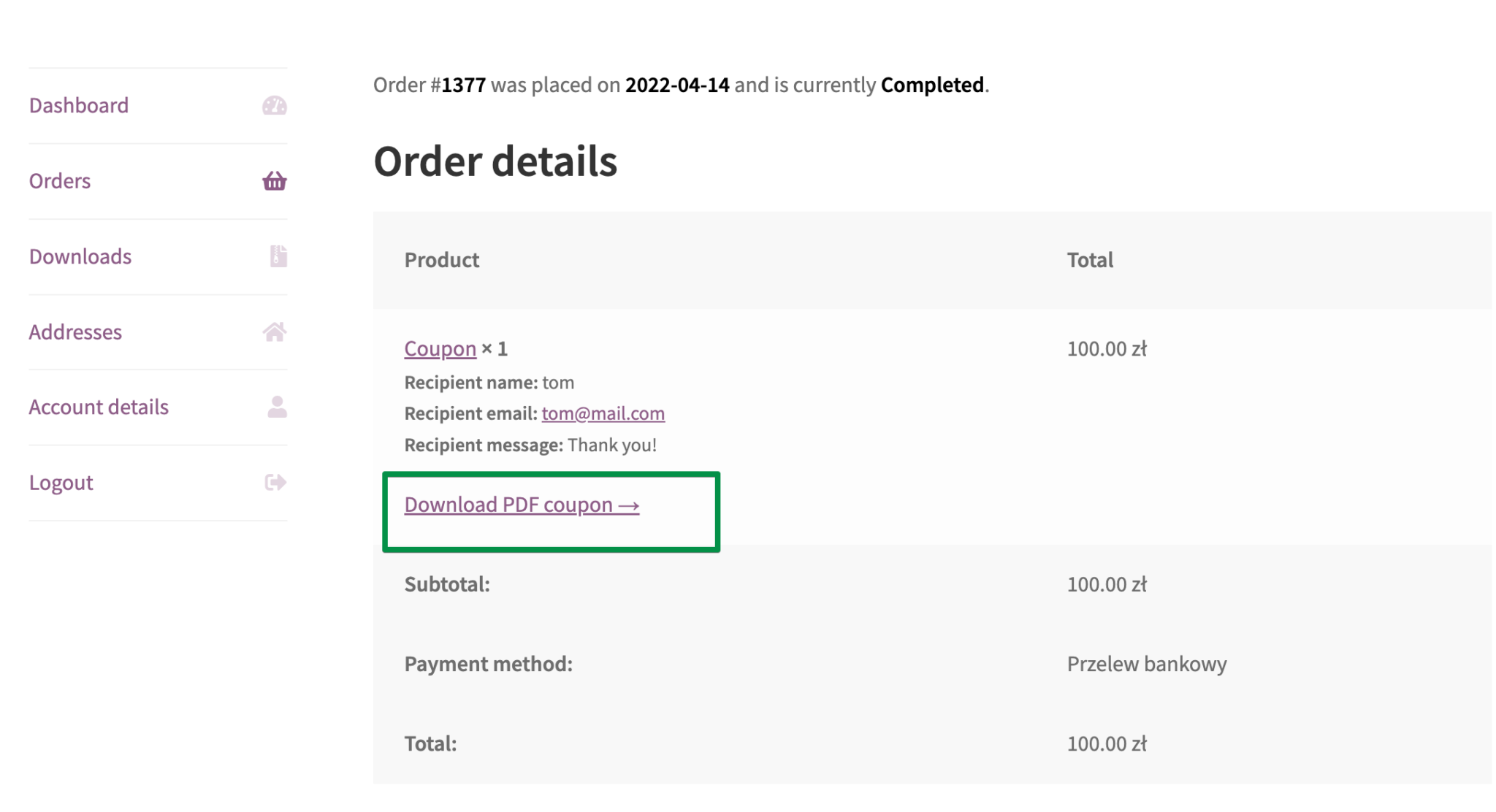
For existing voucher access, check the customer’s order details as well as the PDF Coupons table. Official documentation explains that these download locations use different visibility conditions: changing a product’s coupon settings can remove its table entry while leaving the order-item download link visible.
These checks are a short update regression, not a complete campaign audit. For broader scenario coverage, use the complete WooCommerce gift card testing checklist.
What to Do When Compatibility Is Unconfirmed or an Update Causes Problems
Unconfirmed does not mean incompatible. It means the available evidence does not settle your particular combination. Ask support to confirm the exact proposed versions, and distinguish a published declaration from a result obtained only on your staging site.
If a failure appears after updating, preserve the error details before changing the environment again. On staging, isolate the changed components and check whether the issue persists without unrelated extensions or theme overrides. WooCommerce recommends testing theme and cross-plugin interactions as part of compatibility troubleshooting.
Send support the full version record, checkout type, HPOS configuration, relevant add-ons, reproduction steps, expected and actual results, and the failure’s timestamp. Attach a sanitized system report and relevant logs from WooCommerce → Status → Logs. Remove customer information, credentials, API keys and usable voucher codes before sharing.
Do not turn a temporary compatibility investigation into an indefinite update freeze. WooCommerce advises applying security fixes promptly, and the plugin’s support policy states that support covers its latest versions. Coordinate a tested update or recovery plan with the relevant support team.
Key Takeaways
Use these conclusions when deciding whether your voucher store is ready to update:
- Check Free and PRO separately. Their release numbers and WooCommerce declarations differ.
- Separate requirements from evidence. An installation minimum is not a tested-version matrix.
- Record the complete configuration. Include PHP, add-ons, checkout type, HPOS and theme—not only WordPress.
- Validate both new and existing vouchers. Purchase, generation, delivery, access and redemption all matter.
- Protect live activity. Keep a recovery plan that preserves orders and voucher changes after the backup.
Summary: Is Flexible PDF Coupons Compatible with WordPress 7?
As of November 6, 2026, official changelogs declare WordPress 7.0 support for both Free and PRO. The published versions reviewed were Free 1.14.12 and PRO 2.6.0. That supports a qualified compatibility verdict—not approval of every WooCommerce, PHP or extension combination.
Approve an upgrade using edition-specific declarations, the requirements of the complete stack, a restorable backup and successful staging checks. Refresh this reference whenever official metadata, support statements or relevant compatibility evidence changes.
